Template details
Jalpc
A flexible, free Jekyll theme to build a personal website, blog, or portfolio in three steps.
About this template
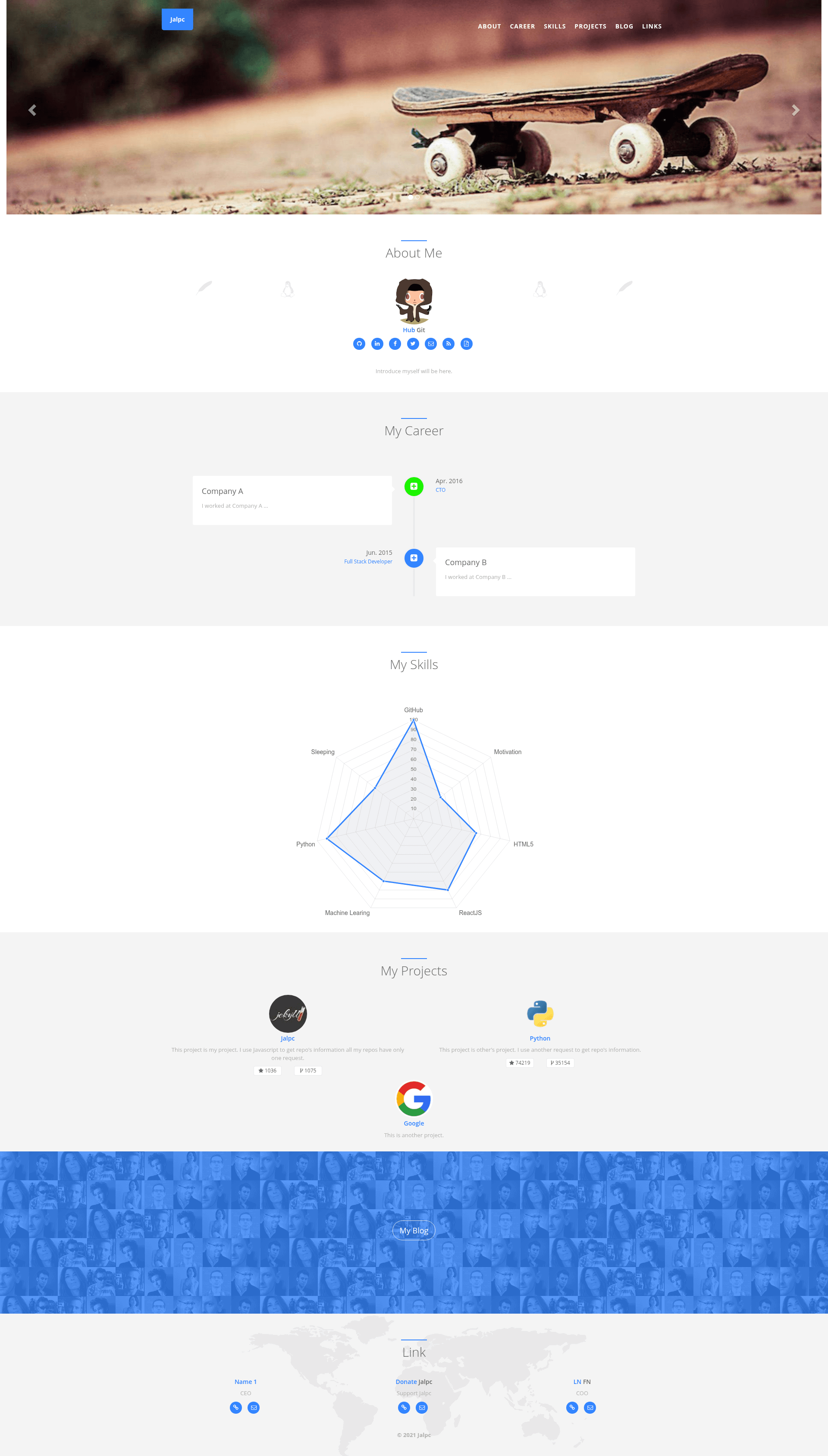
Jalpc is a free, MIT-licensed Jekyll theme that builds a personal website, blog, or portfolio from YAML configuration files instead of editing HTML directly.
What is Jalpc?
Jalpc is a flexible, mobile-first Jekyll theme created by developer Jarrekk. It runs on Jekyll, the Ruby-based static site generator, and is designed to be set up in three steps. As input it takes YAML data files (for example landing.yml, skills.yml, and projects.yml) and renders a static website with sections for career, skills, projects, links, and a blog. The theme is hosted on GitHub and is free to use under the MIT license.
Key Features
- YAML-driven index page — The landing page is split into sections defined in _includes/sections; configuration lives in _data/*.yml (for example landing.yml, index/careers.yml, index/skills.yml, index/projects.yml, index/links.yml) so you can change content without touching HTML files.
- Chart.js skills radar — Skills are displayed as a radar chart using Chart.js, customizable by editing _includes/sections/skills.html and _data/index/skills.yml.
- Category-based blog pages — Posts are organized into categories via URL (e.g. /python/), and all category pages share the template _includes/category.html.
- jPages pagination — Blog pagination uses the jPages front-end JavaScript library instead of Jekyll's built-in pagination.
- Self-hosted page view counter — A custom counter with a Flask backend (deployed on Vultr VPS) powers the visitor counts, with code available in the Z-Tool/ztool-backhend-mongo repository.
- Multilingual landing page — Powered by i18next; languages are configured in _data/index/language.yml, and the feature can be removed by clearing that file and the static/locales folder.
- Analytics, comments, and sharing — Integrates Google Analytics and GrowingIO for web analytics, Disqus for comments, and AddToAny for sharing posts to social networks.
- Compressed CSS/JS — Custom CSS and JS are minified with UglifyJS2 and clean-css into /static/assets; edit sources in _sass or rebuild via npm run build.
Who is it for?
- Developers and designers who want a Jekyll-based personal site with a blog, portfolio, and resume sections without writing custom HTML.
- Job seekers who need an online CV or portfolio — the theme includes sections for career and projects, and a donation page (Alipay, WeChat Pay, PayPal) for freelancers.
- Bloggers who want a lightweight, mobile-first theme with multilingual support and built-in search (double-click Ctrl or the search icon).
- Open-source users who want a theme they can upgrade via git pull from the upstream repository and contribute to on GitHub.
What can you do with Jalpc?
- Personal websites: Set up a one-page landing with sections for skills, projects, and links, driven by YAML data files.
- Programming blogs: Organize posts by category using URL-based pages (e.g., /python/), with jPages pagination and a JavaScript search feature.
- Resume/CV sites: Present career history and skills using the career section and Chart.js radar chart for visual skill representation.
- Multilingual portfolios: Offer the landing page in multiple languages using the i18next integration, with translations stored in static/locales.
How does Jalpc work?
The README describes a three-step setup and links to a separate document. Once installed, you edit YAML files in _data to change the site content, run jekyll serve to preview locally, and deploy the generated _site to GitHub Pages or your own server. Upgrades are handled by adding the upstream remote and pulling the latest changes from the gh-pages branch.
Pricing
Jalpc is free and open source under the MIT license. There are no paid tiers; donations are accepted via PayPal.
FAQ
Is Jalpc free?
Yes, Jalpc is released under the MIT license, so you can use, modify, and redistribute it freely. The project also accepts optional donations through PayPal.
Does Jalpc support multiple languages?
Yes. The landing page uses the i18next plugin for multilingual support. Configure languages in _data/index/language.yml and add translation files under static/locales. The feature can be removed entirely by emptying that YAML file.
How do I add posts to Jalpc?
The project wiki has a guide titled "How to add posts" that explains the process. Posts are created as Markdown files with YAML front matter in the standard Jekyll way.
What analytics tools can I use with Jalpc?
Jalpc integrates both Google Analytics and GrowingIO. To use either, register an account and replace the corresponding ID in _config.yml.
Can I customize the theme without editing HTML?
Almost entirely. The index page and its sections are rendered from YAML files (landing.yml, skills.yml, projects.yml, etc.), so you can change text and structure without touching HTML. For deeper styling changes, edit the Sass files in _sass or rebuild compressed assets with npm run build.
Alternatives
- Jalpc-A — Another Jekyll theme written by the same author, built with AngularJS, offering a different front-end approach.