Template details
JayantGoel001 Personal Portfolio
Open-source Angular personal portfolio with Home, About, Portfolio, Training, Achievement, and Contact sections, PWA support, SEO, and Docker.
About this template
JayantGoel001.github.io is an open-source, MIT-licensed personal portfolio website built with Angular and TypeScript, published on GitHub Pages, and maintained by Jayant Goel.
What is JayantGoel001.github.io?
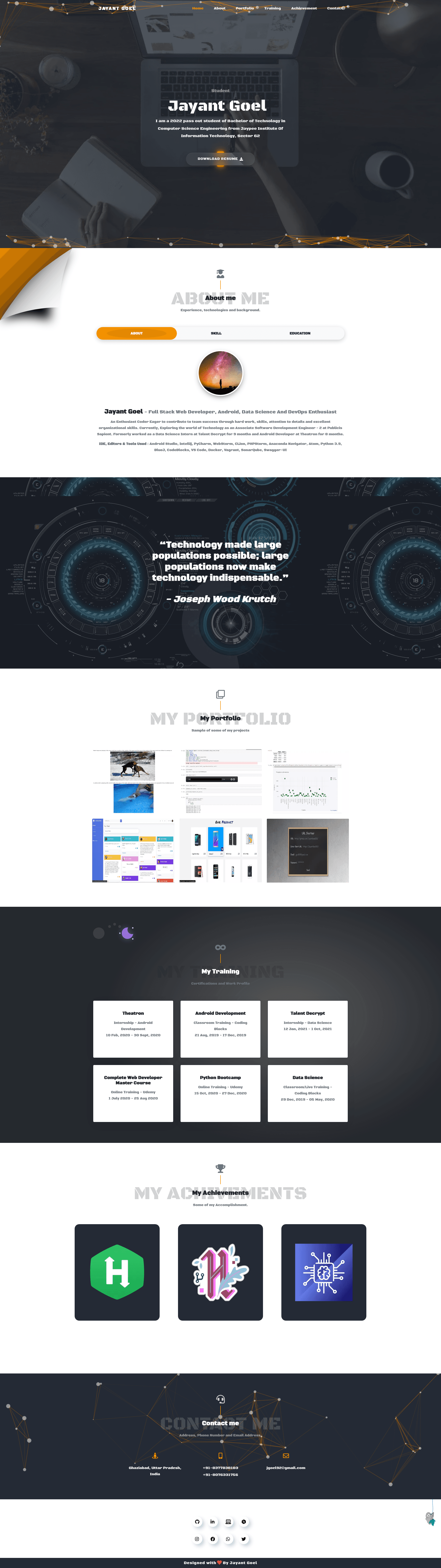
The portfolio is a single-page application that presents a developer's personal brand through predefined sections: Home, About (including Skills and Education), Portfolio, Training, Achievement, and Contact. The website reads data from Angular component templates and TypeScript files, compiles it into a bundle, and outputs a responsive site with a splash loader, a custom 404 page, and a dark gunmetal and orange color scheme. The project runs on Node.js with Angular CLI and is designed to be deployed to GitHub Pages using ng deploy --base-href="/"; Docker images are also published for containerized hosting.
Key Features
- Tech stack — Built with Angular, TypeScript, HTML5, CSS3, JavaScript, Bootstrap, Node.js, and Angular CLI; the repo includes standard Angular project files (
angular.json,tsconfig.json,package.json). - Progressive Web App — Contains
manifest.webmanifest,ngsw-config.json(service worker config), a complete favicon set (16x16, 32x32, apple-touch-icon, safari-pinned-tab, msapplication tiles), andtheme-colormeta tag for installable PWA support. - Docker support — Official images on GitHub Container Registry and Docker Hub; run
docker run -d -p 4200:80 ghcr.io/jayantgoel001/jayantgoel001.github.io:latestto launch locally. - Pre-built sections — Includes Home, About (with Skills and Education), Portfolio, Training, Achievement, Contact, plus navigation, footer, social, quote, splash screen, and page-not-found Angular components.
- SEO-ready — README includes a full copy-paste SEO snippet with Open Graph, Twitter Card, and JSON-LD Person schema; the source also has
robots.txtandsitemap_index.xml. - Animations and effects — Uses vanilla-tilt for tilt effects, WOW.js for scroll animations, particles.js background, and an SVG background in the About section.
- Optimized images — Contains WebP versions of profile images, portfolio thumbnails, and achievement badges, plus pre-generated PWA icon sizes.
Who is it for?
- Developers looking for a portfolio starter — They can fork the repo, replace personal information in the Angular components, and deploy to GitHub Pages with minimal setup.
- Computer science students — The Education and Training sections are already structured to list academic history and certifications; the Achievement section can showcase hackathon or platform badges.
- Open-source learners — The codebase is a clean Angular project with components, routing, environments, and GitHub Actions for CI; useful for studying Angular architecture and PWA setup.
Use cases
- Personal branding: Create a professional portfolio that is installable as a PWA on mobile devices, with offline support and a custom 404 page.
- Docker-based hosting: Run the portfolio inside a container on any server that supports Docker, without installing Node.js or Angular CLI.
- Student showcase: Present skills, education, portfolio projects, and achievements in a single page for internship or job applications.
How does it work?
- Clone the repository with
git clone https://github.com/JayantGoel001/JayantGoel001.github.io.git. - Install dependencies with
npm install -f(the README recommends the-fflag). - Run a development server with
ng serveand edit components undersrc/appto add personal data. - Deploy to GitHub Pages with
ng deploy --base-href="/". - Alternatively, pull and run a Docker image on port 4200.
SEO and performance
The README provides drop-in HTML meta tags for search engines and social sharing, including Open Graph, Twitter Cards, and a JSON-LD Person object with links to GitHub, LinkedIn, HackerRank, and other profiles. It also includes results from PageSpeed Insights and Lighthouse audit links for both desktop and mobile, and the project has Lighthouse CI budget files under .github/lighthouse. The source includes robots.txt and sitemap_index.xml.
FAQ
Is this template free to use?
Yes, the repository is released under the MIT license, so you can use, modify, and distribute it freely for personal or commercial projects.
What do I need to run it?
You need Node.js and git installed. Run the Angular development server with ng serve, or use the provided Docker images to avoid installing Node.js locally.
Which sections are included?
The portfolio includes Home, About (with Skills and Education), Portfolio, Training, Achievement, and Contact sections. There is also a splash screen, 404 page, navbar, footer, social links, and quote component.
Does it work as a PWA?
Yes, the project includes a web app manifest and an ngsw-config.json service worker file, making it installable and capable of offline support after build.
Can I deploy it to GitHub Pages?
Yes, the README documents running ng deploy --base-href="/" to build a production bundle and publish it to GitHub Pages.