Template details
Jekyll Cards Boilerplate
A Jekyll card theme built with Bulma, generating card pages and category pages from YAML data.
About this template
Jekyll Cards Boilerplate is a Jekyll theme and boilerplate for building card-based directory or listing sites, styled with Bulma 0.7.4 and powered by YAML data files that auto-generate card pages and category pages.
What is Jekyll Cards Boilerplate?
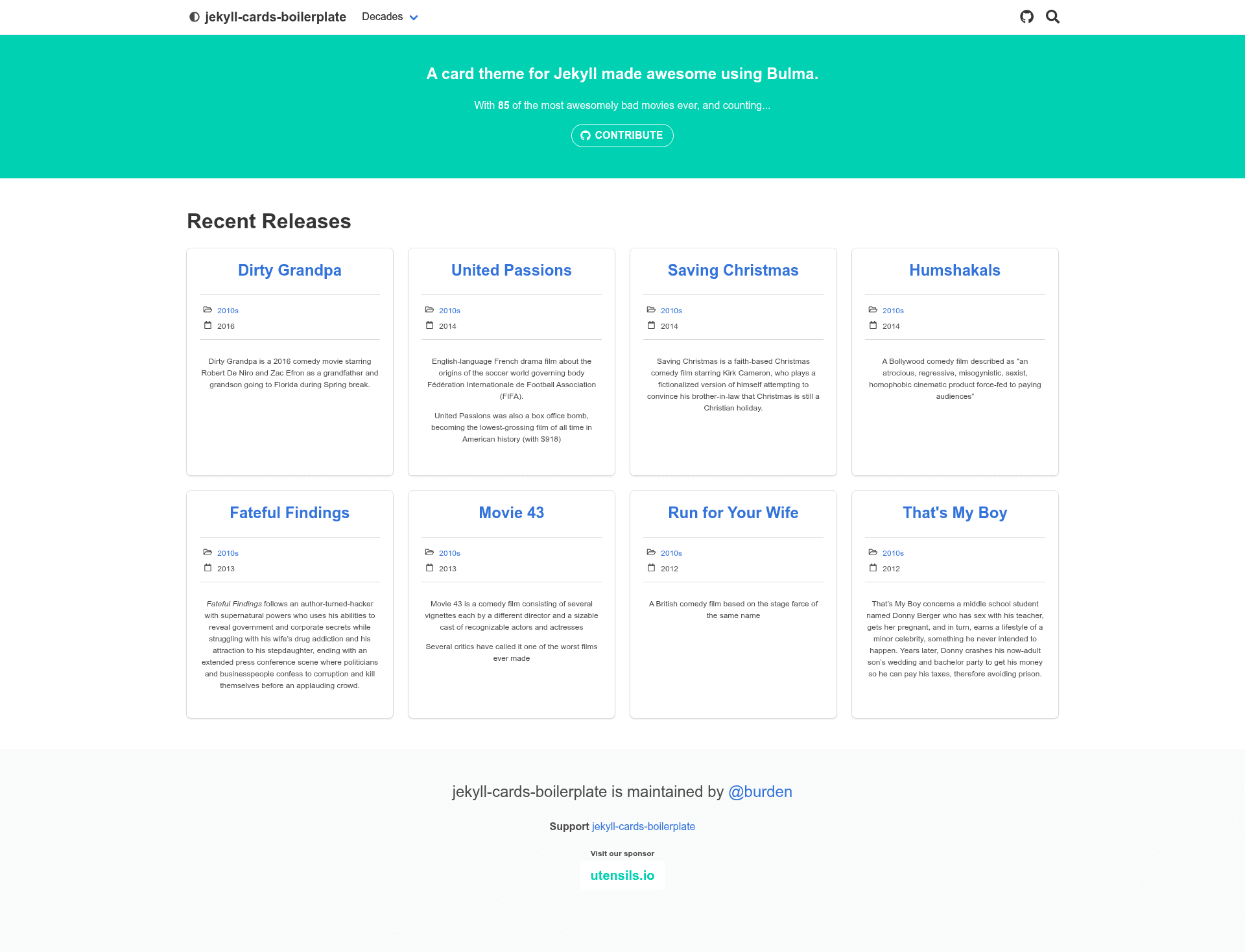
Jekyll Cards Boilerplate is a Jekyll theme that turns structured YAML files into a static card-based website. It takes card data saved in the _data folder as input and produces one HTML page per card plus category pages for grouping, all rendered with the Bulma CSS framework. The project is maintained by GitHub user burden, and its demo is hosted at jekyll-cards-boilerplate.burden.cc. The theme has been adopted by real-world sites such as Elixir Companies, Erlang Companies, Julia Companies, and Kotlin Companies.
Key Features
- Bulma 0.7.4 styling — The card UI is built on the Bulma CSS framework, with Font Awesome icons used for metadata captions.
- jQuery 3.2.1 — The theme bundles jQuery 3.2.1 for front-end scripting.
- Bower dependency management — Front-end libraries are installed via bower, keeping vendor assets organized.
- jekyll-assets asset pipeline — Processes CSS and JavaScript, with Uglifier for JS minification.
- HTML compression — Output HTML is minified using compress.html from jch.penibelst.de.
- html-proofer testing — Includes html-proofer to check for broken links and malformed HTML before deployment.
- Google Analytics — Built-in analytics integration via Google Analytics.
- simple-jekyll-search — Client-side search powered by simple-jekyll-search v1.7.0.
- Disqus comments — Optional per-page comments via Disqus, configurable globally or overridden per card.
Who is it for?
- Jekyll developers who want a ready-made card layout without writing HTML/CSS from scratch — they define YAML and the theme handles page generation.
- Community-driven directory sites such as company or project listings — sites like Elixir Companies and Kotlin Companies use this boilerplate to present cards grouped by year or category.
- Hobbyists building a personal card-based blog or portfolio — the theme includes search, comments, and analytics, so these features work immediately after configuration.
What can you do with Jekyll Cards Boilerplate?
- Create a company directory — add company entries as YAML with fields like url and year, then group them by decade or industry on generated category pages.
- Build a film or media catalog — the README's example uses films.yml, where each film becomes a page and films are grouped by decade.
- Run a group or event listing — cards can hold arbitrary metadata, and the
descriptionfield is displayed below other metadata when present.
How does Jekyll Cards Boilerplate work?
First, install dependencies with bundle install and bower install. Then add a YAML file to src/_data, for example films.yml, and set the cards.data value in _config.yml. Running jekyll serve generates a page for each card at a path based on the data directory and card name (for instance /films/the-room.html), and category pages at paths like /decades/1930s.html when group_by is configured.
FAQ
How do I add a new card?
Add a YAML entry to the file named in cards.data within the src/_data folder. Each entry can include any metadata fields, and if a description field is present it will be displayed below the other metadata on the card page.
How do I deploy to GitHub Pages?
The repository includes Travis CI configuration: pushing to master triggers a deploy to GitHub Pages. You need to set a GitHub Personal Access Token with the repo:public_repo scope as the GITHUB_API environment variable on Travis, and update src/CNAME to your domain.
Can I deploy to Netlify?
Yes. The README includes a "Deploy to Netlify" button that clones the repository into your GitHub account, creates a new Netlify site linked to that repo, and lets you publish changes by pushing to the repo.
Can I disable comments on a specific card?
Yes. Each card entry in the YAML file can include a comments: false field to override the global cards.comments setting for that individual page.
Is group_by required?
Yes, the README states that the group_by section is currently required. When configured, cards are automatically grouped into category pages based on the specified YAML field, such as decade.