Template details
Jekyll Cayman Theme
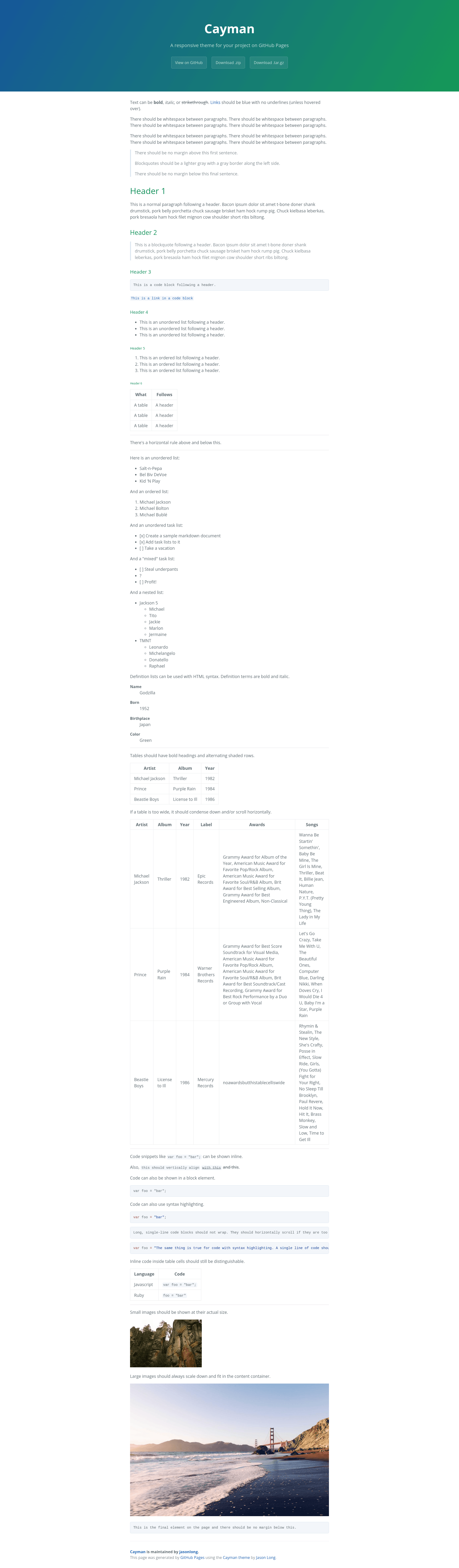
A Jekyll port of the Cayman theme, a clean, responsive GitHub Pages theme.
About this template
Jekyll Cayman Theme is a Jekyll port of Jason Long's Cayman theme, a clean, responsive theme built for GitHub Pages. This template takes a standard Jekyll site structure and produces a mobile-friendly static website that can be hosted on GitHub Pages or any Jekyll-compatible host.
What is the Jekyll Cayman Theme?
The Jekyll Cayman Theme is an open-source Jekyll theme forked from the classic Cayman theme by Jason Long. It is distributed on GitHub at pietromenna/jekyll-cayman-theme and can be downloaded as a ZIP archive, unzipped, and run as a regular Jekyll folder. The theme is designed for GitHub Pages, where it is also available as an option in the Automatic Page Generator. It is licensed under the Creative Commons Attribution 4.0 International license.
Key Features
- Responsive layout — The theme adapts to screen sizes from mobile phones to desktop monitors, matching the Cayman design.
- GitHub Pages ready — Works out of the box with GitHub Pages' Automatic Page Generator or as a manual Jekyll site.
- Standard Jekyll structure — Uses the conventional Jekyll folder layout with
_config.yml, so pages, posts, and data files behave normally. - Configurable baseurl — A
baseurloption in_config.ymllets you host the site under a subpath likehttps://pietromenna.github.io/jekyll-cayman-theme. - Live preview for development — Running
bundle exec jekyll servestarts a local server athttp://localhost:4000and auto-regenerates on changes. - Contribution-friendly — The repository welcomes bug reports and pull requests, and the theme setup is described as a normal Jekyll site for testing modifications.
Who is it for?
- GitHub Pages users — A straightforward way to publish a project documentation site or personal page with a proven, clean design.
- Jekyll beginners — Because the theme is a self-contained Jekyll site, it serves as a learning example for how Jekyll projects are structured.
- Open-source maintainers — Use it to quickly create a documentation page that matches the look of the original Cayman theme used on many GitHub Pages sites.
What can you do with the Jekyll Cayman Theme?
- Document a software project — Deploy a documentation site to GitHub Pages with no server-side dependencies beyond Jekyll itself.
- Create a personal landing page — Show a short bio, links, and a simple layout without custom CSS work.
- Experiment with Jekyll development — Use the theme as a base to test new pages, layouts, and includes, since it behaves like any normal Jekyll site.
How does the Jekyll Cayman Theme work?
Start by downloading the theme ZIP from the GitHub repository and unzipping it. Then run bundle install to pull the required gems, followed by jekyll serve to launch a local server. For deployment, set the baseurl in _config.yml if the site will live under a subpath, and push the contents to GitHub Pages.
FAQ
Is the Jekyll Cayman Theme free to use?
Yes, the theme is open source and licensed under Creative Commons Attribution 4.0 International, so you can use, modify, and share it with attribution.
How do I install the Jekyll Cayman Theme?
Download the ZIP from the GitHub repository, unzip it, run bundle install inside the folder, and then run jekyll serve to preview locally.
Can I use this theme with GitHub Pages?
Yes, the theme is designed for GitHub Pages and is also offered as an option in GitHub's Automatic Page Generator. You can also copy the template manually.
How do I change the site's base URL?
Edit the baseurl value in _config.yml. If your site is at https://pietromenna.github.io/jekyll-cayman-theme, set baseurl: "/jekyll-cayman-theme"; if it is at the domain root, leave it empty.
Can I contribute to the theme?
Yes, the repository at https://github.com/pietromenna/jekyll-cayman-theme accepts bug reports and pull requests. To develop locally, run bundle install and then bundle exec jekyll serve.