Template details
Jekyll Gitbook Theme
Jekyll theme that gives your site a GitBook look with sidebar, search, and TOC.
About this template
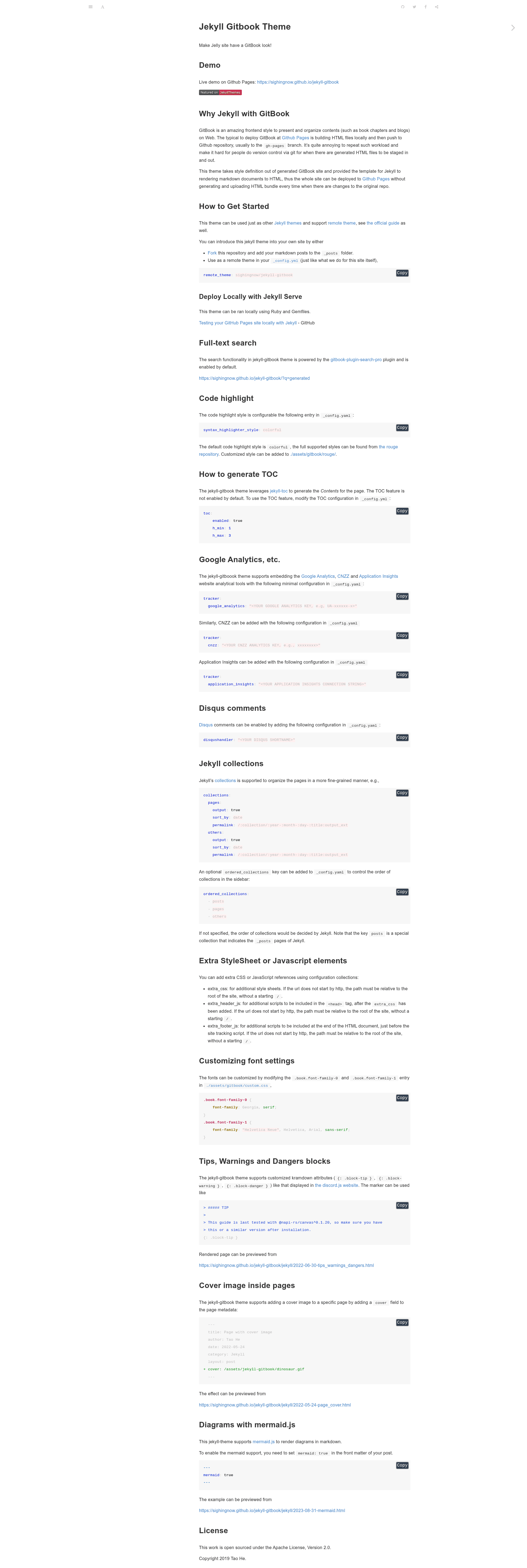
Jekyll Gitbook is an open-source Jekyll theme that renders Markdown sites with the GitBook sidebar style for GitHub Pages deployment.
What is Jekyll Gitbook?
Jekyll Gitbook is a Jekyll theme that recreates the GitBook frontend style using Jekyll's Markdown-to-HTML rendering. It takes Markdown posts and pages as input and outputs a static site with a collapsible sidebar, table of contents, and full-text search, deployable directly to GitHub Pages. The theme is maintained by Tao He and released under the Apache License 2.0.
Key Features
- Remote theme support — Add
remote_theme: sighingnow/jekyll-gitbookto_config.ymlto use it on GitHub Pages without forking. - Full-text search — Enabled by default via the gitbook-plugin-search-pro plugin; the live demo supports queries like
?q=generated. - Code highlighting — Configurable Rouge style (default
colorful), with all Rouge themes supported and custom styles inassets/gitbook/rouge/. - Table of contents — Uses jekyll-toc, disabled by default; enable via
toc.enabled: trueand seth_min/h_maxvalues. - Analytics trackers — Configure Google Analytics, CNZZ, or Azure Application Insights through the
trackerkey in_config.yml. - Disqus comments — Enabled by setting a
disqushandlershortname in the config. - Jekyll collections — Organize content into custom collections with optional
ordered_collectionsto control sidebar order. - Mermaid diagrams — Render Mermaid diagrams by setting
mermaid: truein a post's front matter.
Who is it for?
- Technical writers — Publish documentation sites with a familiar GitBook sidebar without hosting a Node.js GitBook toolchain.
- Bloggers — Use the
_postsfolder for blog posts with GitBook's clean typography and search. - Open-source maintainers — Deploy project docs to GitHub Pages via remote theme, keeping the source and generated site in sync.
- Developers — Customize the theme's fonts, extra CSS, and JavaScript through
custom.cssandextra_cssconfig keys.
What can you do with Jekyll Gitbook?
- Documentation sites: Build a multi-page manual using Jekyll collections and sidebar ordering.
- Blogs: Write posts in Markdown with code highlighting, cover images, and Disqus comments.
- Interactive diagrams: Include Mermaid flowcharts in posts by enabling
mermaid: true. - Themed content blocks: Use kramdown attributes like
.block-tip,.block-warning, and.block-dangerto create callout boxes.
How does it work?
Add the remote theme to _config.yml, then write Markdown files in _posts (or configured collections). The theme compiles these into HTML using Jekyll, so you can preview locally with jekyll serve or push to GitHub Pages for automatic deployment—no need to build and upload an HTML bundle on every change, unlike the typical GitBook workflow.
FAQ
Is Jekyll Gitbook free?
Yes, the theme is open source under the Apache License 2.0 and free to use, including for commercial projects.
Does Jekyll Gitbook work with GitHub Pages?
Yes, it supports GitHub Pages' remote theme mechanism. Add remote_theme: sighingnow/jekyll-gitbook to your _config.yml and push to a GitHub Pages-enabled repository.
How do I enable the table of contents?
TOC is not enabled by default. In _config.yml, set toc.enabled: true and optionally adjust toc.h_min and toc.h_max (for example, h_min: 1, h_max: 3).
Can I use my own domain?
Yes, like any Jekyll site, custom domains are configured in the GitHub Pages settings or through a CNAME file; the theme does not impose domain restrictions.