Template details
cleandocs-template
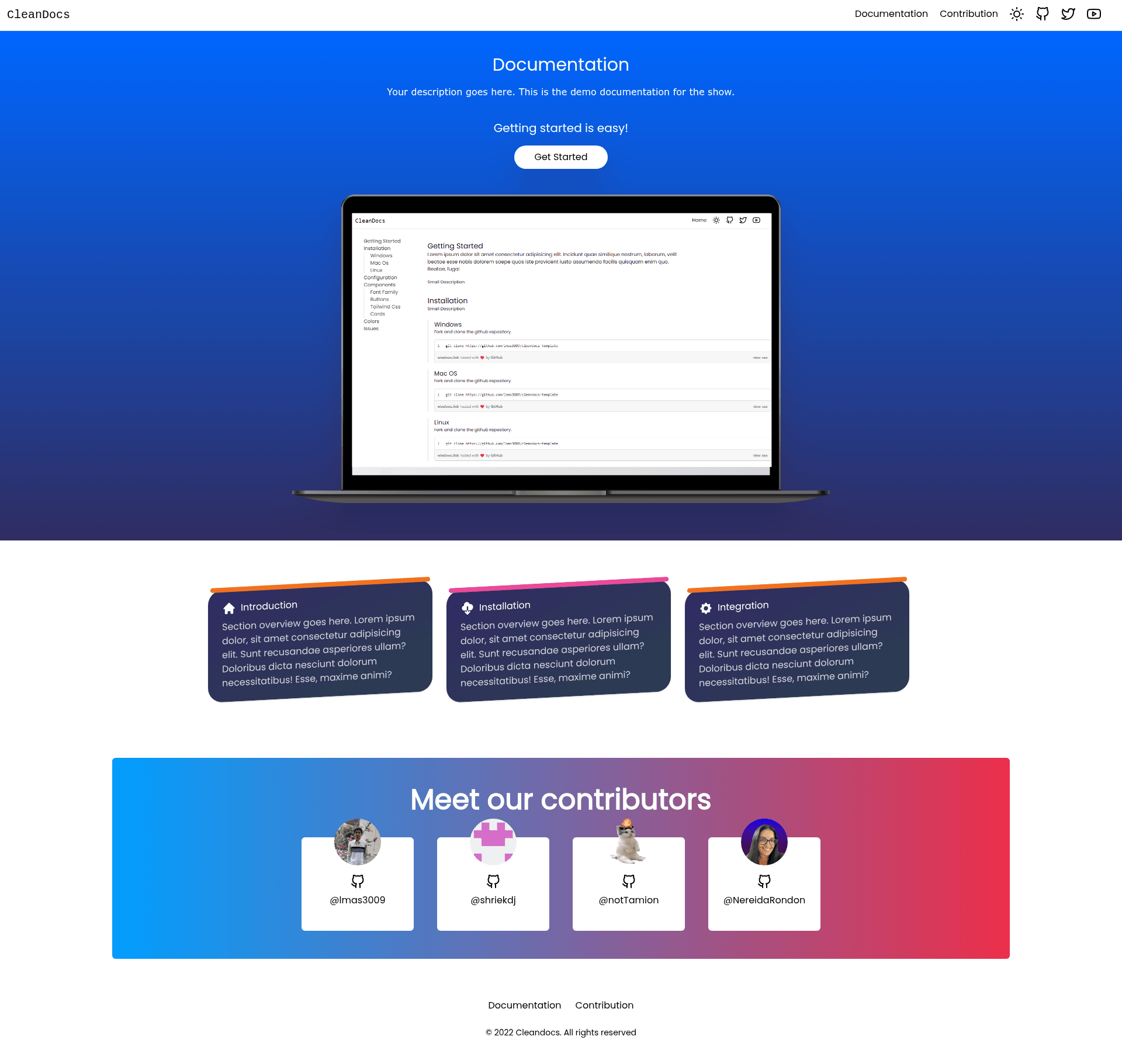
A documentation template built using HTML, Tailwindcss, and Javascript
About this template
cleandocs-template is a free, MIT-licensed documentation template built with plain HTML, Tailwind CSS, and JavaScript that lets you publish a static documentation site by editing a single index.html file. The repository lives on GitHub under the lmas3009 account, has earned 47 stars, and is tagged with the hacktoberfest and hacktoberfest2023 labels, indicating it is open to community contributions during Hacktoberfest.
What is cleandocs-template?
cleandocs-template is a static documentation website template that takes content written directly in the index.html file and renders it as a styled documentation page using Tailwind CSS utility classes and vanilla JavaScript. It runs entirely in the browser without a server-side framework or build step, making it a lightweight option for hosting docs on any static file server or GitHub Pages. The template is maintained by the GitHub user lmas3009 and is published under the standard MIT License, which permits free use, modification, and redistribution.
Key Features
- Single-file content model — Documentation text, contributor names, and page configuration all live in index.html, so updating content requires no compilation or file renaming.
- Tailwind CSS styling — The layout is built with utility-first classes, allowing developers to change colors, spacing, and component appearance by editing class names rather than writing custom CSS.
- Vanilla JavaScript enhancements — Interactivity is handled without a framework, keeping the dependency footprint limited to the three web languages.
- No build tooling mentioned — The README instructs you to simply clone the repository, and no Node.js or bundler setup is described.
- MIT license — The repository includes the standard MIT license text with a link to the Open Source Initiative, so commercial and personal use is allowed with attribution.
- Contribution workflow — All UI changes must go through a pull request and be approved by a core developer, and contributors are asked to add their information to the contributors section in index.html.
- Mermaid flowchart for onboarding — The README includes a visual flowchart that walks newcomers through forking or cloning, creating a branch, committing changes, and opening a pull request.
Who is it for?
cleandocs-template is aimed at developers and open-source maintainers who want a no-frills documentation site without learning a static site generator. It suits anyone comfortable editing HTML who needs a clean, responsive docs page quickly, and it is especially approachable for first-time contributors because the repository is small and Hacktoberfest-tagged. Designers or developers who want to practice Tailwind CSS can also use the template as a starting point for customizing a documentation UI.
What can you do with cleandocs-template?
- Publish project documentation: Write installation steps, API references, and usage guides directly in index.html and host the folder on any static web server.
- Customize the look and feel: Change the Tailwind classes in index.html to alter fonts, colors, spacing, and layout without touching a build pipeline.
- Learn or practice open-source contribution: Use the repo's contributor workflow to make UI improvements, submit a pull request, and get your name listed in the contributors section.
How does cleandocs-template work?
To use the template, clone the repository to your local machine and open the index.html file in a browser; the documentation site is immediately viewable. For contributions, the repository's mermaid flowchart outlines the intended process: fork the repo to your own GitHub account or clone it, create a new branch, make your changes, commit them, and then open a pull request on GitHub. A core developer reviews the pull request, and if it is rejected, you make changes again; if approved, the changes are merged.
Pricing
cleandocs-template is free to use under the MIT License. There are no paid tiers, subscription plans, or commercial restrictions mentioned in the repository.
Alternatives
If you need Markdown-driven documentation with automatic navigation and search, VitePress (a Vue-powered static site generator) and Docsify (which renders Markdown on the fly) are two alternatives that rely on a build step or runtime, unlike cleandocs-template's pure static HTML approach.
FAQ
Is cleandocs-template free?
Yes, the template is released under the MIT License, so you are free to use, modify, and distribute it for any purpose, including commercial projects, as long as you retain the copyright notice.
How do I get started with cleandocs-template?
Clone the repository using the git clone command shown in the README, then open the index.html file directly in your browser. No installation or build command is needed.
Do I need Node.js or a build tool?
The README does not mention Node.js, npm, or any bundler. The template consists of HTML, Tailwind CSS, and JavaScript, so you can edit and preview it with just a text editor and a browser.
How can I contribute?
Fork the repository or clone it, create a new branch, make your changes, and commit them. Then push the branch to GitHub and create a pull request. A core developer must approve the pull request for the changes to be merged, and you should add your information to the contributors section in index.html.
Does cleandocs-template support Hacktoberfest?
Yes, the repository is tagged with both hacktoberfest and hacktoberfest2023, and it has a contribution guide link in the README, making it a suitable target for Hacktoberfest contributions.