Template details
Jekyll P5 Portfolio
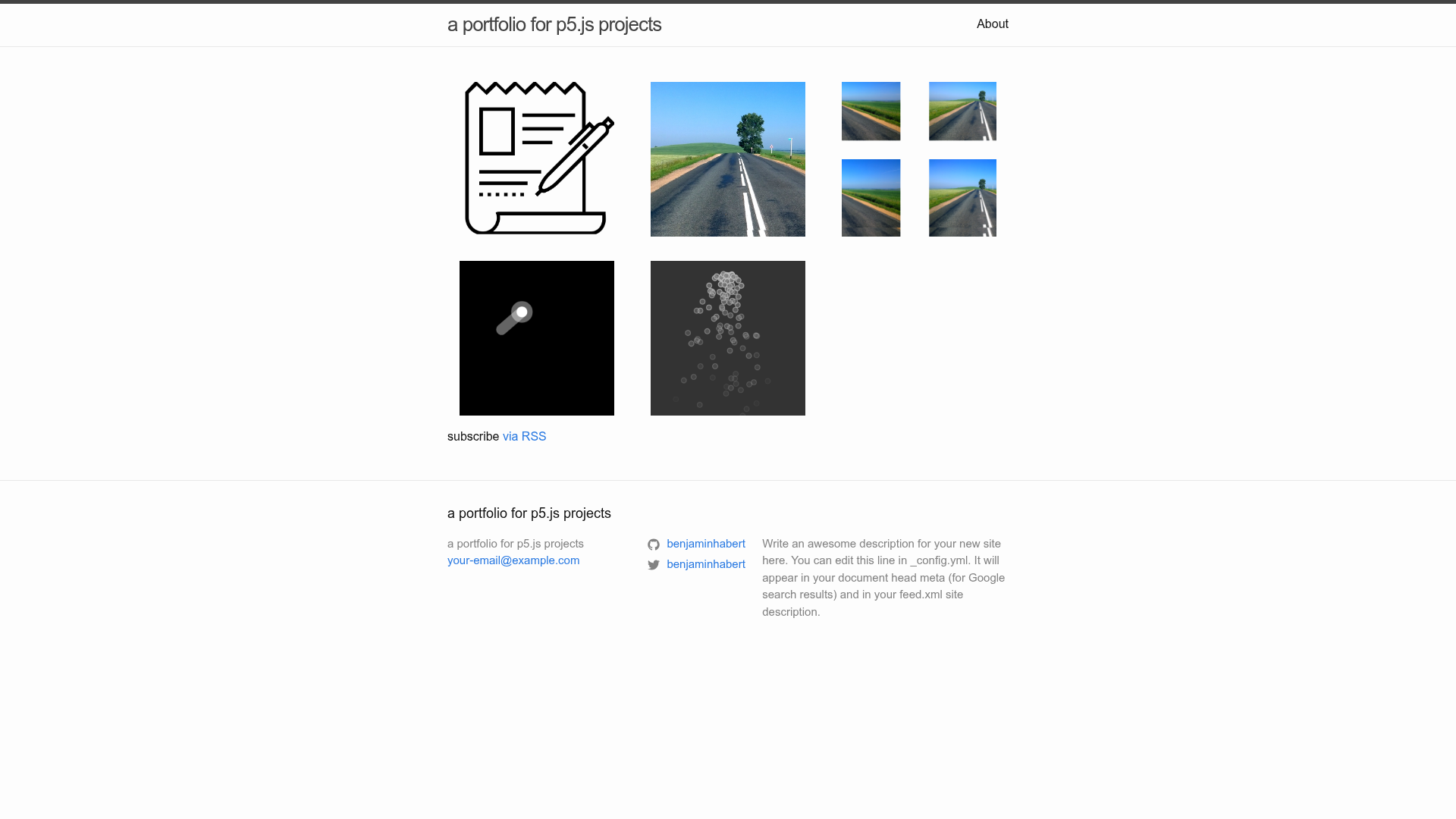
This project is a template for a simple portfolio of pictures and p5.js sketches.
About this template
Jekyll P5 Portfolio is a Jekyll-based template for publishing a portfolio of pictures and interactive p5.js sketches on GitHub Pages for free.
What is Jekyll P5 Portfolio?
Jekyll P5 Portfolio is a static-site template built with Jekyll that turns a folder of project directories into a thumbnail homepage and individual project pages. Each project lives in its own directory under _projects and contains a JavaScript sketch, a thumbnail image, and a Markdown post file with YAML front matter. The template is designed to run on GitHub Pages with no additional hosting costs and is demonstrated live at https://benjaminhabert.github.io/jekyll-p5-portfolio/.
Key Features
- Free GitHub Pages hosting — The template is meant to be published on GitHub Pages by selecting the
masterbranch as the source in the repository settings; there is no need for a separate web server. - Per-project directories — Each project is a self-contained folder under
_projectsholding all the files for that project: the sketch code, thumbnail picture, and ap5project.mdpost with YAML front matter (layout, title, date, thumbnail, and dependencies). - Thumbnail homepage — The homepage automatically displays every project as a thumbnail, sorted by the
datefield in the front matter from most to least recent. - Live-reload development — Running
jekyll servefrom the project root serves the site locally athttp://localhost:4000/<baseurl>/and auto-reloads the browser whenever a file is modified. - Configurable site metadata — The
_config.ymlfile contains fields for the title, email, description, baseurl, Twitter username, and GitHub username; editing this file rebrands the entire site without touching layout files. - Extensible dependency list — Each project's front matter includes a
dependencieslist, making it easy to add other JavaScript libraries besides p5.js on a per-project basis. - Simple image galleries — Because every project directory can contain arbitrary files, the template also supports simple galleries of pictures, not only interactive sketches.
Who is it for?
- Creative coders and p5.js artists — Publish a collection of generative sketches by copying the provided
simple_sketchdirectory, replacing the JavaScript file, adding a square thumbnail, and editing the post front matter. - Students and educators — Host course projects or computational art assignments on free GitHub Pages and present them from a clean thumbnail grid on the homepage.
- Photographers — Use the same per-project structure to create simple picture galleries where each gallery is a directory with images and an accompanying Markdown post.
What can you do with it?
- Showcase p5.js sketches: Give each sketch its own project page with a linked
divfor the canvas; the homepage thumbnail links to that page. - Build a picture portfolio: Upload image galleries inside a project folder and add descriptions in the Markdown post, producing a lightweight photography portfolio.
- Experiment with multiple libraries: Since the front matter exposes a dependencies list, you can mix p5.js with other JavaScript libraries for a project without affecting the rest of the site.
How does it work?
Fork the repository, rename it to a chosen name, and enable GitHub Pages on the master branch in the repository settings. Edit _config.yml to set the site title, description, baseurl (which must match the repository name), and social usernames. To add a project, copy the simple_sketch folder in _projects, rename it, replace the .js file with your sketch, add a square thumbnail picture, and update p5project.md with a title, date, thumbnail filename, and dependencies. For local development, clone the repository, run jekyll serve, and push changes back to GitHub to update the live site.
FAQ
How do I add a new p5.js sketch to my portfolio?
Copy the simple_sketch directory inside _projects to a new directory, rename it, replace the JavaScript file with your own code, and add a thumbnail image. Then edit the p5project.md file to set the title, date, thumbnail, and keep p5 in the dependencies list. Commit and push; GitHub Pages will update the homepage automatically.
Can I use libraries other than p5.js?
Yes. The front matter of each project includes a dependencies list where you can add other JavaScript libraries. The template's file structure keeps each project's dependencies isolated, so you can use any libraries you need for a specific sketch.
Is the template free to use?
Yes. The template is open source and GitHub Pages offers free hosting for public repositories. You only need a GitHub account to fork the repository and publish your portfolio.
Why is my p5 sketch not displaying on the project page?
The template requires that your p5 script be linked to a div element in the post body; the simple_sketch example demonstrates the correct structure. Without that link, the canvas will not render.
Do I need Jekyll installed to use this template?
You can edit files directly through the GitHub interface without installing Jekyll. However, installing Jekyll enables the live-reload development workflow described in the README and is the recommended way to preview changes before pushing them.