Template details
Pillar
Free Bootstrap 5 resume/CV template for developers with SCSS source files, 6 colour schemes, and FontAwesome icons.
About this template
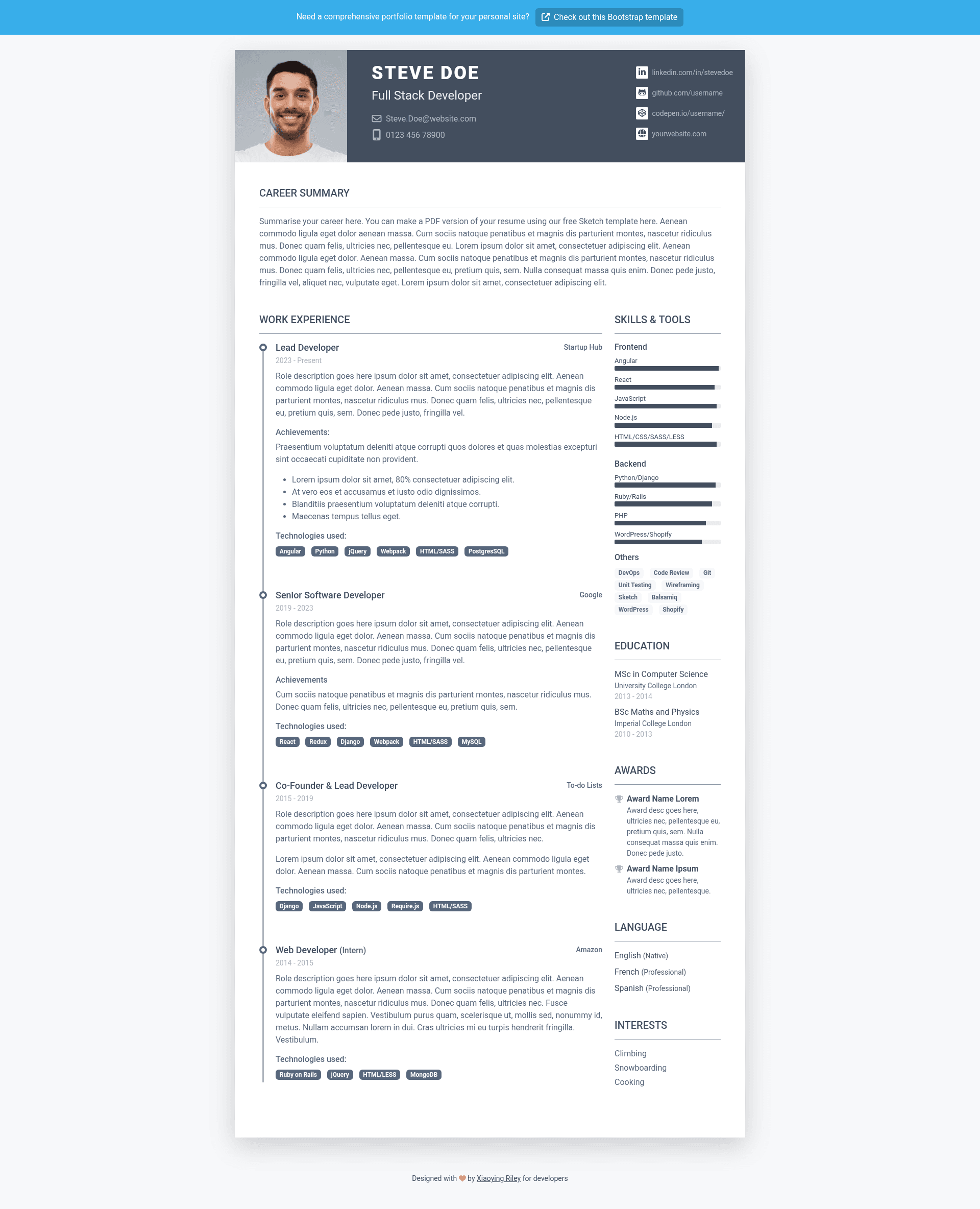
Pillar is a free Bootstrap 5 resume/CV template for developers, created by UX/UI designer Xiaoying Riley, that lets you publish a clean, responsive online resume to support your job hunt.
What is Pillar?
Pillar is a static HTML/CSS resume template built on Bootstrap 5 and SASS, which means the styling is organized as SCSS source files that you can recompile to change colors, spacing, and layout. It outputs a single-page, fully responsive resume website with sections for profile summary, skills, work experience, projects, and education, plus FontAwesome icons for visual accents. The template is distributed as a free download from 3rd Wave Media, and the author also offers a companion Sketch template for designing a printable version. As of June 2023, the latest release is version 2.0.1.
Key Features
- Built on Bootstrap 5 — Uses the current Bootstrap grid and components, ensuring consistent layout across desktops, tablets, and phones.
- SCSS source files included — Instead of only compiled CSS, you get editable .scss files so you can change variables and recompile with your own build process.
- 6 colour schemes — Six pre-made theme styles (pillar-1.css through pillar-6.css) let you switch the look by swapping one stylesheet.
- FontAwesome icons — Icon set integrated throughout the template for skill bars, contact links, and section headings.
- Fully responsive — The layout adapts to any screen size without extra work.
- HTML5 + CSS3 — Modern, semantic markup and styling compatible with all modern browsers.
- Free with attribution — The template is 100% free to use as long as you keep the footer attribution link; a commercial license is available to remove it.
Who is Pillar for?
Pillar is aimed at developers who need a professional online resume to accompany their job applications. Front-end and full-stack developers can use it to present skills and project history in a clean format. Junior developers and bootcamp graduates can quickly customize the SCSS variables to match their personal brand without writing CSS from scratch. Design-conscious developers who want a minimalist, typography-led resume can rely on the pre-built colour schemes instead of designing their own layout.
What can you do with Pillar?
- Create an online resume: Turn your work experience, technical skills, and education into a responsive single-page site you can link from LinkedIn, GitHub, or your email signature.
- Customize the look: Edit the SCSS variables to change colors and fonts, or swap between the 6 provided colour schemes by loading a different CSS file.
- Prototype a printable resume: Pair Pillar with the free Sketch template from 3rd Wave Media to design a print-ready PDF version that matches your online resume.
- Learn Bootstrap 5 theming: Study how the template structures SCSS partials and Bootstrap overrides to apply the same pattern to your own projects.
Pricing
Pillar is free to use under the condition that you keep the footer attribution link. If you want to remove the attribution, Xiaoying Riley sells a commercial license through the theme website on 3rd Wave Media.
FAQ
Is Pillar really free?
Yes. The template is 100% free to download and use for personal or commercial projects as long as you retain the footer attribution link. You cannot resell, sublicense, or redistribute the template on its own, even for free.
Does Pillar work with WordPress or other CMS?
No. Pillar is a plain HTML/CSS/SCSS template, not a WordPress theme or a CMS template. You download the static files, edit them, and host them anywhere that serves HTML files.
Can I remove the attribution link?
Yes, but you need to buy a commercial license from the 3rd Wave Media website. The free license requires that the footer attribution stays visible.
What's the difference between Pillar and the Sketch template?
The main Pillar download is a web-ready Bootstrap 5 resume. The separate Sketch template is a design file you can use in Sketch to create a printable, print-styled version of the same resume layout.
How do I change the colour scheme?
Each colour scheme is a separate stylesheet: pillar-1.css through pillar-6.css. To change the look, replace the CSS file referenced in the HTML head with one of the other five files.