Template details
Jekyll Theme Twenty
A Jekyll version of the 'Twenty' theme by HTML5 UP, with multilingual, GDPR-ready, and SEO features.
About this template
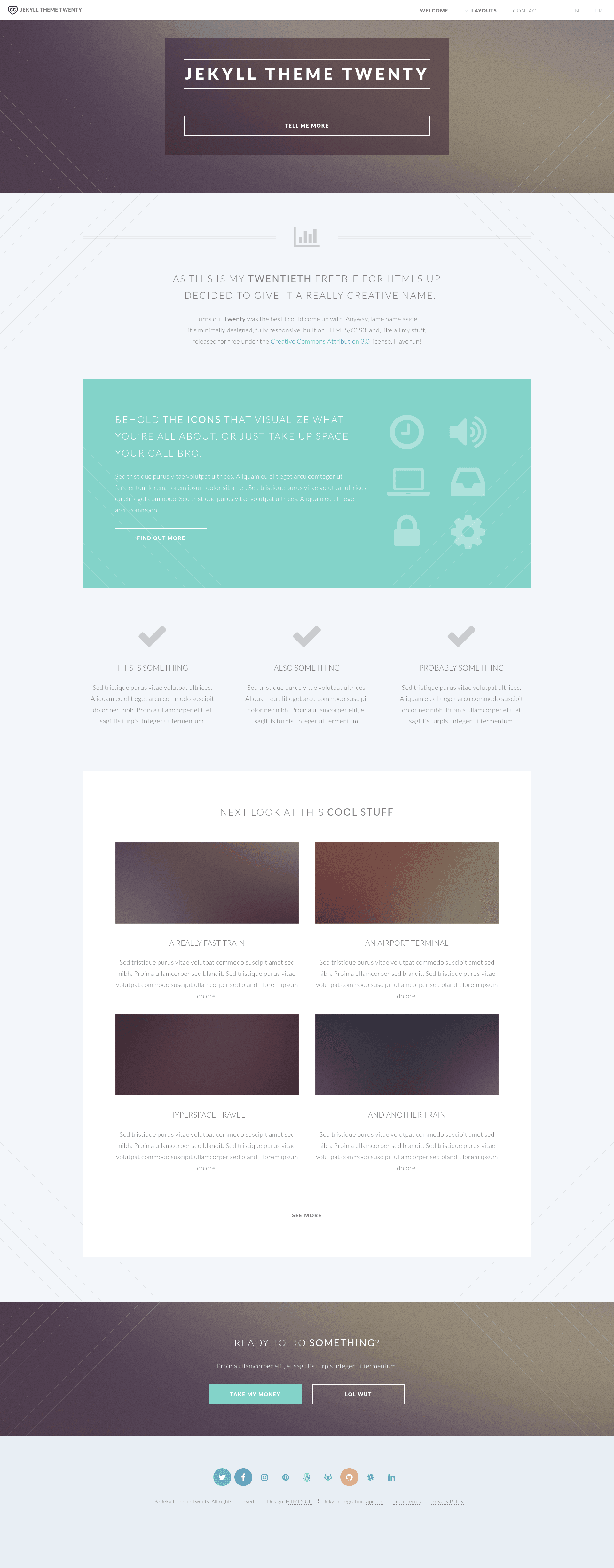
Jekyll Theme Twenty is an open-source Jekyll theme — distributed as a Ruby gem — that ports HTML5 UP's "Twenty" multi-page responsive design into a static website generator workflow.
What is Jekyll Theme Twenty?
Jekyll Theme Twenty is a Ruby gem (jekyll-theme-twenty) that takes a Jekyll site's Markdown content, front matter, and _config.yml settings and generates a responsive multi-page static website. It is maintained by GitHub user apehex and is a direct port of the "Twenty" design by HTML5 UP, which was that author's twentieth template release and includes four extra page layouts beyond the landing page. The theme is open source under the CC-BY-3.0 license, and a live preview runs at https://apehex.github.io/jekyll-theme-twenty with the source at https://github.com/apehex/jekyll-theme-twenty.
Key Features
The theme bundles eight documented features covering layout, languages, privacy, SEO, and performance.
- Responsive layout — out-of-the-box support for smartphones, laptops, tablets, and other screen sizes.
- Multilingual content — manage pages, the navigation menu, URLs, dates, and the sitemap in several languages from a central config.
- Centralized customization — theme colors, menu structure, and social icons are changed in one
_config.ymlfile. - Reusable Jekyll includes — custom includes insert contact forms, navigation menus, and other page templates easily.
- Vector images — theme images are SVG, so they render smoothly on any display and can be dynamically styled.
- GDPR ready — bundled with a cookie consent plugin and a boilerplate privacy policy compliant with GDPR.
- SEO ready — sitemap, robots.txt, and tags are automatically generated for the website.
- Hardened contact forms — the form is validated with Google's reCAPTCHA, and the theme's libraries are verified.
The layout is built on HTML5/CSS3 with optional Sass sources, and the theme keeps pages light through SVG images, thumbnail generation, lazy loading for raster images, and few third-party libraries beyond jQuery and Font Awesome.
Who is it for?
Four user groups get concrete value from this theme.
- Jekyll users who want a ready-made multi-page site without hand-building layouts, includes, and configuration.
- Static site developers who need a multilingual site managed from a single central configuration file.
- Privacy-conscious site owners who must ship GDPR cookie consent and a privacy policy boilerplate from day one.
- Portfolio and marketing site builders who want the Twenty design's multiple page layouts at no cost.
What can you do with Jekyll Theme Twenty?
Three common site types can be built with the theme's bundled templates and integrations.
- Personal portfolios: publish a multi-page responsive portfolio and host it for free on GitHub Pages using the documented
gh-pagesbranch workflow. - Small business sites: set up a contact form protected by Google reCAPTCHA, with social links, cookie consent, and a privacy policy.
- Multilingual content sites: publish content in several languages with localized URLs, menus, dates, and sitemap entries.
How does Jekyll Theme Twenty work?
Add gem "jekyll-theme-twenty" to your site's Gemfile and set theme: jekyll-theme-twenty in _config.yml, then run bundle. Configure the site title, subtitle, social URLs, contact information, and reCAPTCHA site key in _config.yml. Build the site with JEKYLL_ENV=production bundle exec jekyll build and deploy the contents of the _site folder to GitHub Pages or any web server.
Pricing
The theme is free and open source under the CC-BY-3.0 license.
FAQ
How do I install Jekyll Theme Twenty?
Add the line gem "jekyll-theme-twenty" to your site's Gemfile, set theme: jekyll-theme-twenty in _config.yml, and run bundle to install it from RubyGems. You can also install the gem globally with gem install jekyll-theme-twenty before adding it to a project.
Does Jekyll Theme Twenty support multiple languages?
Yes. The theme manages pages, the navigation menu, URLs, dates, and the sitemap in several languages, all configured from _config.yml. Each language's content is organized so Jekyll generates localized pages and sitemap entries for the site.
How do I deploy the theme to GitHub Pages?
Set the url in _config.yml to the GitHub Pages URL for your repository, build the site with JEKYLL_ENV=production bundle exec jekyll build, and push the generated files to a branch named gh-pages using the workflow described in the theme's README.
How do I enable reCAPTCHA on the contact form?
Sign your website up at Google's reCAPTCHA admin console to get a client-side integration key, then copy that key into _config.yml under recaptcha.sitekey. The site key activates validation on the bundled contact form.
What license is the theme distributed under?
The theme is available as open source under the terms of the CC-BY-3.0 license, which permits personal and commercial use with attribution, consistent with the original HTML5 UP CCA 3.0 license.