Template details
Koibumi Astro Blog
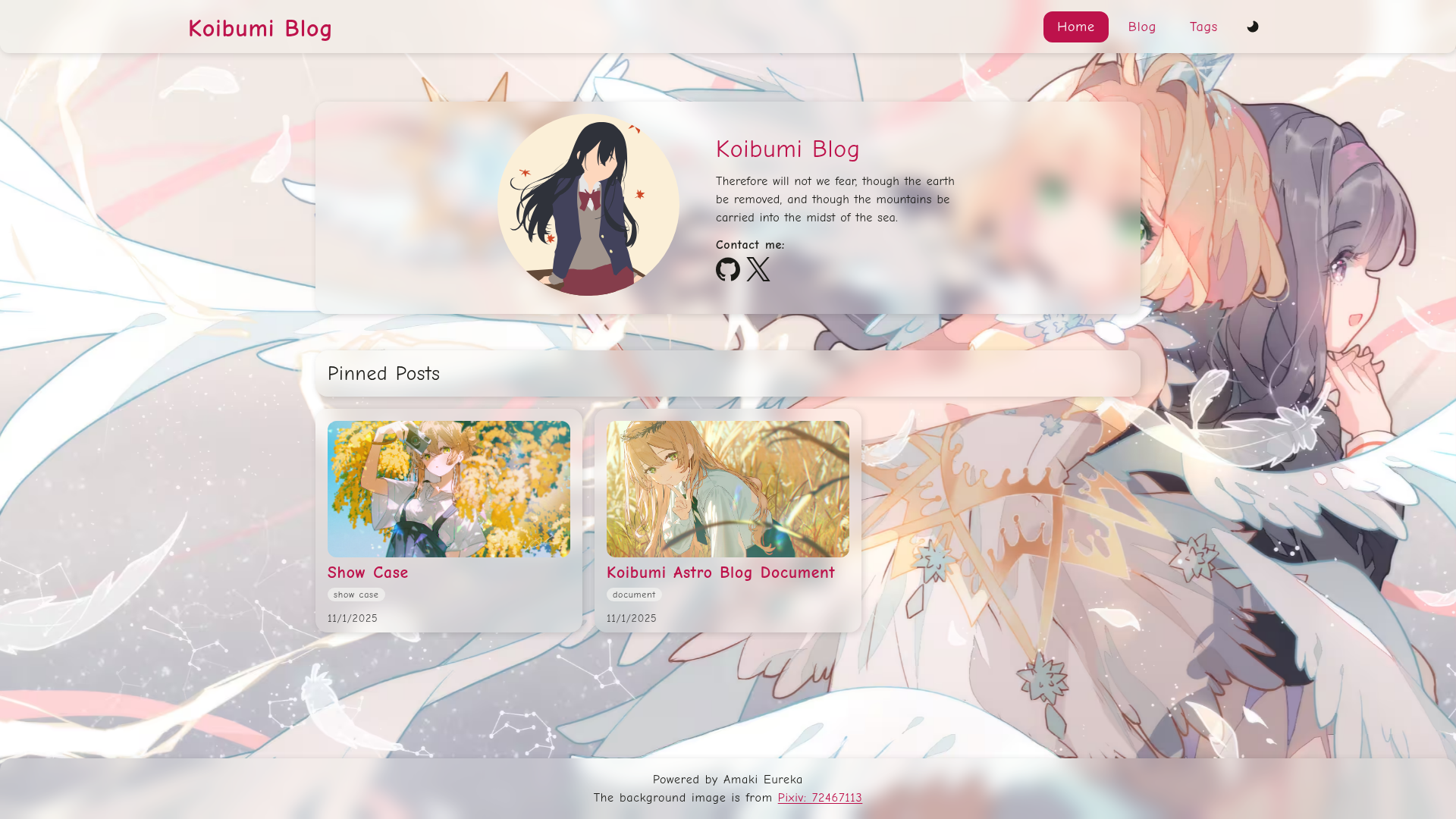
A lightweight, performant Astro blog template with comic-style typography, dark mode, and 98+ Lighthouse scores.
About this template
Koibumi Astro Blog is a free, open-source blog template built on Astro that generates a lightweight static site featuring comic-style typography, dark mode, and a 98+ Lighthouse performance score.
What is Koibumi Astro Blog?
Koibumi Astro Blog is an Astro-powered starter for personal and technical blogging. It takes Markdown and MDX posts placed in the content/blog directory and outputs a fully static site with tag archives, an RSS feed, and an auto-generated sitemap. The template is maintained by haruki-nikaidou and is distributed under the MIT license, with documentation and a live demo hosted at astro.koibumi.art.
Key Features
- Comic-style typography — Uses the Comic Neue font for English and Klee One for Japanese, giving the site a hand-drawn, friendly look.
- Dark mode — Includes a full dark mode with a theme toggle so readers can switch between light and dark appearances.
- High performance — Scores 98 or higher on Lighthouse audits, ships minimal JavaScript, and keeps the entire site under 512KB gzipped.
- Tag system — Posts can be organized with any number of tags, and the template automatically generates tag listing pages.
- Rich content support — Author posts in MDX, embed KaTeX math expressions, and get syntax highlighting through Expressive Code.
- Responsive layout — Uses a mobile-first design with grid-based card layouts that adapt from phone screens to desktop.
- SEO built-in — Generates a sitemap and RSS feed automatically, with TypeScript throughout for type safety.
Who is it for?
This template suits bloggers who want a fast, minimalist site with a distinctive look. Developers can use its SCSS architecture and Svelte components as a starting point for custom Astro projects, and writers covering technical topics can take advantage of KaTeX math and code highlighting without extra configuration.
What can you do with it?
- Personal bloggers: Publish posts as Markdown or MDX files, assign tags, and get automatic RSS and sitemap output for their readers.
- Technical writers: Write posts containing math or code blocks, which render cleanly thanks to KaTeX and Expressive Code.
- Design-curious developers: Customize the theme by editing SCSS partials, swapping the Comic Neue and Klee One fonts, and toggling dark mode via the theme script.
How does it work?
Start by clicking the "Use this template" button on the GitHub repository, then clone your new repository. Install dependencies with pnpm install, run pnpm dev for local development, and edit the content/site.json file to set your blog's title, description, favicon, bio, and copyright name. Write posts as markdown files in content/blog, then run pnpm build to generate the production site.
Pricing
Koibumi Astro Blog is free and open source under the MIT license, so there are no paid tiers or subscription costs.
FAQ
Is Koibumi Astro Blog free to use?
Yes, the template is released under the MIT license, meaning you can use, modify, and distribute it freely, including for commercial projects.
What do I need to install it?
You need Node.js, the pnpm package manager, and a basic understanding of the Astro framework. The setup commands are pnpm install and pnpm dev.
Can I write math equations in my posts?
Yes, the template includes KaTeX support, so you can add mathematical notation directly in MDX or Markdown posts and it will render in the browser.
How do I change the blog's name and description?
Open the content/site.json file and replace the title, description, bio, and copyright_name fields with your own values. Then update the site URL in astro.config.mjs.