Template details
Jekyll Theme Mehdix RTL
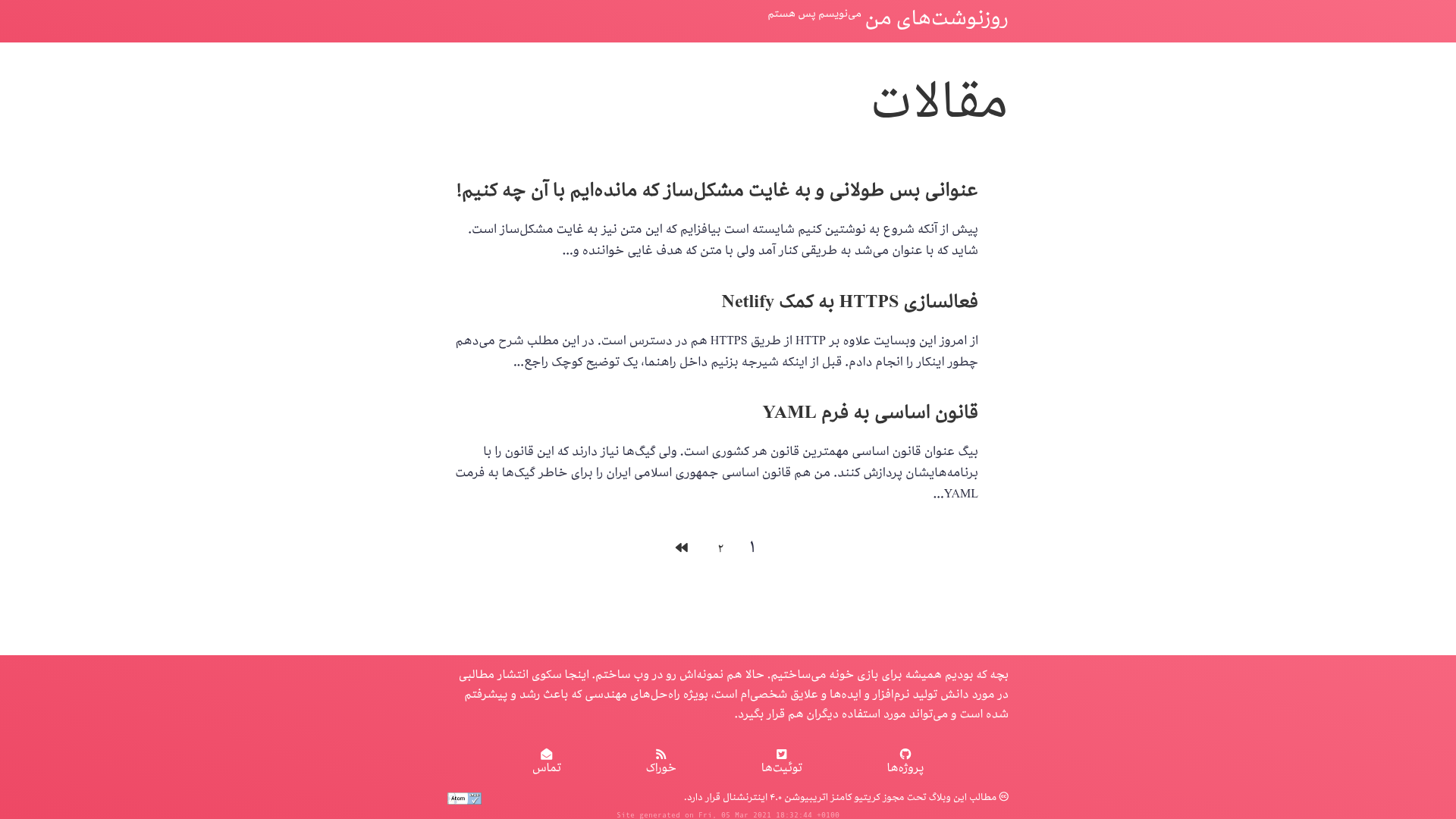
A right-to-left theme for Jekyll with Jalali support and some other goodies.
About this template
jekyll-theme-mehdix-rtl is a Jekyll theme for building right-to-left (RTL) websites with Persian (Farsi) content and Jalali calendar support, created by Mehdi Sadeghi for his personal website mehdix.ir.
What is jekyll-theme-mehdix-rtl?
jekyll-theme-mehdix-rtl is a Jekyll theme that produces a static RTL website when given a standard Jekyll site structure. It is distributed both as a GitHub repository you can fork and as a Ruby gem (version 3.x). The theme was built to help Persian speakers set up a Jekyll website that reads right-to-left and includes Jalali dates. It includes layouts, Sass styles, comment integrations, analytics, and SEO configuration.
Key Features
- RTL and Jalali support — The theme handles right-to-left text direction and uses plugins for the Persian Jalali calendar, but the default GitHub Pages builder cannot build it; use the included GitHub Actions workflow instead.
- Two installation methods — Fork the repository and clone it to start a new site, or install the Ruby gem with
gem install jekyll-theme-mehdix-rtland settheme: jekyll-theme-mehdix-rtlin your_config.yml. - Homepage layouts — Choose between
home(post titles with excerpts and pagination) andminimal(only post titles) in the theme. - Comment systems — Disqus is enabled with
comment_system: disqusanddisqus_shortname; static comments requirecomment_system: staticand YAML files per post in_data/commentsnamed by post UUID. - Style customization — Override the default pink theme by editing CSS variables in
assets/css/main.scssor by adding a_sass/custom.scssfile, which the theme loads automatically. - Footer and analytics — Footer links appear when
github_username,twitter_username,feedburner_id, oremailare set in the config; Google Analytics works withgoogle_analytics_id. - SEO integration — The theme uses the
jekyll-seo-tagplugin; addinglang,logo, and your GitHub and Twitter usernames improves search engine results.
Who is it for?
Persian-speaking bloggers who want a right-to-left Jekyll site with Jalali dates and a ready-made comment system can use this theme to avoid building the basic structure from scratch. Developers comfortable with Jekyll themes can install the gem and customize it via _sass/custom.scss. Anyone who wants a simple forked personal website on GitHub Pages can use the fork method without learning Jekyll's internals.
What can you do with jekyll-theme-mehdix-rtl?
- Persian bloggers: Launch a blog with excerpts, pagination, and either Disqus or static comments, hosted on GitHub Pages or Netlify.
- RTL site builders: Start from the forked repository, change the site name and content, and deploy to GitHub Pages using the
gh-pagesbranch workflow. - Netlify users: Use the included
netlify_comments.pyscript to process custom comment forms and merge them into the static comments data.
How does jekyll-theme-mehdix-rtl work?
For the gem method, create a new Jekyll site, add gem "jekyll-theme-mehdix-rtl", "~> 3.0" to your Gemfile, set theme: jekyll-theme-mehdix-rtl in _config.yml, and run bundle install. For the fork method, clone the repository, enable GitHub Pages on the gh-pages branch, and edit the site settings and content. Both routes yield a static RTL website with the theme's layouts and integrations.
Pros and cons
- Pros: Free under the MIT license; simple fork-and-edit workflow; supports Disqus and static comments; includes Google Analytics and SEO setup.
- Cons: The repository is unmaintained and the author explicitly recommends against using it; the default GitHub Pages build does not work (plugins are missing); when installed as a gem, Jekyll will not load the 404 page or feed-related files from the theme.
FAQ
Is jekyll-theme-mehdix-rtl still maintained?
No. The repository header says "Unmaintained repository. Don't use." and the author notes he no longer uses the theme himself, though he still uses Jekyll for his website. Expect no updates or support if you adopt it.
Does it work with GitHub Pages out of the box?
No. The default GitHub Pages builder does not have the plugins the theme needs (like Jalali calendar support). You must use the GitHub Actions workflow in the repository (.github/workflows/gh-pages.yml) to build and publish the site to the gh-pages branch.
Can I use it for a GitHub user page?
The documented workflow assumes a project page (repository name different from your username). The author states he has not tested a user page (username as repo name) and suggests storing source on another branch and pushing build output to master.
How do I change the pink color scheme?
Edit the CSS variables in assets/css/main.scss to change the site's colors, or add a _sass/custom.scss file to override the default styles. The theme automatically loads custom.scss.
What comment systems does the theme support?
It supports Disqus (comment_system: disqus plus a shortname) and static comments (comment_system: static) that read YAML files from _data/comments. Each post must have a uuid in its front matter, and the comment files are named after that UUID.