Template details
Lanyon for Hugo
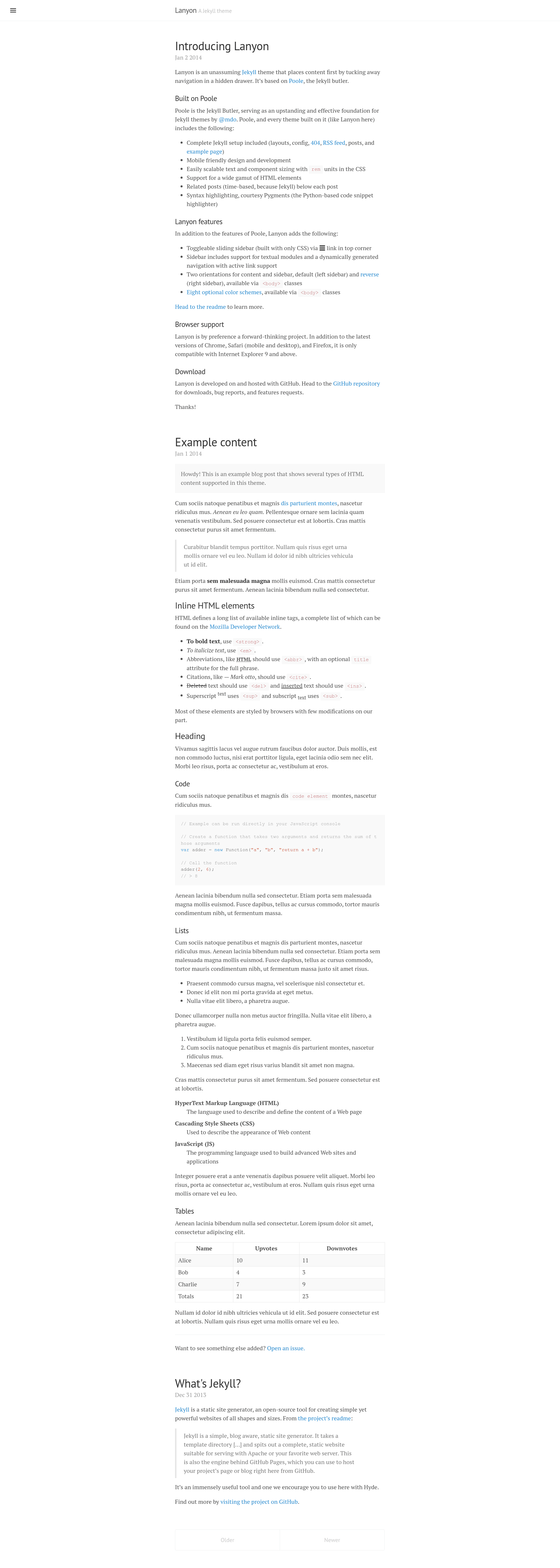
A Hugo port of the Jekyll Lanyon theme, offering a minimal sidebar-driven blog layout with the same CSS and interactions.
About this template
Lanyon for Hugo is a Hugo static-site theme that ports the classic Jekyll Lanyon blog theme to Hugo, giving you a minimal, sidebar-driven blog layout with the same CSS and interaction design. It takes Markdown content placed in content/post and content/fixed and renders a static blog with a toggleable left sidebar, Jekyll-style date-based permalinks, and Pygments syntax highlighting.
What is Lanyon for Hugo?
Lanyon for Hugo is a faithful port of the poole/lanyon Jekyll theme, rebuilt for the static site generator Hugo. The theme accepts Markdown files as input and outputs a static website with a clean reading layout and a hidden sidebar that toggles open via a CSS-only button. It is released under the MIT license and described by its author as an attempt to bring Lanyon's look and interactions to Hugo users.
Key Features
- Faithful Lanyon port — The CSS from the original Lanyon is unchanged and lives in
static/css, preserving the parent theme's visual design exactly. - CSS-only sidebar toggle — The sidebar is hidden by default and slides in when you click a button; the interaction is implemented entirely in CSS, with no JavaScript.
- Two content types — Posts (dated, listed on the homepage) and fixed pages (undated, hidden from the homepage) map to the
content/postandcontent/fixedfolders, respectively. - Sidebar link control — Add
sidebar: trueto a page's front matter to pin it in the sidebar; ordering is controlled by aweightvalue, with lower weights listed first. - Jekyll-style permalinks — The included
config.jsonconfigures permalinks to match Jekyll's/year/month/day/title/format, provided you set a date in the front matter. - Flexible front matter — Hugo accepts front matter written in JSON, YAML, or TOML; the example posts use JSON.
- Pygments syntax highlighting — Ships with
static/css/syntax.cssfor Pygments, and you can regenerate that file for other Pygments color schemes with apygmentizecommand.
Who should use Lanyon for Hugo?
Bloggers moving from Jekyll to Hugo who want the same Lanyon visual style without recreating the theme from scratch will find a drop-in replacement here. Hugo beginners get a working blog theme with example posts already in place, so they can start writing immediately. Developers who like to customize themes can treat the unchanged Lanyon CSS as a stable foundation and apply any of the modifications listed in the upstream Lanyon README.
What can you do with Lanyon for Hugo?
- Start a personal blog or dev blog — Clone the repository, write Markdown posts in
content/post, and configure the site title, tagline, and GitHub link viaconfig.json; the theme generates a post list at/post/and includes a sidebar entry for it. - Publish fixed pages — Create an About page (an example
about.mdis included) or other undated content as a fixed page; it will appear with only a title and won't clutter the homepage. - Reorder the sidebar — Assign weight values (as quoted strings) to sidebar items to control their vertical order, even using negative weights to move items higher.
How does Lanyon for Hugo work?
Getting started is a matter of cloning the repository and adding Markdown files. The README instructs: "all you have to do is clone this repository and start writing Markdown files in content/post." You must specify a date in each post's front matter because Hugo does not parse dates from filenames like Jekyll does. Site-wide settings are edited in the Hugo configuration file, which can be JSON, YAML, or TOML.
Pricing
Lanyon for Hugo is free and open source under the MIT license. There are no paid tiers or premium features.
FAQ
Is Lanyon for Hugo free?
Yes. The theme is MIT-licensed, which means you can use it freely for personal or commercial projects, modify it, and redistribute it, as long as you retain the copyright notice.
How do I add a page to the sidebar?
Set sidebar to true in the front matter of the content. You can also set a weight value to control its position; lower weights go to the top. For example, the included about.md demonstrates this by being pinned to the sidebar.
Does Lanyon for Hugo support Jekyll-style permalinks?
Yes, if you set the date in each post's front matter. The theme's config.json defines permalinks that mimic Jekyll's default /year/month/day/title/ structure, so your URLs will look identical to what you had on Jekyll.
Can I use YAML or TOML for front matter instead of JSON?
Yes. Hugo natively supports JSON, YAML, and TOML. The theme's example posts are written in JSON, but you are free to use whichever format you prefer in your own content files.
How do I enable syntax highlighting?
Install Python's Pygments library and use the included syntax.css, which the theme references. To switch to a different Pygments color scheme, run pygmentize -f html -S colorful -a .highlight > static/css/syntax.css (or replace colorful with another theme name).