Template details
latexcv
A collection of self-designed LaTeX templates for CVs and resumes, with CJK support and Overleaf integration.
About this template
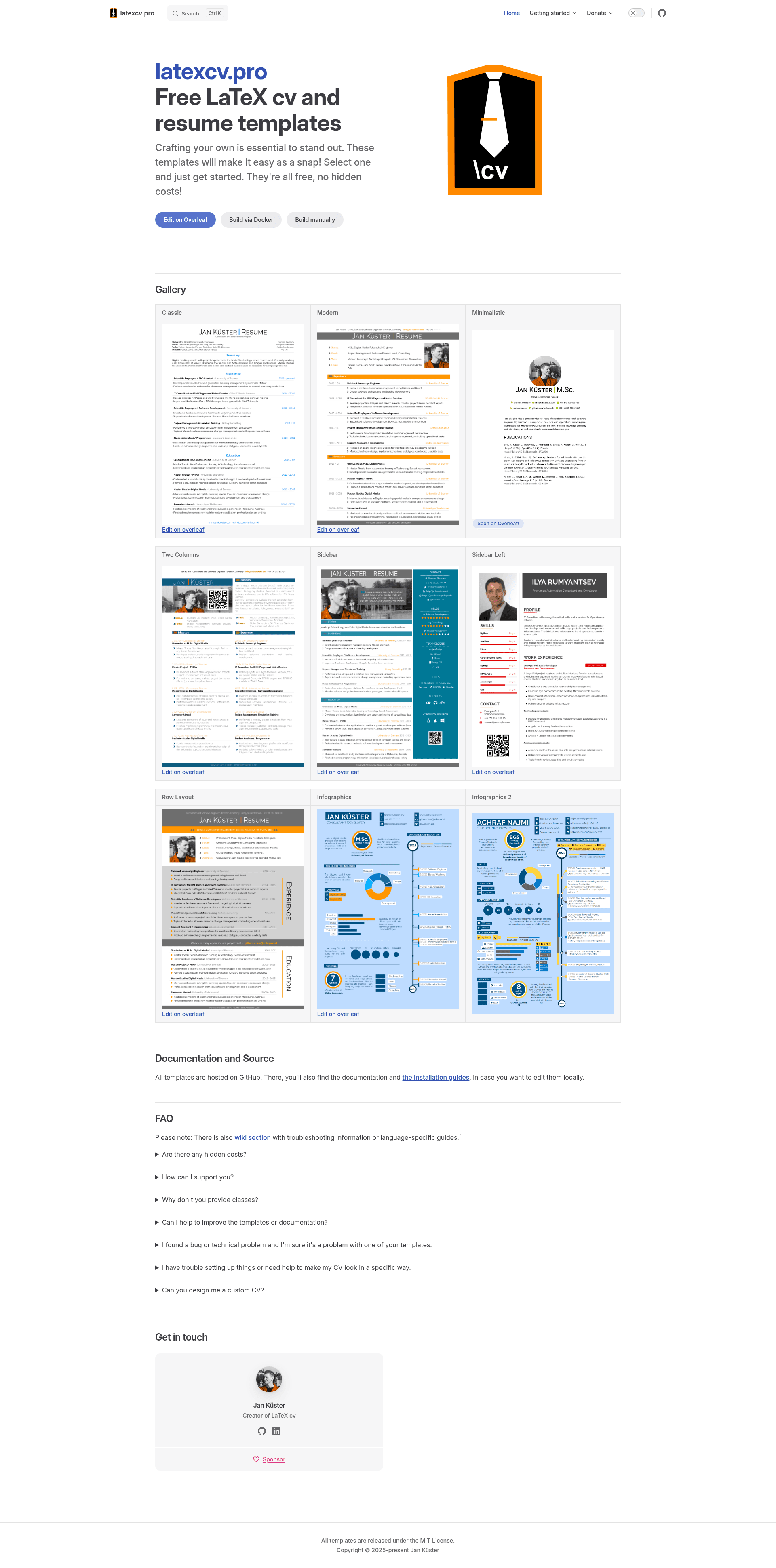
LaTeX CV and Resume Collection (latexcv) is an open-source set of nine self-designed LaTeX templates for building CVs and resumes, created by Jan Küster and hosted on GitHub, where the repository has accumulated over 3,300 stars. The templates are written from scratch, not copied from other collections, and they compile with a minimal TeX Live distribution using plain pdflatex.
What is latexcv?
latexcv is a GitHub repository containing nine self-designed LaTeX templates for CVs and resumes, maintained by Jan Küster under the MIT License. It takes your information written in a main.tex file and compiles it into a PDF using pdflatex, with no requirement for XeTeX, Koma-script, or LuaTeX. The project is open source, and a GitHub Actions workflow builds all templates on every change.
Key Features
- Nine layout templates — Classic, Modern, Minimalistic, Two Columns, Sidebar, Sidebar Left, Row Layout, and two Infographics variants, each in a separate folder with its own main.tex.
- Overleaf ready — Seven of the nine templates have dedicated Overleaf pages, letting you edit and compile in a browser without installing any LaTeX distribution.
- CJK character support — Chinese, Japanese, and Korean are supported with a two-line configuration change, documented in the docs/cjk directory.
- Minimal build environment — A minimal TeX Live distribution is enough; the repository includes a texlive.profile that installs only the required packages.
- Docker build scripts — A Dockerfile plus shell scripts (.docker/create_image.sh, .docker/build.sh, .docker/daemon.sh) let you build any template inside a container.
- Code-documented templates — Colors, fonts, and layout settings are explained directly in the LaTeX source, making customization beginner-friendly.
- Self-designed layouts — Every template is original, not copied from a template collection, so your CV won't look identical to a common stock template.
- Actively maintained — The repository shows an active project status, has a build-all GitHub Actions workflow, and provides contribution guidelines for new contributors.
Who is it for?
- Job seekers who want a typeset, pixel-perfect CV and are willing to edit LaTeX source rather than drag-and-drop in a GUI.
- LaTeX beginners who need a working template that compiles with plain pdflatex and contains commented settings for colors, fonts, and layout.
- Developers and researchers who already use LaTeX and want a resume that fits their existing editing and build toolchain, including Docker or Overleaf.
- Multilingual applicants who need a CV in Chinese, Japanese, or Korean and want a template that natively supports those character sets.
What can you do with latexcv?
- Create a one-page CV: Use the Classic or Minimalistic template to fit the most important facts on a single page for a quick first impression.
- Build a detailed full CV: Use the Row Layout or Infographics templates to present an extended curriculum vitae with more space for publications and experience.
- Customize colors and fonts: Edit the documented settings in main.tex to match your personal branding, then recompile to PDF.
- Automate builds: Run the Docker scripts or the GitHub Actions workflow to regenerate your CV whenever you push changes.
How does latexcv work?
Clone or download the repository, switch into the folder of the template you want (for example, "classic"), edit main.tex with your personal data, and run pdflatex. The output is a PDF named main.pdf. For a local install, use the provided texlive.profile to install only the necessary TeX Live packages, or use Overleaf by opening the linked template from the README.
FAQ
Is latexcv free to use?
Yes, the entire repository is released under the MIT License, which permits free use, modification, and distribution, including for commercial purposes, as long as the copyright notice is retained.
Do I need a full TeX Live installation?
No. The templates require only a minimal TeX Live distribution; the repository includes a texlive.profile to install just the needed packages. You also can compile entirely online via Overleaf without any local installation.
Can I write my CV in Chinese, Japanese, or Korean?
Yes. The project added support for CJK characters, and the setup is described as only two lines of code, documented in docs/cjk/README.md.
Are all templates available on Overleaf?
Seven of the nine templates have direct Overleaf links in the README: Classic, Modern, Two Column, Sidebar, Left Sidebar, Row Layout, and Infographics. Minimalistic and Infographics 2 are available only in the repository.
What output format does latexcv produce?
Compiling a template's main.tex with pdflatex produces a PDF file. The templates are designed to compile without XeTeX, Koma-script, or LuaTeX.