Template details
Linkhub
A free, open-source Jekyll theme for a single-page link-in-bio website, styled with a custom lightweight CSS framework and YAML-driven customization.
About this template
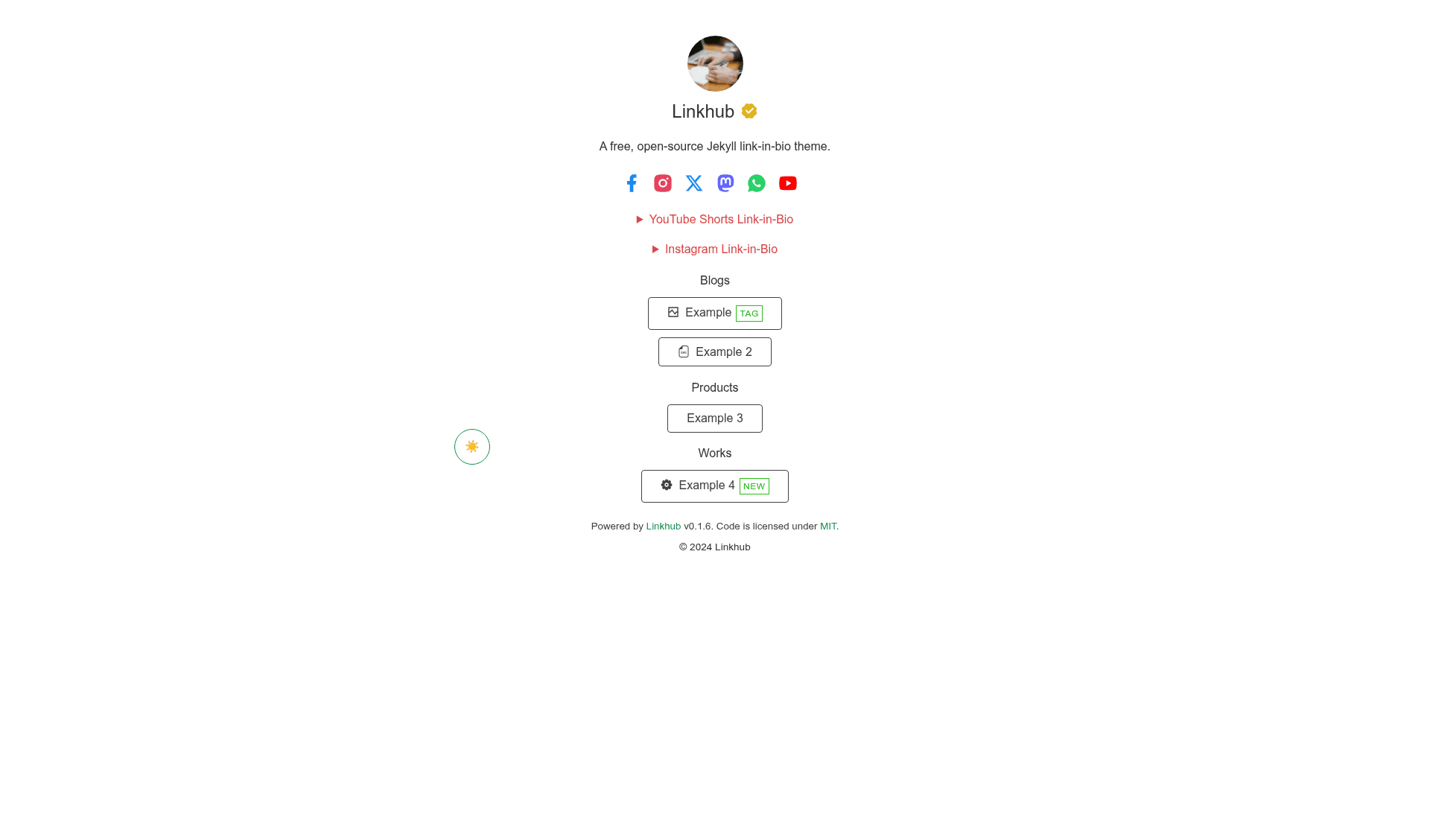
Linkhub is a free, open-source Jekyll theme for creating a single-page, link-in-bio website like Linktree or Later, controlled entirely through YAML data files and deployable to GitHub Pages.
What is Linkhub?
Linkhub is a minimal Jekyll theme that turns a GitHub repository into a one-page link hub with categorized buttons, social links, and an Instagram/TikTok/YouTube media grid. It is maintained by digitalmalayali, released under the MIT License, and distributed as a Ruby gem, a GitHub remote theme, and a GitHub template. The theme uses a single default.html layout, no _posts, and a modified version of the chota CSS framework; the resulting site weighs around 362kb.
Key Features
- Dark/light mode — built-in toggle that defaults to the visitor's system preference and can be removed without disabling automatic detection.
- Iconify icons — over 150,000 free icons through Iconify; each social or link button accepts an icon name, or a custom inline SVG via the custom-icon field.
- Link categories — links are grouped into categories in links.yml with optional per-link icons, tags, and fixed or fluid button widths; icon position can be set to left or right for all buttons globally.
- Social media grid — bio.yml renders an image grid (three columns, 1:1 square by default, or 9:16 vertical with a ratio variable) for Instagram posts, TikTok videos, and YouTube Shorts, similar to Later's link-in-bio.
- SEO metadata — includes Open Graph and Twitter Card tags; site name, description, logo, favicon, locale, GA4 measurement ID, and image dimensions are configured in _config.yml.
- Verified badge — optional badge with an Iconify icon and custom color, enabled in _config.yml.
- Lightweight — the complete site is around 362kb per a Cloudflare Radar scan, thanks to a stripped-down version of the chota CSS framework.
Who is it for?
- Jekyll beginners — can use the GitHub template workflow and GitHub Actions to publish a link page without writing any Ruby or Liquid code.
- Creators and influencers — can centralize links for Instagram, TikTok, and YouTube by adding thumbnails to bio.yml, removing the need for a paid Linktree plan.
- Developers — who want a self-hosted, MIT-licensed, dependency-light link page they can fork and extend; the theme is structured like a normal Jekyll site with _layouts, _includes, _data, and assets.
- Personal brands — who want a single-page profile with social links, categorized links, and SEO tags under their own domain.
What can you do with Linkhub?
- Instagram/TikTok/YouTube creators: display a grid of recent post thumbnails linking out to the original content; vertical 9:16 images are supported via a ratio variable.
- Freelancers and consultants: create a one-page hub of project links, products, and social profiles with categories and tags, and add a verified badge.
- Self-hosters: install Linkhub as a Ruby gem or remote theme and serve the page on GitHub Pages or any Jekyll-compatible static host, including custom domains.
- Open-source contributors: fork the repository, submit pull requests or bug reports, and list the resulting site in the "Powered by Linkhub" section.
How does Linkhub work?
The site is configured exclusively through YAML: _config.yml holds site identity, SEO, favicon, GA4, and the verified badge; _data/social.yml defines social buttons with icons and colors; _data/bio.yml defines the media image grid; and _data/links.yml defines categorized link buttons. After editing these files, the theme renders a single default.html layout (plus included partials such as the theme switch and bio) into a static page. Deployment can be done via GitHub Actions when using the template or by building locally with bundle exec jekyll serve.
Pricing
Linkhub is free and open source under the MIT License. There are no paid tiers; the gem, remote theme, and GitHub template are all available at no cost.
Alternatives
- Linktree — a hosted link-in-bio service with a free tier and paid plans; Linkhub differs by being a self-hosted, MIT-licensed Jekyll theme.
- Later — a social media scheduling platform that includes a link-in-bio feature; Linkhub specifically mimics its post-grid style without the scheduling tool.
- LittleLink — another open-source link-in-bio alternative, built as a static site rather than a Jekyll theme.
FAQ
Is Linkhub free?
Yes, Linkhub is free and released under the MIT License. You can install it as a Ruby gem, use it as a GitHub remote theme, or create a repository from the GitHub template — all without paying anything.
Does Linkhub work with GitHub Pages?
Yes, one of the recommended installation methods is the GitHub template workflow with GitHub Actions as the build source. You can also use it via remote_theme in _config.yml and publish to GitHub Pages with a custom domain.
Can I add Instagram, TikTok, or YouTube link-in-bio posts?
Yes, edit _data/bio.yml to add the name of the platform and a list of items containing a URL and an image URL or local asset path. Images default to a 1:1 aspect ratio in a 3-column grid; set ratio: vertical on the platform entry for 9:16 thumbnails.
How do I customize the icons?
Icons are set in _data/social.yml and _data/links.yml using Iconify icon names such as ri:facebook-fill. For a custom icon, use the custom-icon variable and paste the full SVG markup into that field. You can also adjust button width and icon position globally.
Does Linkhub have a setting to remove the dark/light mode toggle?
Yes, edit the default.html layout and remove or comment out the theme-switch include. Note that the automatic detection based on system preference is embedded in the theme and will still change the mode unless you also remove that script.