Template details
Little Squirrel - Free Bootstrap 5 HTML5 Education Template
Free multipage education website template built with Bootstrap 5, featuring course sections, pricing tables, and testimonial carousel.
About this template
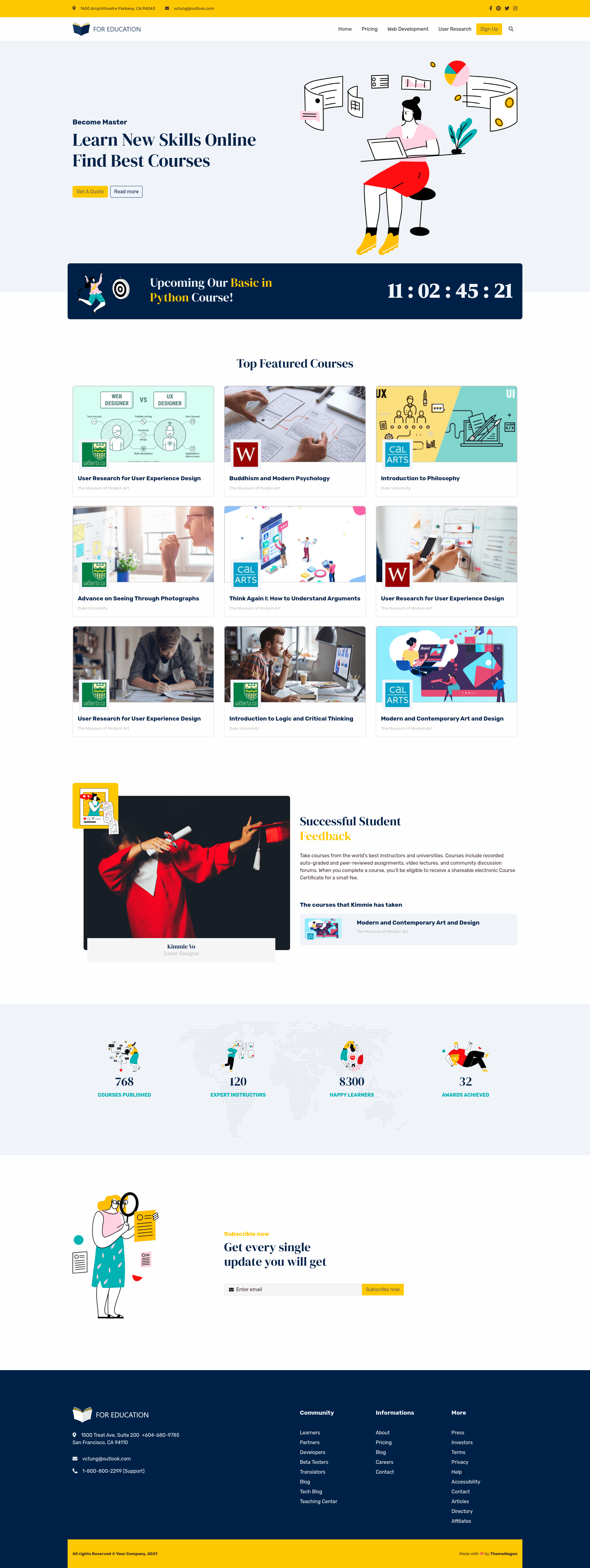
Little Squirrel is a free, multipage education website template built on Bootstrap 5 by ThemeWagon, designed to help schools, course creators, and learning platforms publish responsive sites with prebuilt sections like pricing tables, course listings, and testimonial carousels.
What is Little Squirrel?
Little Squirrel is a free, multipage HTML5 website template created by ThemeWagon and built on the Bootstrap 5 framework. It includes 4 complete HTML pages with custom illustrations and a yellow-blue color scheme, giving you a ready-made hero header, pricing tables, a blog section, categorized course listings, and a testimonial carousel as reusable components. The template runs entirely in the browser with no backend, and the download package contains all HTML files, demo images, JavaScript source files, and plugin libraries.
Key Features
- Bootstrap 5 framework — Built on Bootstrap 5 with HTML5 and CSS, ensuring responsive layouts and cross-browser compatibility for Chrome, Edge, Firefox, Opera, Safari, and mobile devices.
- Multipage structure — Ships with 4 HTML pages covering landing, courses, pricing, and blog layouts, all linked with a fixed top navigation bar.
- Custom illustrations and color scheme — Uses a well-adjusted yellow-blue palette with original illustrations, plus FontAwesome icons for visual elements.
- Subscription UI and call-to-action — Includes a built-in subscription form and prominent CTA buttons, ready to connect to email marketing services.
- Interactive components — Features fun fact counters, on-hover effects, testimonial carousel, and a blog section to keep pages engaging.
- Gulp-based workflow — The template comes with a Gulp-based build workflow (source files included) to help developers compile and optimize assets easily.
Who should use Little Squirrel?
- Schools and universities — Publish informational sites with course categories, pricing plans, and enrollment calls to action.
- Course creators and instructors — Showcase curriculum, blog about subjects, and collect email subscriptions from prospective students.
- Web developers and freelancers — Use the template as a fast starting point for client education projects, customizing pages and styles with included source files.
What can you do with Little Squirrel?
- Online course websites: Display categorized course lists, pricing tables, and student testimonials in a single clean layout.
- Tutoring centers: Use the subscription form and CTA buttons to capture leads and announce new batches.
- Education blogs: Publish articles with the built-in blog section while keeping the course catalog visible through the navigation.
FAQ
Is Little Squirrel free?
Yes, Little Squirrel is a free template released under an open-source license. You can use it in commercial projects and receive lifetime free updates from ThemeWagon. No payment or attribution is required, making it a cost-effective choice for educational projects.
What files come with the template?
The download includes 4 HTML pages, all demo images, JavaScript source files, library and plugin files, and the full set of Bootstrap 5, Google Fonts, and FontAwesome assets. Everything is organized into classified folders for easier development and customization.
Does Little Squirrel work on mobile devices?
Yes, the template is highly responsive and tested for Chrome, Edge, Firefox, Opera, Safari, and mobile browsers. The layout adapts to different screen sizes, ensuring a consistent experience across desktops, tablets, and smartphones.
Can I customize the template?
Yes, the template's files are organized into classified folders and includes a Gulp-based workflow, so developers can edit the source and recompile assets. All HTML, CSS, and JS files are accessible, and the code is commented for clarity.
Which browsers are supported?
Little Squirrel is cross-browser compatible with Chrome, Edge, Firefox, Opera, Safari, and mobile devices. It was tested on these browsers to ensure consistent rendering and functionality.