Template details
M10c
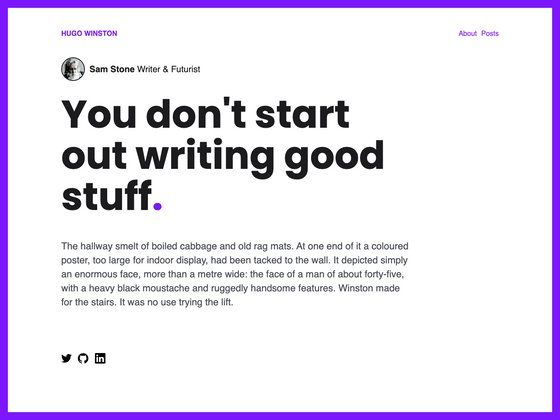
A minimalistic, responsive Hugo blog theme with customizable colors, social links, and 100/100 Lighthouse performance.
About this template
M10c is a minimalistic Hugo blog theme designed for fast, responsive personal blogs; it was built by vaga and scores 100/100 on Google Lighthouse performance tests.
What is M10c?
M10c is a Hugo theme that turns a standard Hugo site configuration into a clean blog layout with a sidebar for author info, menu navigation, and social links. Its input is a config.toml file plus Markdown content, and its output is a fully static, responsive website. The theme is released under the MIT License and includes built-in partials for Twitter Cards, Open Graph, Disqus, and Google Analytics.
Key Features
- Fully responsive — The layout adapts to mobile and desktop widths without needing any extra configuration.
- 100/100 Lighthouse score — The theme is optimized for performance, achieving a perfect score on Google Lighthouse audits.
- Two icon libraries included — Feather icons are used for application icons, and Simple Icons provides brand icons that are prefixed with
brand-(for example,brand-githuborbrand-x). - Customizable colors — Define five SCSS color variables in
params.styleinsideconfig.tomlto match your brand palette. - Sidebar personalization — Set author name, description, avatar image, favicon, and a custom menu separator directly from the config file.
- Social menu — Add unlimited social links by adding
[[params.social]]entries with icon, name, and URL. - SCSS overrides — Place an
_extra.scssfile inassets/css/to customize styles; this requires thehugo_extendedbinary.
Who should use M10c?
- Personal bloggers who want a distraction-free, text-first layout without heavy JavaScript.
- Hugo developers who need a small theme they can configure entirely from TOML and extend with SCSS.
- Static-site hobbyists who deploy to Netlify, Vercel, or GitHub Pages and want a fast, minimal theme out of the box.
Use cases
- Tech writers: Publish tutorials and notes with a clean reading experience and code-friendly typography.
- Minimalist portfolio sites: Use the sidebar to show an avatar, bio, and links to GitHub, Mastodon, or X.
- Performance-focused blogs: Serve a lightweight static site that passes Lighthouse with a perfect score.
How does M10c work?
After creating a new Hugo site with hugo new site, clone the repository into themes/hugo-theme-m10c and set theme = "hugo-theme-m10c" in config.toml. Menu items are defined as [[menu.main]] entries, social links as [[params.social]] entries, and the theme picks up standard Hugo content from the content/ directory.
FAQ
Is M10c free?
Yes, M10c is released under the MIT License, so it can be used, modified, and redistributed freely.
Do I need hugo_extended?
The base theme works with the regular Hugo binary. To compile custom SCSS from an _extra.scss file, you must use the hugo_extended version.
How do I add a menu item?
Add a [[menu.main]] block to config.toml with identifier, name, and url. Hugo will render it in the sidebar; see the Hugo documentation for more menu options.
How do I change the theme color?
Set the five color variables under [params.style] in config.toml: darkestColor, darkColor, lightColor, lightestColor, and primaryColor.