Template details
Hugo Winston
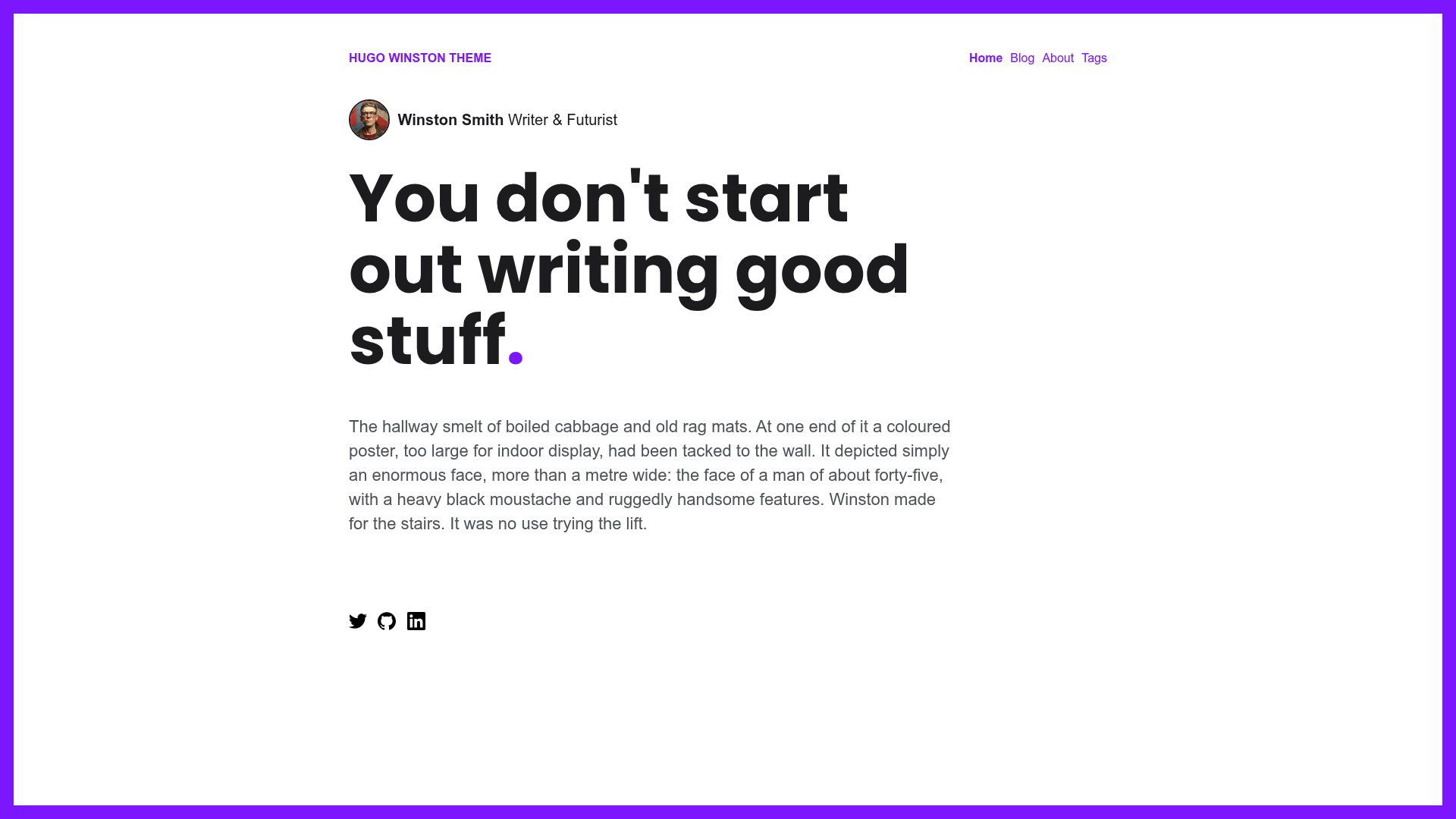
A bold minimal blogging theme for Hugo by Zerostatic Themes with Markdown support, SEO meta tags, and a 100/100 Lighthouse score.
About this template
Hugo Winston is a bold minimal blogging theme for Hugo, created by Zerostatic Themes, that compiles Markdown posts and basic pages into a fast, responsive static blog with semantic HTML and auto-generated SEO metadata.
What is Hugo Winston?
Hugo Winston is a free, open-source Hugo theme for bloggers who want a bold, minimal look. It takes Markdown content (posts and basic pages) as input and outputs a static website with semantic HTML, auto-generated title, meta description and tags, plus Open Graph data for Facebook and Twitter. It runs on the Hugo static site generator, and because it compiles SCSS through Hugo Pipes, it requires the Hugo Extended version.
Key Features
- Markdown content — Write posts and basic pages in Markdown; the theme renders them as static HTML without a database.
- SCSS via Hugo Pipes — Styles are built from SCSS using Hugo's asset pipeline, with minification and fingerprinting; requires Hugo Extended.
- Responsive design — The layout adapts to mobile, tablet, and desktop, and reports perfect 100/100 Google Lighthouse scores for speed, SEO, and accessibility.
- Google Analytics — Add your GA ID in
config.tomlundergoogle_analytics_id, or set theHUGO_GOOGLE_ANALYTICS_IDenvironment variable for Netlify deployments. - Plausible Analytics — Supports the privacy-friendly Plausible analytics service by setting the
plausible_analytics_domainparameter inconfig.toml. - Auto-generated SEO meta tags — Every page gets a title, meta description, and meta tags automatically, along with Open Graph and Twitter card metadata.
- Configurable design tokens — Colors, fonts, and layout toggles (such as
addDot,addFrame,showAuthorOnHomepage, pagination and post limits) are all set inconfig.toml.
Who is it for?
- Independent bloggers — Publish Markdown posts with zero build complexity and get a fast, SEO-ready blog.
- Developers using Hugo — Start from a minimal, configurable base and adjust colors, fonts, pagination, and author visibility entirely through
config.toml. - Netlify users — Deploy with the included
netlify.tomland the one-click Deploy to Netlify button for automatic builds from theexampleSitefolder. - Technical writers — Use the semantic HTML and 100/100 accessibility score to produce clean, readable article pages.
What can you do with Hugo Winston?
- Personal bloggers: publish a blog with Markdown posts, auto-generated meta tags, and Open Graph sharing — no extra setup.
- Open-source contributors: fork the repository and customize the SCSS and layout for a unique look while keeping full Lighthouse scores.
- Portfolio side-project: add a basic page to describe yourself or a project, alongside the blog, using the included page template.
- Theme developers: use the
exampleSitefolder to run the theme standalone withhugo server --source=exampleSite --theme=../.., which is handy for testing changes.
How does Hugo Winston work?
- Install Hugo Extended and create a new site with
hugo new site mynewsite. - Clone the theme into
themes/hugo-winston-themeand copy the example content fromexampleSiteto the site root. - Run
hugo serverto view the site locally atlocalhost:1313, or runhugoto generate the static output. - Configure parameters like analytics IDs, colors, and fonts in
config.toml, then deploy.
Pros and cons
Pros
- Perfect 100/100 Lighthouse scores for speed, SEO, and accessibility.
- Open-source and free, with a straightforward
config.tomlfor customization. - Supports two analytics services (Google and Plausible) without extra code.
- Includes
netlify.tomlfor one-click deployment to Netlify.
Cons
- Requires Hugo Extended specifically to compile SCSS; the standard Hugo binary will not work.
- The theme is minimal by design, so it only includes posts and basic page templates — no built-in portfolio, e-commerce, or docs layouts.
Pricing
Hugo Winston is free and open-source.
FAQ
Does Hugo Winston require Hugo Extended?
Yes. The theme uses Hugo Pipes to compile SCSS and minify assets, which is only available in Hugo Extended. Run hugo version and check for /extended in the output.
Is Hugo Winston free?
Yes, Hugo Winston is an open-source theme. Its GitHub repository is publicly available and has 304 stars.
How do I configure Google Analytics?
Add your Google Analytics ID to config.toml under [params].google_analytics_id. Alternatively, set the HUGO_GOOGLE_ANALYTICS_ID environment variable, which is compatible with Netlify deployments.
What content types does Hugo Winston support?
It supports two content types: posts and basic pages, both written in Markdown. The homepage can show posts and optional intro content, with configurable pagination.
Can I deploy Hugo Winston to Netlify?
Yes. The theme includes a netlify.toml file configured to deploy from the exampleSite folder. There is also a "Deploy to Netlify" button on the theme's homepage that starts a Netlify deployment directly from the GitHub repository.