Template details
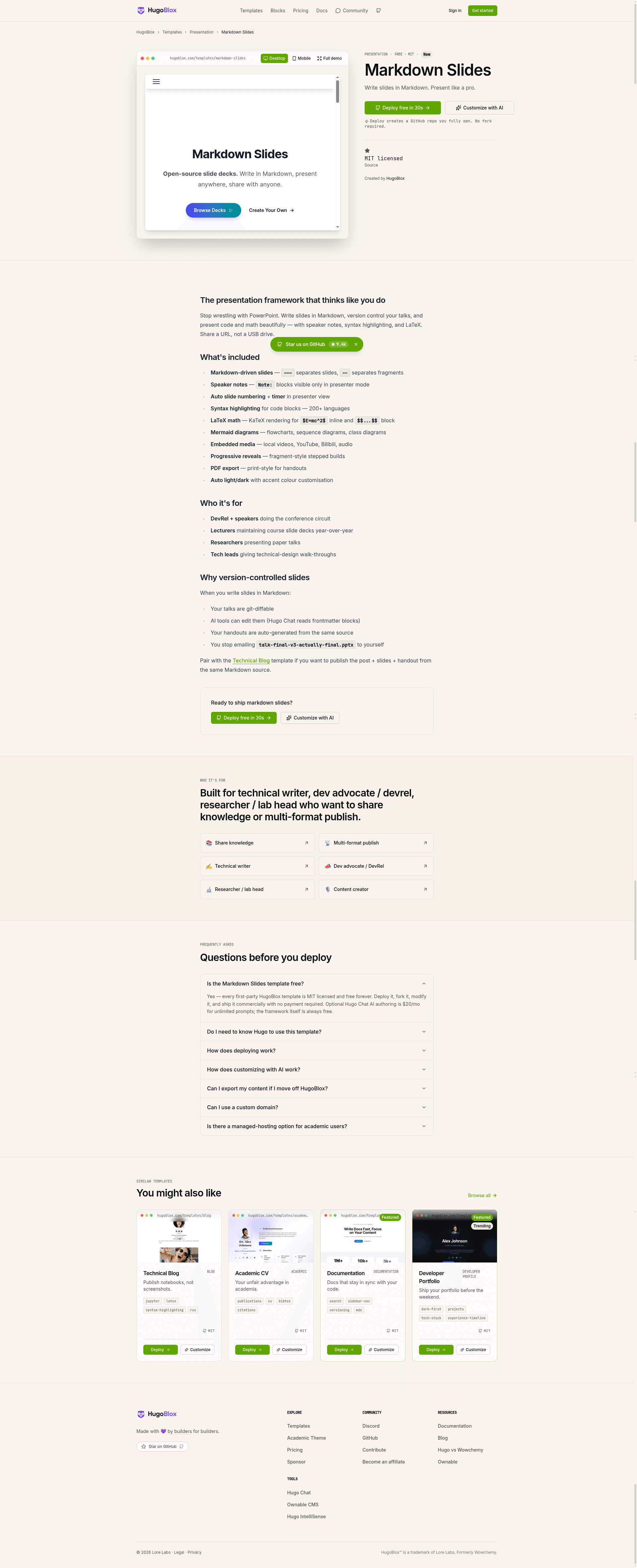
Markdown Slides
🎤 Presentation slides from Markdown — LaTeX math, code highlighting, speaker notes, Git version control. AI generates pages, you own them forever.
About this template
Markdown Slides is an open-source Hugo template for building presentation decks entirely in Markdown, using reveal.js to render slides with LaTeX math, syntax highlighting, speaker notes, and Mermaid diagrams, and part of the HugoBlox ecosystem.
What is Markdown Slides?
Markdown Slides is a Hugo theme and template that turns plain Markdown files into a complete presentation website. You write slides in Markdown with --- separating each slide and Note: for speaker notes; Hugo builds the site, and reveal.js renders the deck in the browser. It is built on HugoBlox, the open-source framework from Lore Labs (MIT licensed), and the README states the HugoBlox ecosystem powers over 150,000 sites and has run since 2016. The template supports deployment to GitHub Pages, Netlify, Vercel, or Cloudflare Pages.
Key Features
- Markdown-first slides — Write each slide as Markdown;
---starts a new slide andNote:adds speaker notes at the end of a slide. - LaTeX math — Native rendering of equations using
$...$or$$...$$syntax, no plugin needed. - Syntax highlighting — Code blocks highlight 100+ languages, so you can present real code instead of IDE screenshots.
- Speaker notes & timer — Presenter mode includes a next-slide preview and a timer for timing talks.
- Mermaid diagrams — Render flowcharts, sequence diagrams, and architecture drawings directly from Mermaid text.
- Deck landing pages — Each presentation gets a searchable landing page with an abstract, metadata, and download links.
- PDF export — One-click printable version of the deck for handouts.
- Light & dark themes — Multiple reveal.js themes are included to match conference or brand styling.
- AI and visual editing — Hugo Chat (free to try) generates structured pages with correct front matter; Ownable CMS is a VS Code extension for drag-and-drop editing.
- Free hosting — Deploy to the free tiers of GitHub Pages, Netlify, Vercel, or Cloudflare Pages.
Who is it for?
- Academics — Share a conference talk by URL instead of emailing a .pptx attachment; LaTeX equations render natively and code keeps syntax highlighting.
- Data scientists — Explain analyses with real code snippets that highlight properly, rather than screenshots of an IDE.
- Lecturers and educators — Build course materials that students can search, read, fork, and submit pull requests with questions.
- Developers — Write slides in a text editor and version control every deck with Git, avoiding binary PowerPoint files.
What can you do with Markdown Slides?
- Conference talks: Present from a URL with live LaTeX rendering and syntax-highlighted code, as described in a NeurIPS speaker testimonial in the README.
- Collaborative course materials: Students fork the slide repository, add their own notes, and submit PRs with questions, turning passive slides into collaborative material.
- Technical documentation: Embed Mermaid flowcharts and code blocks in slides that double as readable documentation.
- Offline presentations: Once loaded, reveal.js presenter mode works offline; you can also save the page for fully offline talks.
How does it work?
To get started, either deploy a live site in about 60 seconds from the HugoBlox template page with no install, or run the CLI command npx hugoblox create site --template markdown-slides (requires Hugo Extended and Node.js). Then customize by describing your content to Hugo Chat in plain English or by installing the Ownable CMS VS Code extension for drag-and-drop editing. Slides are just Markdown files in the repo, and Hugo compiles them to a static site.
Pricing
The template is free and open source under the MIT license. The README lists Hugo Chat as "free to try" and states hosting is free on GitHub Pages, Netlify, Vercel, and Cloudflare Pages free tiers.
Alternatives
- Slidev — a Vue-based markdown presentation tool that also supports code highlighting and diagrams.
- Marp — a Markdown-to-slides tool focused on simple PDF export from Markdown.
FAQ
Do I need to know Hugo?
No. You can edit visually with Ownable CMS or write Markdown directly. Hugo is the build engine that compiles the site, but you do not need to touch it.
How do I separate slides?
Use --- between slides in your Markdown file. Speaker notes go after Note: at the end of each slide.
Can I present offline?
Yes. The reveal.js presenter mode works offline once the page is loaded. You can also save the page for a fully offline presentation.
Can I host for free?
Yes. GitHub Pages, Netlify, Vercel, and Cloudflare Pages all offer free tiers for static sites, which is all this Hugo template needs.
What's Hugo Chat?
Hugo Chat is an AI assistant trained on Hugo and HugoBlox documentation. Describe the presentation you want and it generates the right pages with correct front matter. The README says it is free to try.