Template details
Material Card Blog
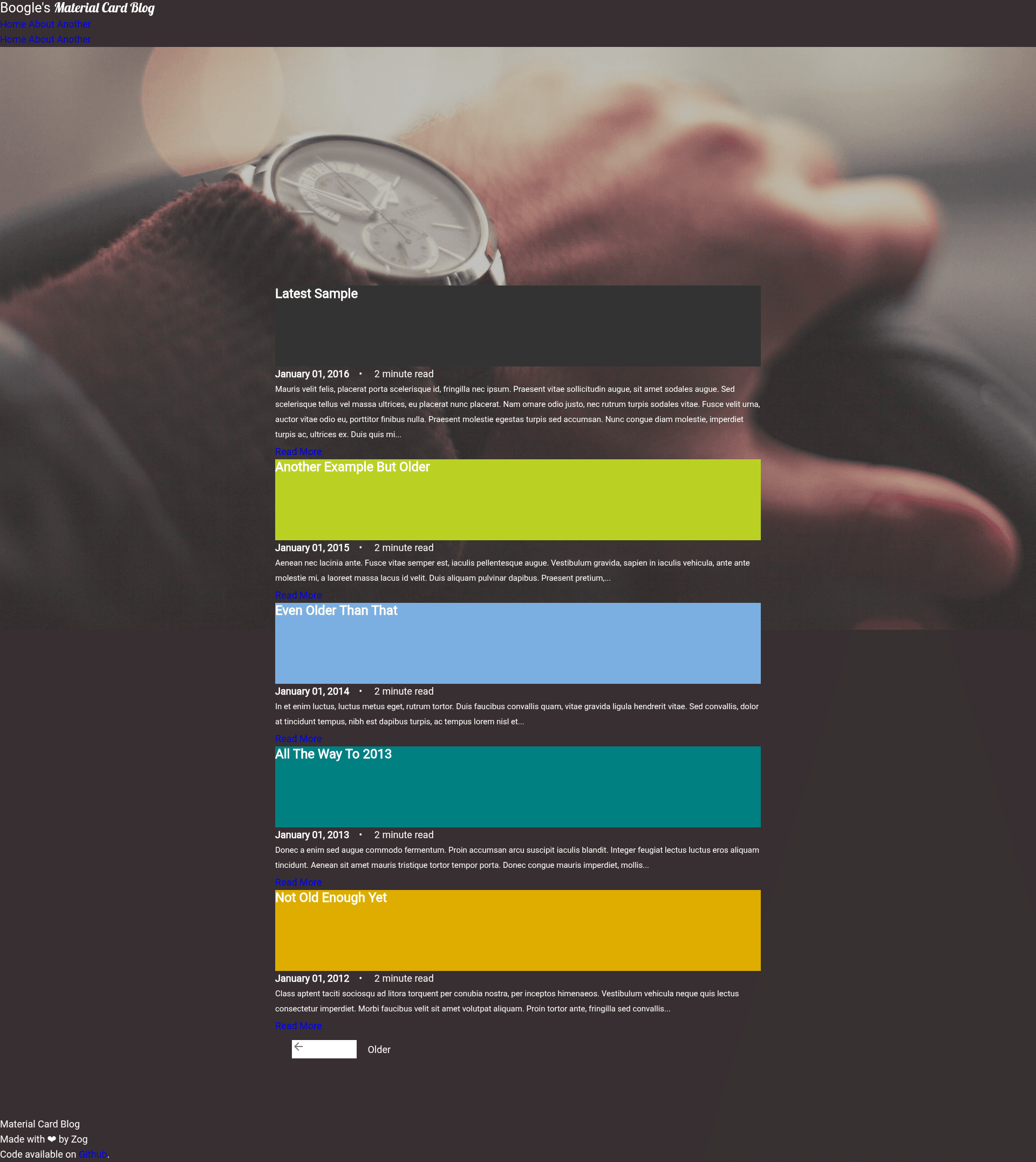
A fast, responsive Jekyll blog theme built with Google's Material Design Lite framework, fully compatible with GitHub Pages.
About this template
Material Card Blog is a Jekyll blog theme built on Google's Material Design Lite framework, purpose-built to create fast, responsive, and lightweight blogs that deploy directly to GitHub Pages.
What is Material Card Blog?
Material Card Blog is an open-source Jekyll theme that turns Markdown posts into a Material Design–styled static site. It takes Jekyll posts written in Markdown with YAML front matter and generates HTML pages using the Material Design Lite (MDL) framework for all styling. The theme is designed to be fast: external resources are minified and gzipped, keeping the homepage under 500KB, and subsequent page loads are quicker due to caching. The repository is available on GitHub and is fully compatible with GitHub Pages, so publishing requires only a git push.
Key Features
- Material Design styling — Uses Google's Material Design Lite framework, giving the blog a consistent Material Design look without a heavy front-end stack.
- Per-post and per-page color theming — Front matter variables
colorandtextcolorlet you set a background color and text color for each post or page, applied consistently across the site. - Lightweight and optimized — All external resources are minified and gzipped, with the homepage weighing under 500KB and faster loads on subsequent pages.
- Simple setup workflow — Fork the repository, delete the boilerplate posts, add your own posts using the
YYYY-MM-DD-title-of-post.markdownnaming convention, and push to GitHub to enable Pages. - Custom metadata per post — Front matter supports
author,title, anddateoverrides, so you can show a custom byline and control display dates. - GitHub Pages native — The repository is described as fully compatible with GH-Pages, and the setup instructions include enabling Pages in repository settings.
Who is it for?
- Jekyll bloggers who want a Material Design look — You can publish a themed blog without writing any HTML or CSS, just by writing Markdown posts and setting a few front matter variables.
- Developers deploying to GitHub Pages — Since the theme is Jekyll-native and Pages-compatible, you can get a live site by forking the repo, customizing the branding, and pushing.
- Minimalist site owners — If you prefer a lean site that loads fast, the under-500KB homepage and gzipped assets make this a strong fit.
What can you do with it?
- Personal blog: Write posts in Markdown, set per-post colors, and publish to GitHub Pages with a Material Design aesthetic.
- Custom pages: The front matter theming applies to pages too, so you can create a portfolio or project page with a distinct color scheme.
- Rapid prototype site: Fork the repo, rename it, and update the branding in
index.htmlandheader.htmlto have a working site in minutes.
How does it work?
The README outlines a straightforward workflow: first, fork the repository on GitHub and rename it as needed. Next, pull the repository locally, delete all boilerplate posts in the _posts directory, and add your own posts using the YYYY-MM-DD-title-of-post.markdown format. Then modify the site branding in index.html and header.html, push the changes back to GitHub, and enable GitHub Pages in the repository settings. Once enabled, Jekyll builds the site automatically.
FAQ
Is Material Card Blog free?
Yes, Material Card Blog is an open-source Jekyll theme hosted on GitHub. You can fork it, use it for personal or commercial projects, and modify it freely.
Does Material Card Blog support tags and categories?
Not yet. The README's "To be implemented" list includes a tagging and category system, along with comments. However, it doesn't support these features out of the box yet.
How do I change the color of a post?
You set the color and textcolor variables in the post's front matter. For example, a front matter block containing layout, color, textcolor, and author will apply that color scheme to the individual post.
Is Material Card Blog compatible with GitHub Pages?
Yes, the repository description explicitly states it is fully compatible with GH-Pages. The setup step of enabling GitHub Pages in the repository settings confirms this.