Template details
Megeto
School website template built with Gatsby and WordPress, using Material-UI and GraphQL.
About this template
Megeto is a static school website template that pairs Gatsby with WordPress as a headless CMS, using GraphQL to turn WordPress posts into fast, pre-rendered pages.
What is Megeto?
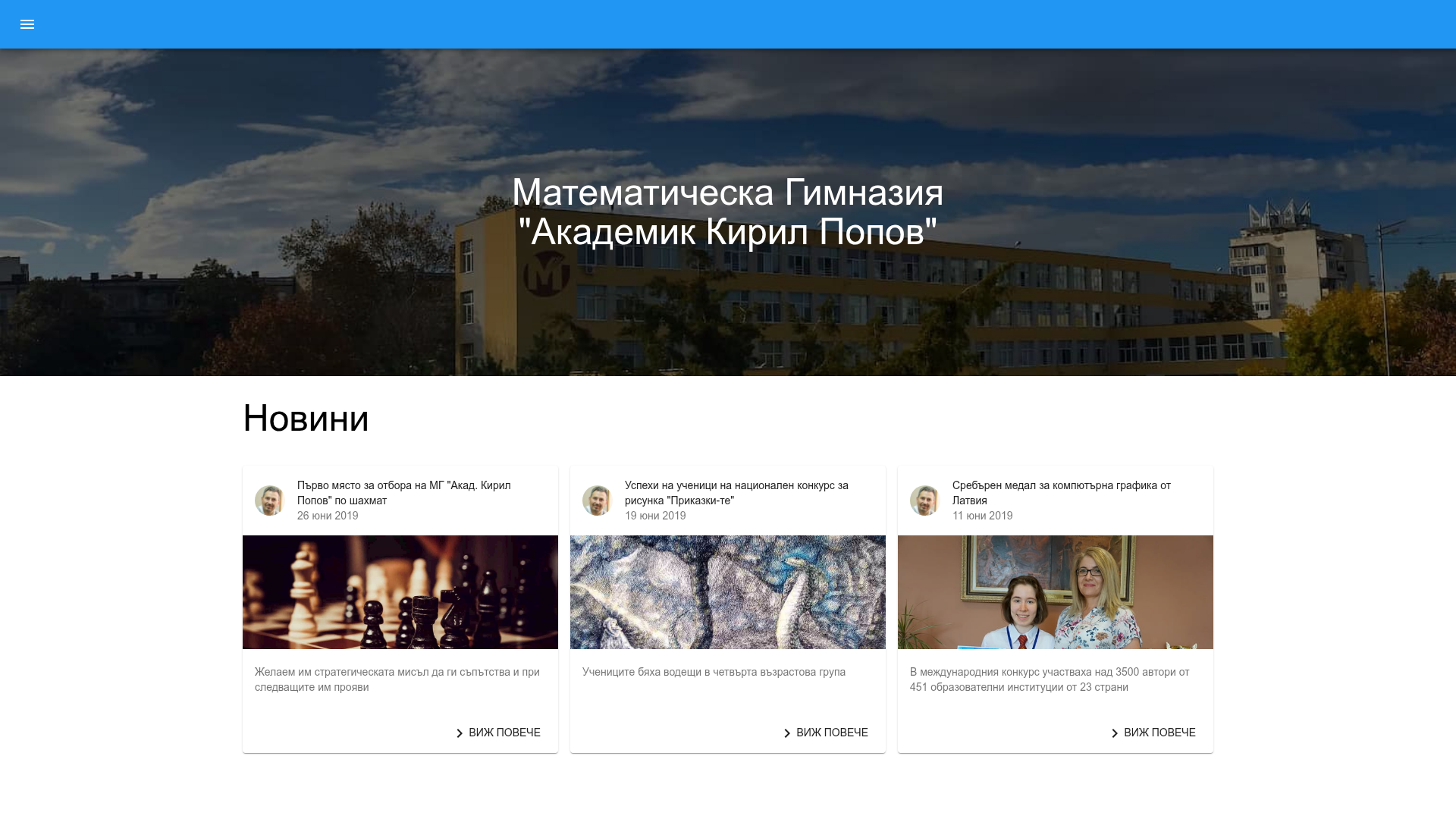
Megeto is a Gatsby-based template for school websites that connects to WordPress as its content backend. It pulls posts, featured images, and author metadata from a WordPress installation via GraphQL and generates static pages at build time, producing a site that loads quickly and is easy to host. The project is written in TypeScript and uses Material-UI for its component library, and it was created to demonstrate a complete headless CMS setup for educational institutions. The live demo (at megeto.netlify.app) shows a news site for a Bulgarian mathematics high school, with Bulgarian-language articles, images, and author avatars.
Key Features
- Gatsby static generation — builds all pages ahead of time for fast loading and good SEO; content comes from WordPress through GraphQL queries.
- WordPress as headless CMS — editors manage content in WordPress's admin panel, and the Gatsby site mirrors that content after each build.
- Material-UI components — the template's UI is built with MUI, giving buttons, cards, typography, and navigation a consistent, accessible style.
- TypeScript source — the codebase is typed with TypeScript, making it easier to maintain and extend the GraphQL queries and components.
- News listing pages — the demo site includes a home page with news cards that show a featured image, headline, date, author gravatar, and a "read more" link to the full post.
- Author and date display — each post shows the author's Gravatar and the publication date, pulled automatically from WordPress metadata.
- Responsive media handling — article hero images are served from the WordPress media library and displayed responsively on the generated pages.
Who is it for?
- Schools and universities — need a straightforward news and announcements site that staff can update through WordPress without touching code.
- Gatsby and headless CMS developers — want a concrete starter that demonstrates a WordPress-to-Gatsby data flow with TypeScript and Material-UI.
- Organizations with a WordPress site — who want a faster, modern front end using the existing WordPress content as a backend.
What can you do with Megeto?
- School office: publish news posts and achievements in WordPress, then rebuild the Gatsby site to publish them on the static front end.
- Front-end developer: customize the MUI theme, add new GraphQL queries, and extend the template with sections like events, staff, or a photo gallery.
- Site owner: deploy the static build to Netlify or any static host and get a fast, secure website without maintaining a server-side runtime.
How does Megeto work?
Megeto uses Gatsby's build process to query a WordPress site's GraphQL endpoint, fetch posts and media, and render static pages. The repository includes the Gatsby configuration, GraphQL fragments, and page templates needed to run the flow. After connecting the template to a WordPress URL, a developer runs the Gatsby build and then deploys the generated public folder to a static host; the demo on Netlify is an example of this deployment.
FAQ
What is Megeto?
Megeto is a Gatsby school website template that uses WordPress as a headless CMS. It generates static pages from WordPress content via GraphQL and is styled with Material-UI.
Does Megeto require WordPress?
Yes, WordPress is the content source for Megeto. You need a WordPress site with posts or pages, and the template fetches that content through GraphQL during the Gatsby build.
What is the tech stack behind Megeto?
The template uses Gatsby with React, TypeScript, and Material-UI. It connects to WordPress GraphQL, and the generated static site can be hosted on Netlify or other static hosts.
Can I use Megeto for a non-school website?
While the template is specifically designed for schools, its underlying Gatsby + WordPress architecture is generic. You could adapt the components and GraphQL queries to serve a blog, club, or small organization site, though you would need to modify the layout and content structures.