Template details
MERN School Management System
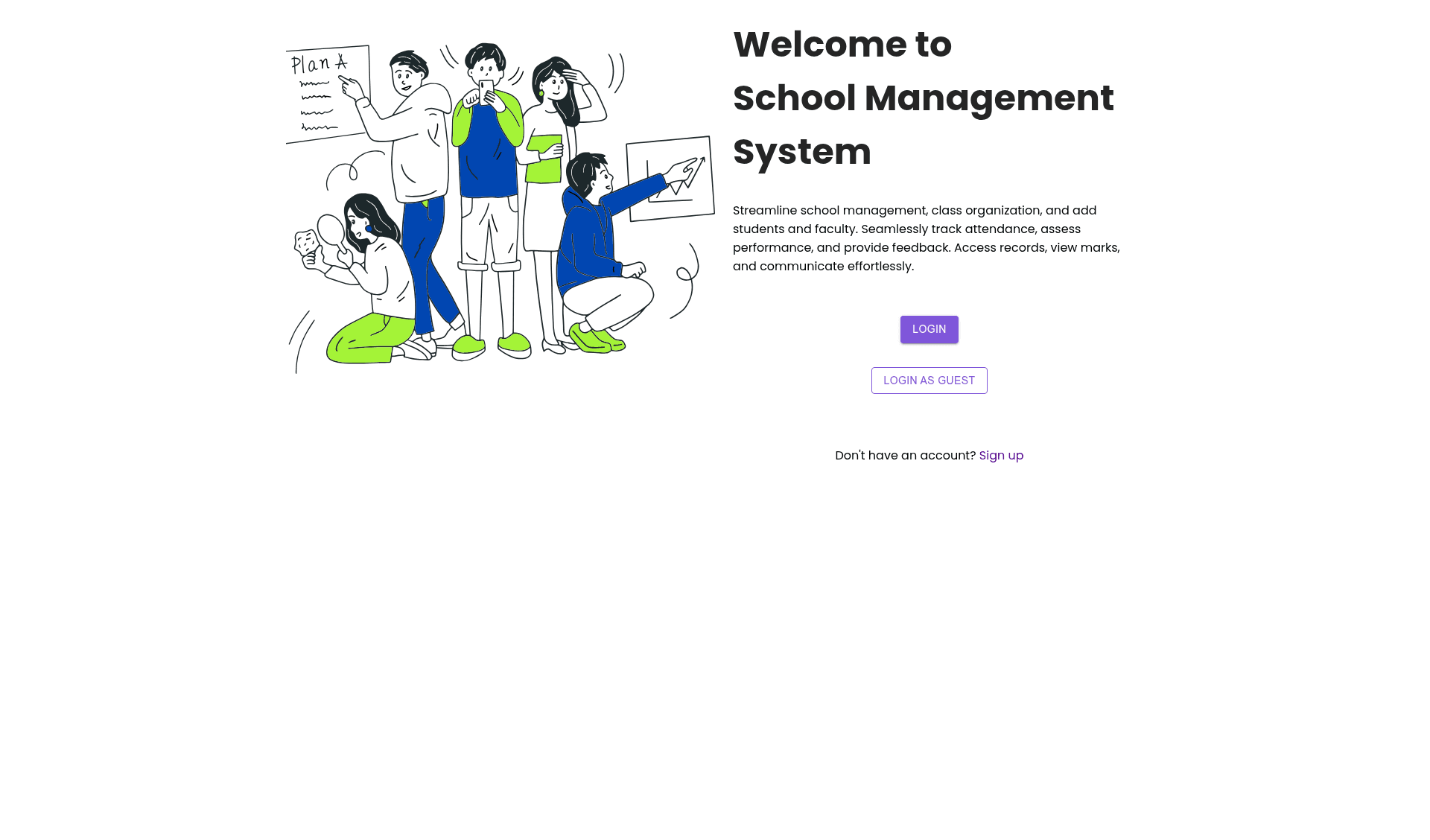
MERN stack school management app with role-based dashboards, attendance tracking, grade assessment, and messaging.
About this template
MERN School Management System is a full-stack boilerplate built with the MERN stack (MongoDB, Express.js, React.js, Node.js) that gives you a role-based school administration app with attendance, grades, and messaging built in. It is an open-source GitHub project by Yogndrr, provided with three branches (main, community-version, legacy-version) so you can pick the codebase that matches your needs.
What is MERN School Management System?
MERN School Management System is a web application that manages students, teachers, classes, subjects, attendance, marks, and messages through three user roles: Admin, Teacher, and Student. As input it takes MongoDB documents for users, classes, subjects, attendance records, and marks; as output it serves a React dashboard where each role sees only its permitted actions. The project runs on Node.js and Express on the backend with a React frontend styled with Material UI, and the source is available on GitHub under the repository name MERN-School-Management-System.
Key Features
- Three user roles — Admin, Teacher, and Student each have distinct permissions: admins manage the whole system, teachers handle their classes, and students view their own records.
- Admin dashboard — Administrators can add students and teachers, create classes and subjects, manage user accounts, and adjust system settings.
- Attendance tracking — Teachers mark students present or absent per class and can generate attendance reports.
- Performance assessment — Teachers enter marks and feedback for students, and students can view their grades to track progress over time.
- Data visualization — Students see their performance as interactive charts and tables built into the React frontend, making academic trends easy to scan.
- Messaging — Teachers and students can send messages to each other through the interface, keeping communication inside the app.
- MERN tech stack — The project uses React.js with Material UI and Redux on the frontend, Node.js and Express.js on the backend, and MongoDB as the database, so it is a complete full-stack starter.
Who is it for?
- School administrators — set up the whole system: add staff, create classes, assign subjects, and manage accounts from a single dashboard.
- Teachers — take daily attendance, enter marks and feedback, and message students without leaving the app.
- Students — log in to view marks, attendance records, and performance charts, and communicate with teachers.
- Developers learning the MERN stack — use the repository as a reference for building role-based apps with React, Express, and MongoDB, with a
legacy-versionbranch matching the exact code from the accompanying YouTube tutorial.
What can you do with it?
- Run a school administration workflow — manage the full cycle of student enrollment, class assignment, attendance taking, and grade reporting.
- Deploy a full-stack app — the README includes specific deployment steps for Render (backend), Netlify and Vercel (frontend), plus guidance for connecting the two through an environment variable.
- Customize and extend — three branches are provided:
mainfor the rebuilt architecture,community-versionfor external contributions, andlegacy-versionfor the original tutorial code.
How does it work?
After cloning, you set up the backend by running npm install and adding a .env file with your MongoDB connection string and a secret key, then start it with npm start. The frontend is installed from the frontend folder with its own .env file containing the backend URL, and runs on localhost:3000. MongoDB can be run locally with Compass or through MongoDB Atlas for deployment.
FAQ
Which branch should I use?
Use legacy-version if you are following the two-year-old YouTube tutorial and want the exact code shown there. Use main if you want the current rebuild with cleaner architecture, and community-version if you want to contribute pull requests.
How do I set up MongoDB?
You can install MongoDB Community Server and Compass locally and connect with mongodb://127.0.0.1:27017/yourdbname, or create a free MongoDB Atlas cluster and use the connection string Atlas provides. The README walks through both options.
Can I deploy this for free?
Yes. The README describes deploying the Express backend on Render and the React frontend on Netlify or Vercel, both of which have free tiers. You set REACT_APP_BASE_URL to your deployed backend URL and rebuild the frontend.
Is the system a paid product or open source?
It is an open-source GitHub project. You can clone the repository freely; there is no mention of any paid license or fee.