Template details
Create Next Stack Website
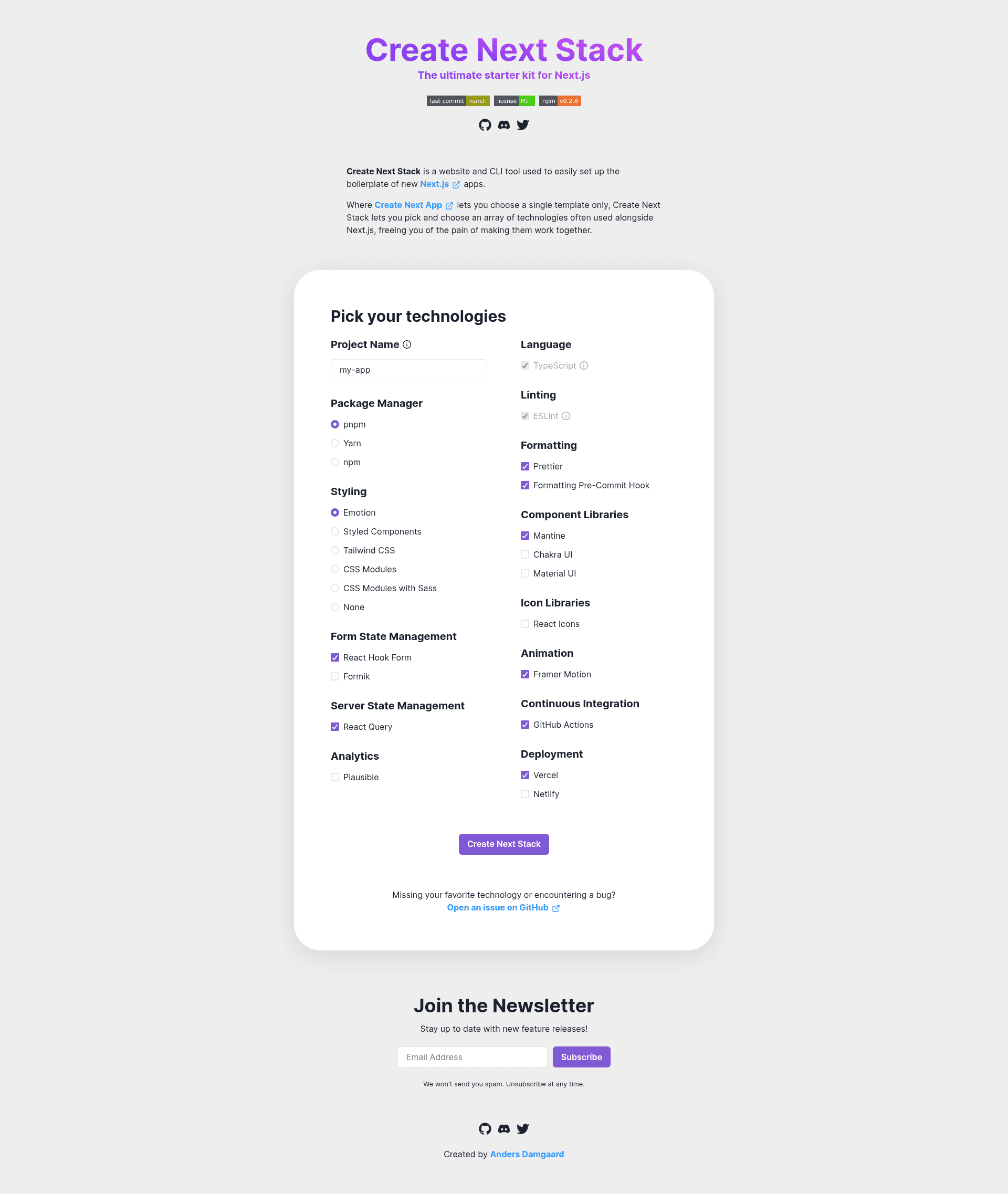
Create Next Stack is a website and CLI tool used to easily set up the boilerplate of new Next.js apps.
About this template
Create Next Stack Website is the open-source front-end for the create-next-stack CLI, a tool that scaffolds new Next.js apps with a configurable tech stack.
What is Create Next Stack Website?
Create Next Stack Website is the user interface for the create-next-stack CLI, hosted at create-next-stack.com and maintained by akd-io. It runs on Next.js with React, TypeScript, Emotion, Chakra UI, React Hook Form, and Framer Motion. The website takes user selections about desired packages and feeds them to the CLI, which produces a new Next.js project with that configuration. This repository only covers the website; issues about the CLI itself are filed in the separate create-next-stack repository.
Key Features
The project combines a modern React stack with automated code-quality tooling and one-command scripts.
- Next.js framework — The application is built on Next.js, with
yarn devfor development,yarn buildfor production builds, andyarn startto run the production server. - TypeScript — The whole codebase is written in TypeScript, giving type safety across the React components and CLI integration.
- Chakra UI and Emotion — Components are styled with Chakra UI on top of the Emotion CSS-in-JS library.
- React Hook Form — Forms use React Hook Form to manage validation and input state.
- Framer Motion — Motion and animations are implemented with Framer Motion.
- ESLint and Prettier — ESLint catches linting errors, while Prettier formats the code; both are runnable via
yarn lint,yarn format, andyarn format:check. - Husky and lint-staged — Git pre-commit hooks are set up through the
preparelifecycle script and run linting/formatting checks on staged files. - GitHub Actions CI — A continuous integration workflow for the develop branch is included, with a status badge in the repository.
- Yarn — The project is managed with Yarn, and the package scripts are documented in the README's scripts table.
Who should use Create Next Stack Website?
This repository is intended for Next.js developers and open-source contributors who want to generate configured starters or improve the create-next-stack ecosystem.
- Next.js developers who want a web-based way to assemble a new project boilerplate with their preferred packages.
- Open-source contributors who want to fix bugs, add features, or improve the website, with contributing instructions and issue templates provided.
- Users of the create-next-stack CLI who prefer a graphical interface over a command-line prompt.
- Developers learning from real code who can read the source to see how Chakra UI, Emotion, React Hook Form, Framer Motion, and quality tooling are integrated.
What can you do with Create Next Stack Website?
The repository gives you several concrete paths: scaffold apps, study the code, or contribute.
- Scaffold a customized Next.js app: Use the web form to choose packages, and the CLI generates a ready-to-run project with that stack.
- Learn a production Next.js configuration: Inspect the
package.jsonscripts, ESLint/Prettier setup, and GitHub Actions workflow to see how a modern React project is wired together. - Contribute improvements: Fork the repository, run
yarn devto start the development server, and submit pull requests following the guidelines in the README.