Template details
Miccall
A personal blog theme for Hexo with custom navigation, gallery and team pages, and support for multiple comment systems.
About this template
Miccall is a Hexo theme (version 1.2.0) for personal blogs that transforms a standard Hexo installation into a portfolio-style site with a customizable intro screen, data-driven gallery and team pages, and support for multiple comment, search, and view-count systems.
What is Miccall?
Miccall is a Hexo theme version 1.2.0 built for personal blogs and portfolio sites. It accepts a standard Hexo site configuration and outputs a static blog with a loading intro, custom navigation, and dedicated pages for about, group, gallery, and tags. The theme is open-sourced under the GPL v3.0 license and maintained on GitHub by miccall, with contributions from developers such as moecopilot, sli1989, and staunchkai. It runs on Hexo, the static site generator, and uses Bootstrap and Font Awesome for styling.
Key Features
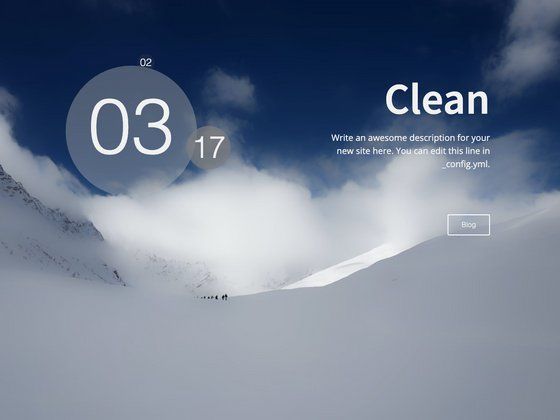
- Custom intro screen — Set your name, slogan, and head button text in the theme's
_config.ymlto control what visitors see at load. - Flexible navigation — Enable or disable homepage, categories, and archives, and add custom page links for resume, team, gallery, and tags directly from configuration.
- Multiple comment systems — Switch between duoshuo, disqus, disqus_click, changyan, or Valine by setting the
comment.useoption. - Data-driven gallery and team pages — Define images in
_data/gallery.ymland team members in_data/links.yml; these pages render with thegalleryandlinkslayouts. - Social icons — Toggle GitHub, Twitter, Facebook, and Instagram icons in the navigation bar, each with its own enable flag and link.
- Search integration — Choose Google Custom Search or Swiftype via the
search.usesetting. - View counting — Optional Leancloud or busuanzi integration to show site-wide and per-post views.
- Simple asset replacement — Swap
bg.jpgfor the homepage background andme.jpgfor the profile picture in the theme source images; both files must keep their names unless CSS is changed.
Who is it for?
- Personal bloggers using Hexo who want a distinctive, profile-focused layout for technical articles and life updates.
- Developers building portfolio sites who need about, team, gallery, and tag pages without hand-coding each template.
- Content editors who prefer managing images and links via YAML data files instead of editing HTML.
What can you do with Miccall?
- Publish articles with rich front-matter — Write Markdown posts with title, date, tags, categories, and a thumbnail; enable code highlighting by installing the hexo-prism-plugin.
- Create a photo gallery — Add image names, full links, thumbnails, and descriptions in
gallery.ymlto generate a responsive gallery layout. - Build a team or links page — Add members with link, avatar, and description in
links.yml; optional fields like QQ or WeChat only appear when configured.
How does Miccall work?
- Install Hexo and create a new site.
- Download the theme into the
themesdirectory and settheme: miccallin the site root_config.yml. - Edit the theme's
_config.ymlto set intro, navigation, background, comments, search, and analytics options. - Create custom pages by adding folders like
source/aboutorsource/gallerywith anindex.mdthat specifies the required layout in front-matter. - Add supporting data in
_data/links.ymlor_data/gallery.ymland start writing posts undersource/_posts.
FAQ
Does Miccall support external background images?
No. The backgroundpic setting only accepts paths relative to the site root, like img/bg.jpg, and does not support external links. To change the background, replace the bg.jpg file in the theme's source images.
Which comment systems can I use?
The theme supports duoshuo, disqus, disqus_click, changyan, and Valine. You set the system by changing the use value in the comment section of the theme configuration.
Is Miccall open source?
Yes, it is released under the GPL v3.0 license, and the source is available on GitHub.
Can I customize the social icons?
Yes, each social icon in the navigation has an use flag and link field in the theme's _config.yml. Turn icons on or off and set their destination URLs independently.
Does Miccall include search?
Yes, it supports Google Custom Search and Swiftype. Configure the search.use setting and provide the required key, such as a Swiftype key.
What should I do if HTTPS resources break?
One contributor fixed a bug where Bootstrap and Font Awesome files were referenced as HTTP on HTTPS sites. Ensure you are running theme version 1.2.0 or later, which includes that fix.