Template details
Mijin
Tailwind CSS UI components for Vue.js 2.x and Nuxt.js 2.x with dark mode, responsive design, and no extra dependencies.
About this template
Mijin is an open-source Tailwind CSS UI component library for Vue.js 2.x and Nuxt.js 2.x that provides styled components with zero additional runtime dependencies.
What is Mijin?
Mijin is an npm-distributed component library that generates UI components such as Button and Input, styled entirely through Tailwind CSS preset classes. It runs inside Vue.js 2.x and Nuxt.js 2.x applications that already have Tailwind CSS version 2.0 or higher installed. The library is maintained on GitHub at github.com/lecoueyl/mijin and has a documentation site at lecoueyl.github.io/mijin.web/docs. Its key outputs are the Vue components you can register globally or individually, a tailwind-preset.js file, and a documented PurgeCSS configuration for production builds.
Key Features
- Tailwind-only styling — Every component is styled with Tailwind CSS utility classes, so the library ships no custom CSS files.
- Responsive components — Components use Tailwind's responsive utilities to adapt to different screen sizes without extra JavaScript.
- Dark and light mode — Built-in support for both themes lets you switch between dark and light styling without writing overrides.
- Zero extra dependencies — The package has no runtime dependencies beyond Vue and Tailwind, as stated in the README's feature list.
- Tailwind preset — Mijin provides
tailwind-preset.js, which you load into thepresetsarray oftailwind.config.js. - PurgeCSS-ready — The README instructs adding
node_modules/mijin/src/components/**/*.vueto your purge content list so unused component styles are removed. - Flexible registration — Use
Vue.use(Mijin)to load everything, or import components likeButtonandInputand register them asMjButtonandMjInput. - Project tooling — The repository uses semantic-release for automated versioning and lists a Codecov badge for test coverage.
Who is it for?
- Vue 2 application developers — Add ready-made Tailwind-styled components to an existing app without writing component-level CSS.
- Nuxt 2 developers — Wire Mijin in as a plugin via
plugins/mijin.jsso components are available on every page and layout. - Teams standardizing on Tailwind — Load the Mijin preset to keep design tokens consistent across a project that already uses Tailwind CSS 2.0 or higher.
- Open-source contributors — Submit bug reports or feature requests through the GitHub issue templates or read the contribution guidelines to help evolve the library.
What can you do with Mijin?
- Rapid form building: Compose forms and actions using pre-styled Button and Input components, then override visuals with your own Tailwind utilities.
- Dark-mode interfaces: Use the built-in dark and light mode support to theme your app without adding custom CSS for each component.
- Bundle optimization: Register only the components you need via named imports and configure the PurgeCSS content path to strip unused Mijin styles from your final CSS.
- Nuxt project setup: Add Mijin as a plugin in a Nuxt 2 project and get the components auto-registered across the entire application.
How does Mijin work?
Follow the README's getting-started steps:
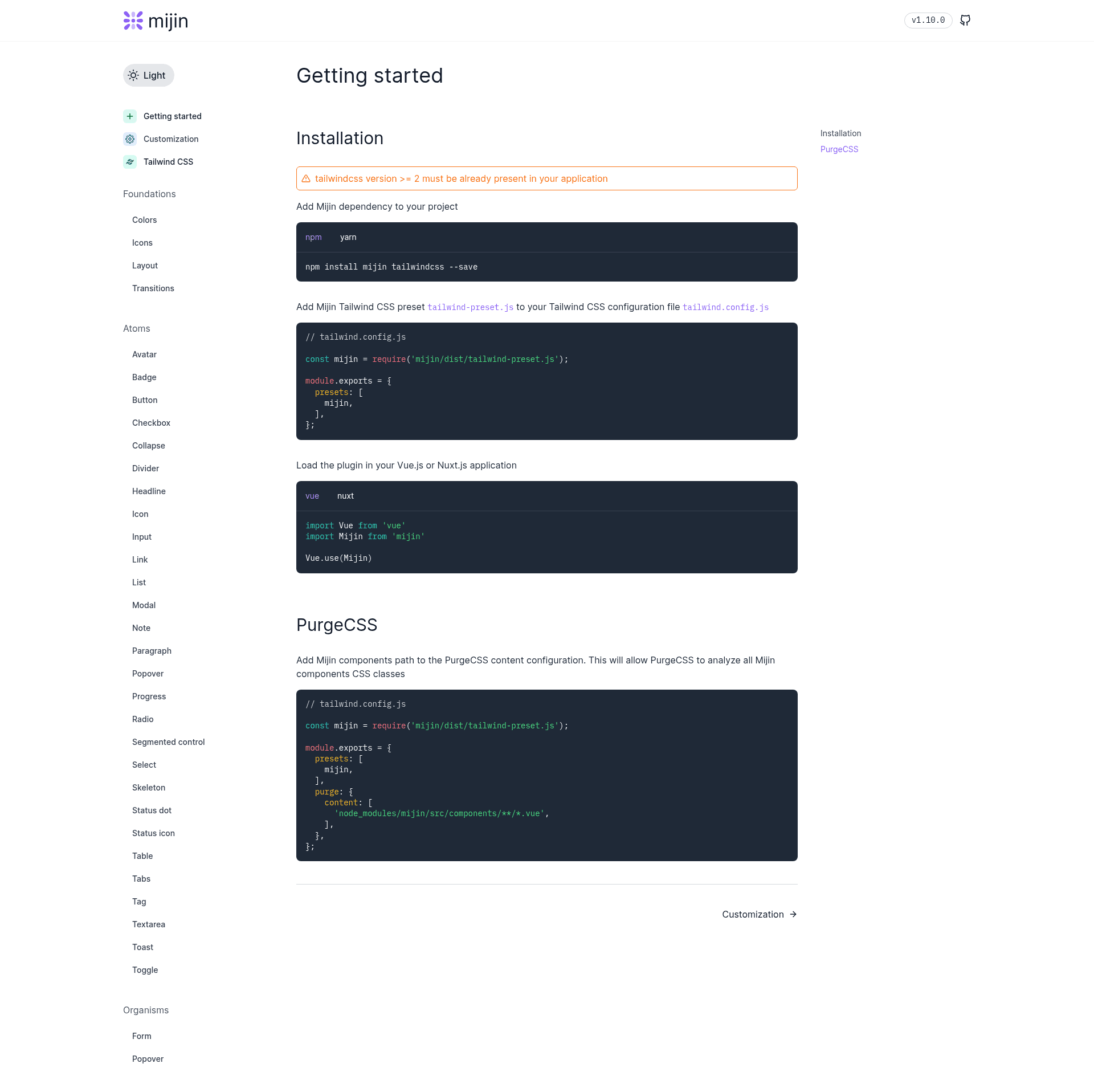
- Install
mijinandtailwindcssas dev dependencies using npm or yarn. - Add
mijin/dist/tailwind-preset.jsto thepresetsarray intailwind.config.js, and addnode_modules/mijin/src/components/**/*.vueto thepurge.contentarray. - In a Vue app, call
Vue.use(Mijin), or importButton,Input, and other components and register them manually. - In a Nuxt app, create
plugins/mijin.jswithVue.use(Mijin)and list~/plugins/mijin.jsin thepluginsarray ofnuxt.config.js.
Note that Tailwind CSS version 2.0 or higher must already be present in the project.
FAQ
Does Mijin work with Vue 3?
No. The README states Mijin is built for Vue.js 2.x and Nuxt.js 2.x. There is no mention of Vue 3 support, so treat it as a Vue 2 / Nuxt 2 library until the project announces otherwise.
Does Mijin require Tailwind CSS?
Yes. The getting-started instructions explicitly require Tailwind CSS version 2.0 or higher to already exist in your application before adding Mijin.
Can I import only specific Mijin components?
Yes. The README shows importing Button, Input, and other components individually and registering them under custom names like MjButton and MjInput.
How do I integrate Mijin with Nuxt.js?
Create a file at plugins/mijin.js containing import Vue from 'vue'; Vue.use(Mijin), then add '~/plugins/mijin.js' to the plugins array in nuxt.config.js.
Does Mijin have any dependencies besides Vue and Tailwind?
The README lists "No dependencies" as a feature, meaning the package does not bring any third-party runtime dependencies beyond the Vue and Tailwind stack your project already uses.