Template details
Minimal
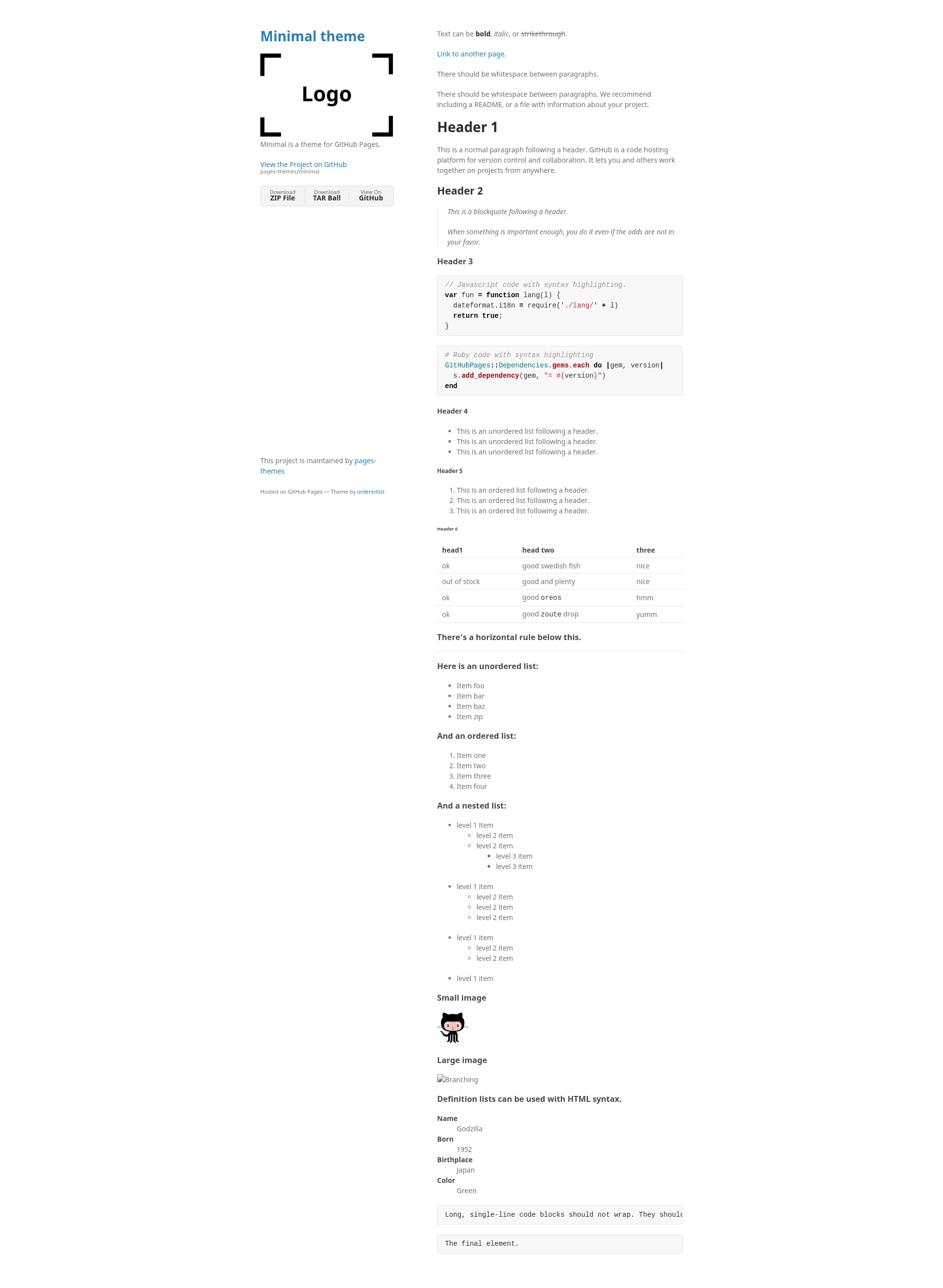
Minimal is a Jekyll theme for GitHub Pages
About this template
Minimal is a free Jekyll theme for GitHub Pages, created by the GitHub Pages team (pages-themes organization), that builds a simple single-column personal or project website from a remote_theme configuration line.
What is Minimal?
Minimal is a Jekyll theme distributed as a Ruby gem (jekyll-theme-minimal) and as a remote theme for GitHub Pages, currently at version v0.2.0. It takes your Markdown content and _config.yml settings as input and produces a static HTML/CSS site hosted on GitHub Pages, with a profile header and a content area. The theme is maintained by the pages-themes GitHub organization and is the starting point for many GitHub-hosted personal pages.
What makes Minimal stand out?
Minimal stands out for its short installation path: adding remote_theme: pages-themes/minimal@v0.2.0 and the jekyll-remote-theme plugin to _config.yml is the whole setup. It also provides an explicit override system for nearly every part of the site, which keeps the baseline simple while allowing deeper customization.
- Remote theme installation — Install with one line in
_config.ymland a plugin; GitHub Pages builds the theme automatically, so no local Jekyll setup is required for hosting. - Site configuration variables —
titleanddescriptionare read from_config.ymland injected into the page; optionalshow_downloadsandgoogle_analyticstoggle extra features. - Download-button support — Set
show_downloads: trueto render links to the repository’s ZIP archive and source on GitHub, useful for project releases. - Google Analytics integration — A
google_analyticsconfig field accepts a tracking ID; you can replace the snippet by creating_includes/head-custom-google-analytics.html. - Sass customization layer — Users can create
/assets/css/style.scssto import the theme’s Sass and add custom rules, or modify Sass variables before the import. - Layout overriding — The default layout (
_layouts/default.html, with_includespartials) can be copied into your site and edited, giving full HTML control. - GitHub URL override — A
github:map in_config.ymllets you replace any GitHub-generated URL (such as zip download links) that the theme uses. - Local preview and testing — The repository includes a bootstrap script and a minimal test suite (
script/cibuild) to verify a site builds successfully.
Who should use Minimal?
GitHub Pages users who want a no-fuss personal or project homepage will find Minimal useful: newcomers can publish by editing only _config.yml, while developers can extend the layout and Sass for custom projects. The README’s philosophy states the theme should meet most users’ needs out of the box and let them opt into complexity, so it fits anyone who prefers a clean baseline over a feature-heavy theme. It is equally suitable for students, open-source maintainers, and hobbyists who need a quick online presence.
What can you do with Minimal?
- Personal homepage — Set a title and description, add a profile image, and write a short intro; the theme renders a minimal, mobile-friendly page hosted at your GitHub Pages URL.
- Project landing page — Turn on
show_downloadsto add buttons that link to your project’s source and release ZIP on GitHub, which is typical for repos that need a landing page. - Blog or static site — Write Jekyll posts as Markdown in the
_postsfolder; the default layout applies consistent typography, and the same_config.ymlsettings control the whole site. - Customized brand site — Override the stylesheet and layout to add a favicon, extra navigation, or page-specific styles while keeping the theme’s semantics.
How does Minimal work?
To use the theme, add remote_theme: pages-themes/minimal@v0.2.0 to _config.yml and include jekyll-remote-theme in your plugins, then push to a GitHub Pages branch. For local development, clone the repository, run script/bootstrap to install dependencies, and start a preview with bundle exec jekyll serve. The theme reads standard Jekyll variables and optional github: overrides when building each page.
FAQ
Is Minimal free?
Yes, Minimal is an open-source Jekyll theme hosted publicly on GitHub, and GitHub Pages serves sites using it without any payment. You only need a GitHub account to publish.
How do I install Minimal for GitHub Pages?
Add remote_theme: pages-themes/minimal@v0.2.0 to your _config.yml and add jekyll-remote-theme to your plugins list. Then commit the file and push to your GitHub Pages branch; the site is built automatically.
Can I customize the colors and typography?
Yes. Create /assets/css/style.scss, import the theme’s Sass using Jekyll’s theme import, and either set new Sass variables before that import or add custom CSS after it. The README walks through this exact procedure.
Does Minimal support Google Analytics?
Yes, set google_analytics in _config.yml to your tracking ID. If you want to use the newest analytics snippet, provide a _includes/head-custom-google-analytics.html file in your site and place the code there.
How do I change the layout of my site?
For small changes, add files to your site’s _includes folder. For larger modifications, copy _layouts/default.html from the theme’s repository into your own _layouts folder, then edit it; the README includes a step-by-step guide.