Template details
Modernize Free Bootstrap 5 Admin Template
Free, open-source Bootstrap 5 admin dashboard template with SASS, jQuery, and ApexCharts for SaaS dashboards and admin panels.
About this template
Modernize Free is an open-source Bootstrap 5 admin dashboard template from AdminMart, built with SASS, jQuery, and ApexCharts, that gives developers a responsive starter for SaaS dashboards, admin panels, and internal tools. The template is released under the MIT license and can be used in personal and commercial projects without cost.
What is Modernize Free Bootstrap 5 Admin Template?
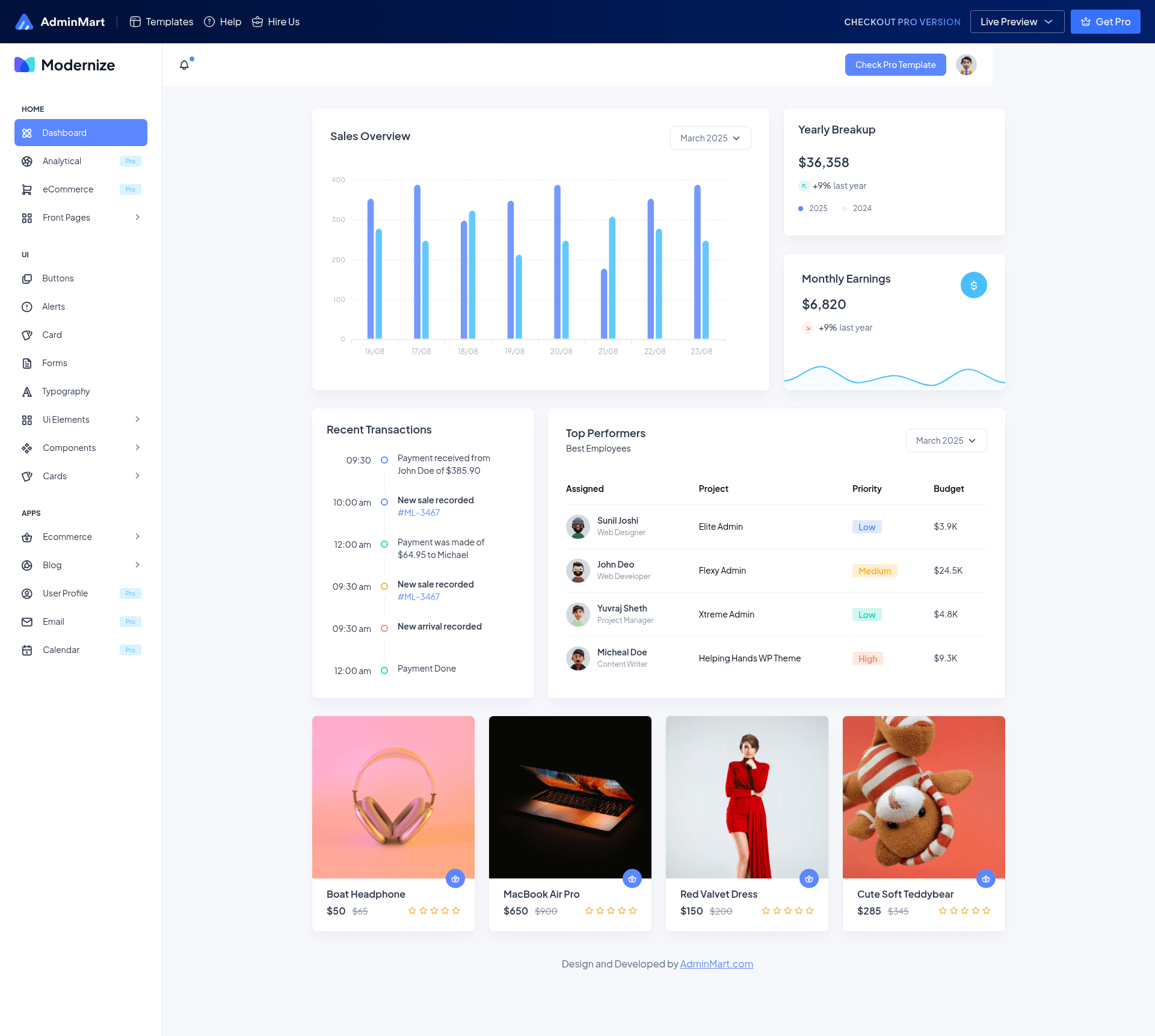
Modernize Free is a mobile-first admin dashboard template built on Bootstrap 5, styled with SASS, and enhanced with jQuery and ApexCharts. It accepts a basic HTML project structure and outputs a ready-to-run dashboard with pre-built pages such as the main dashboard, login form, user profile, and error pages. AdminMart, the template's publisher, distributes it as a public GitHub repository that you clone, install with npm, and start via a gulp task.
Notable libraries and tools in the source: Bootstrap 5 for layout and components, SASS for maintained stylesheets with variables and mixins, jQuery for DOM traversal and event handling, and ApexCharts for interactive, responsive charts.
Key Features
- Modern tech stack — Uses Bootstrap 5, SASS, jQuery, and ApexCharts in one project, giving you a familiar foundation for front-end work.
- Responsive layout — Built on Bootstrap's grid system with SASS custom styles so the dashboard adapts across screen sizes.
- Reusable UI components — Ships with extendable Bootstrap components including cards, forms, buttons, and similar elements ready to drop into your pages.
- Interactive charts — ApexCharts is integrated out of the box for dynamic data visualizations such as line, area, and bar charts.
- Pre-designed pages — Includes a dashboard page, login forms, user profile, and error pages to accelerate project setup.
- Developer-friendly workflow — Clone the repo, run npm install, and start the local preview with gulp; SASS variables and a modular codebase make customization straightforward.
Who is it for?
- Web developers building SaaS dashboards — get a pre-built data-heavy layout with charts and navigation so they can focus on business logic.
- Freelancers and agencies creating admin panels for clients — use the reusable components and pre-designed pages to deliver a polished UI without starting from scratch.
- Product teams prototyping internal tools — leverage the responsive layout and error pages to validate ideas quickly before investing in custom design.
What can you do with Modernize?
- SaaS founders: Launch a customer-facing analytics dashboard with interactive ApexCharts and a clean Bootstrap layout.
- Admin tool builders: Assemble user management screens from the pre-built login form, profile page, and card components.
- Open-source contributors: Fork the repository and extend the SASS variables and jQuery scripts to add custom widgets or pages.
How does it work?
The installation process follows three steps: 1) Clone the GitHub repository at github.com/adminmart/Modernize-bootstrap-free, 2) run npm install to fetch dependencies, and 3) execute gulp to start a local development server. The output is a static HTML dashboard that runs in any browser without a required backend. A live demo is available at https://bootstrapdemos.adminmart.com/modernize-bt-free/src/html/index.html?ref=56.
Pricing
Modernize Free is free and MIT-licensed, usable in personal and commercial projects. AdminMart also sells a Pro version of the template that adds multiple themes and color skins, advanced widgets, real-time notifications, user roles and permissions, multi-language support, and priority support; the page does not list a price.
FAQ
Is Modernize Free really free?
Yes, Modernize Free is completely free and released under the MIT License, so you can use it in personal and commercial projects without paying a license fee. The free version includes the core dashboard, basic pages, and ApexCharts support.
What tech stack does Modernize use?
Modernize Free is built with Bootstrap 5, SASS, jQuery, and ApexCharts. It uses a gulp-based build process and requires Node.js and npm for local development.
What is included in the free version?
The free version includes a responsive dashboard page, login form, user profile, error pages, basic widgets, and basic ApexCharts. It does not include multi-language support, user permissions, real-time notifications, or multiple theme options — those are Pro-version features.
How do I install Modernize?
Clone the repository from GitHub, run npm install to install dependencies, then run gulp to start the local development server. Full documentation is available at adminmart.github.io/free-documentation/bootstrap/modernize.
Is there a Pro version?
Yes, AdminMart sells a Pro version of Modernize that adds multiple themes and color skins, advanced widgets, real-time notifications, user roles and permissions, multi-language support, advanced analytics, and priority support. The free version includes basic widgets and charts only.