Template details
Soft UI Dashboard React
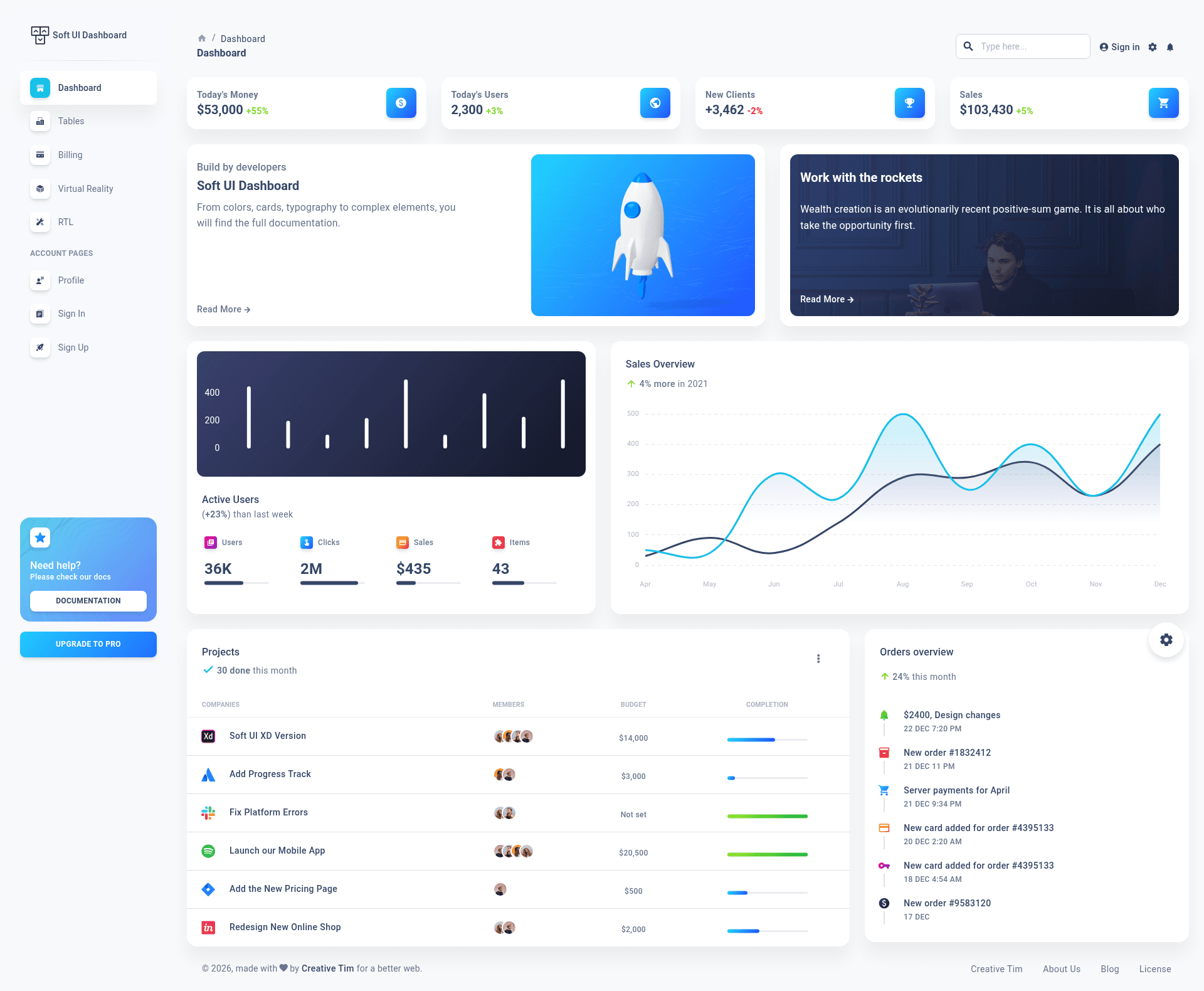
Free React and Material UI admin dashboard template with 70+ components, example pages, and documentation from Creative Tim.
About this template
Soft UI Dashboard React is a free admin dashboard template from Creative Tim that runs on React and Material UI, delivering 70+ coded UI components and prebuilt example pages for building web apps and admin panels.
What is Soft UI Dashboard React?
Soft UI Dashboard React is a free admin dashboard template built with React and Material UI (MUI), currently at version 4.0.1. It takes prebuilt React components and a MUI theme as its foundation and produces a complete dashboard application with working pages for analytics, user profiles, authentication, billing, tables, and virtual reality display. Creative Tim maintains the project and hosts the full documentation on its Learning Lab website.
Key Features
- 70+ frontend components — The template includes buttons, inputs, navbars, nav tabs, cards, and alerts, all of which can be recolored using MUI's styled API and the sx prop.
- MUI theme layer — The
src/assets/themefolder organizes styles into base, components, and functions, with a separatetheme-rtl.jsfor right-to-left layouts. - Example pages — Ready-to-use pages cover Dashboard, Profile, RTL, Sign In, Sign Up, Billing, Tables, and Virtual Reality, accessible from the live demo.
- Charts and counters — Integrates React ChartJS 2 for flexible charts and React Countup for animated numerical data.
- Nepcha Analytics integration — The template comes with Nepcha analytics wired in so you can measure traffic sources out of the box.
- Browser support — Officially supports the last two versions of Chrome, Firefox, Edge, Safari, and Opera.
- One-click deploy to Genezio — A deploy button on the README lets you push the template to Genezio without manual CI setup.
- PRO version — A paid PRO React version with additional components and pages is available from Creative Tim.
Who should use Soft UI Dashboard React?
React developers who need a jump-start on admin panels can clone the repository and customize the MUI theme without building components from scratch. Startup founders can use the prebuilt Dashboard and Profile pages to prototype a web app and present it to investors or clients. Freelancers can leverage the authentication and billing pages to deliver common SaaS-style features faster.
Use cases
- Data analytics dashboards — Display KPIs with Line, Bar, or Pie charts via ChartJS and animated count-up numbers.
- User profile pages — Use the Profile layout to show user info, posts, and activity in a Material Design card layout.
- RTL interfaces — Switch to right-to-left layout mode for Arabic or Hebrew audiences using the included theme-rtl.js.
- Authentication flows — Start from the Sign In and Sign Up pages and connect them to any backend auth service.
How does Soft UI Dashboard React work?
After downloading the repository, install Node.js LTS from the official site, navigate to the project root, and run yarn install or npm install to install dependencies. The template then runs as a standard React app; the README also provides a one-click Genezio deploy button to host it directly.
Pricing
Soft UI Dashboard React is free to download from Creative Tim. A paid PRO version with more components, pages, and support is also sold by Creative Tim.
FAQ
Is Soft UI Dashboard React free?
Yes, the React dashboard is available for free from Creative Tim's product page. The PRO version is a separate paid product that adds more UI elements, extended documentation, and premium support.
What tech stack does it use?
The template is built with React and Material UI (MUI). It also uses React ChartJS 2 for charts, React Countup for animations, ChromaJS for color utilities, and UUID for ID generation.
What pages are included?
Included pages are Dashboard, Profile, RTL, Sign In, Sign Up, Billing, Tables, and Virtual Reality. The demo lets you preview each one before downloading.
Can I deploy it to a cloud service?
Yes, the README includes a one-click deploy button for Genezio. Alternatively, you can build and host the React app on any platform that serves static files or runs Node.
Does it include documentation?
Each component and page is documented on Creative Tim's Learning Lab, with examples for alerts, avatars, badges, buttons, inputs, pagination, progress, and typography.