Template details
Motor Admin Rails
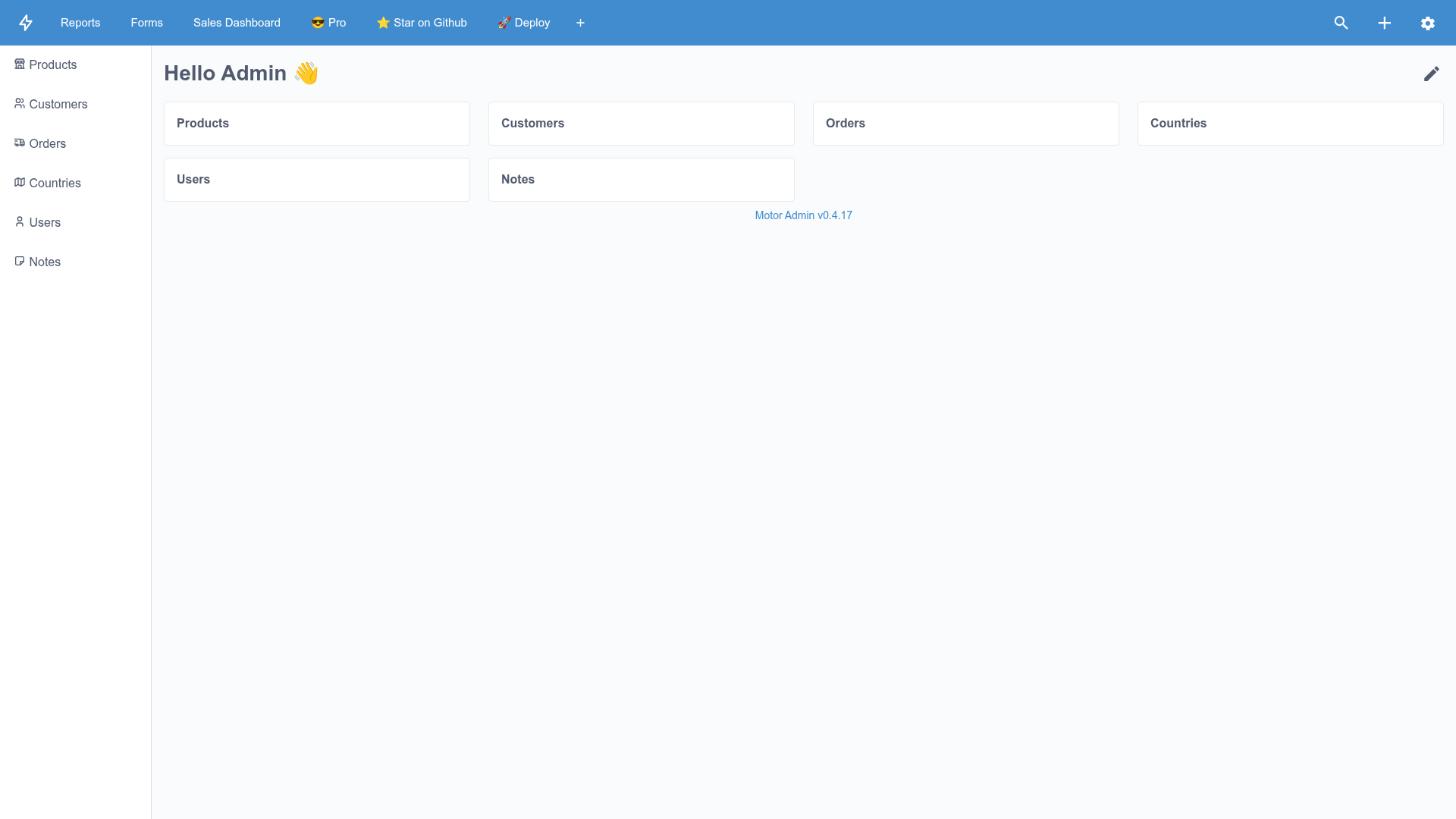
Low-code Admin panel and Business intelligence Rails engine. No DSL - configurable from the UI. Rails Admin, Active Admin, Blazer modern alternative.
About this template
Motor Admin Rails is an open-source, low-code admin panel and business intelligence engine that mounts into Ruby on Rails applications and is configured entirely from the UI instead of through a DSL.
What is Motor Admin Rails?
Motor Admin Rails is a Ruby on Rails engine, distributed as the motor-admin gem, that gives existing Rails applications a ready-made admin panel, CRUD interface, and business intelligence layer. It takes your ActiveRecord models as input and produces configurable resource pages, custom forms, SQL queries, visualizations, dashboards, and email alerts as output. The engine is MIT-licensed, carries 839 GitHub stars, and positions itself as a modern alternative to Rails Admin, Active Admin, and Blazer.
Key Features
- Customizable CRUD — Every resource page is configurable through a settings UI opened from the top-right icon; you can attach SQL queries and dashboards as resource tabs and use the
{{resource_name_id}}variable to scope query results. - Custom actions — Add actions via an ActiveRecord method call, an API endpoint, or a custom form, and override the default create, update, and delete actions.
- Virtual attributes — Expose any ActiveRecord model method as a column in the admin panel simply by adding a column whose name matches the method, such as a computed lifetime_value built from customer orders.
- Forms builder — Build forms whose field values are interpolated into API paths using
{field_name}syntax, for example/api/some-endpoint/{resource_id}/apply. - SQL queries — Write queries with mustache-style
{{variable}}substitution and{{#variable}}...{{/variable}}conditionals to include or exclude query sections dynamically. - Data visualization — Render SQL query output as a table, number, line chart, bar chart, pie chart, funnel, or markdown.
- Dashboards — Group multiple SQL queries into dashboards for a consolidated business-intelligence view.
- Email alerts — Send query results on a schedule written in natural language, such as 'every day at midnight', 'every Monday at 8 PM', or 'every minute', with the sender set via
MOTOR_ALERTS_FROM_ADDRESS. - Authorization and Active Storage — Set row-level and column-level permissions with CanCanCan, and upload files through the app's configured Active Storage provider; direct uploads can be enabled with
MOTOR_ACTIVE_STORAGE_DIRECT_UPLOADS_ENABLED=true.
Who is it for?
- Rails developers — add the motor-admin gem to an existing Rails app to get an admin UI without writing CRUD controllers or views.
- Operations managers — use the settings UI and dashboards to manage data and monitor metrics without developer involvement.
- Data analysts — use SQL queries and email alerts to build and deliver recurring reports.
- Product teams at small-to-mid-sized companies — stand up low-code internal tooling on top of existing ActiveRecord models.
What can you do with Motor Admin Rails?
- Rails teams: generate a full admin panel for ActiveRecord models by adding the gem and running
bundle install,rails motor:install, andrake db:migrate. - Operations managers: create dashboards from SQL queries to monitor business metrics in one place without developer help.
- Data analysts: schedule query results to arrive by email on natural-language intervals for recurring reporting.
- Support staff: use intelligence search, opened from the top-right button or Cmd+K, to find records quickly across resources.
How does Motor Admin work?
Install the engine by adding gem 'motor-admin' to the Gemfile, run bundle install, then run rails motor:install && rake db:migrate. Once the engine is mounted on a route (optionally inside an authenticate :admin_user block for devise-based auth), resources, queries, dashboards, and forms are all configured from the browser UI. No DSL is required during setup.
Pricing
The core Motor Admin engine is free and MIT-licensed. A paid Pro tier adds custom styling and white labeling, multi-factor authentication, and SSO/SAML; the README links to the Pro page but does not publish prices.
Alternatives
The README calls Motor Admin a modern alternative to Rails Admin and Active Admin, both Ruby on Rails admin DSLs, and Blazer, a SQL-focused business intelligence tool for Rails.
FAQ
Is Motor Admin Rails free?
Yes. The motor-admin gem is MIT-licensed and free to use in your Rails application. A separate paid Pro tier adds white-label styling, multi-factor authentication, and SSO/SAML, but the core engine's code and features remain open source.
How do I install Motor Admin?
Add gem 'motor-admin' to your Gemfile, run bundle install, then run rails motor:install followed by rake db:migrate. The engine mounts into your existing Rails app and provides the admin UI without requiring you to write CRUD controllers.
How can I secure the admin panel?
You can enable HTTP Basic authentication by setting the MOTOR_AUTH_USERNAME and MOTOR_AUTH_PASSWORD environment variables. Alternatively, mount the engine inside an authenticate :admin_user do ... end block so it uses devise or any other authentication library already in your application.
Can I sync configurations between environments?
Yes. All admin panel configurations are stored in config/motor.yml, which you can commit to git. To push local development configurations to a remote production app, run rake motor:sync with MOTOR_SYNC_REMOTE_URL and MOTOR_SYNC_API_KEY set.
Does Motor Admin support multiple databases?
Yes. Multiple databases support is listed among the engine's features, alongside the audit log, live collaboration notes, and personalized report alerts via Slack.