Template details
@mux/ai + Vercel Workflows Starter
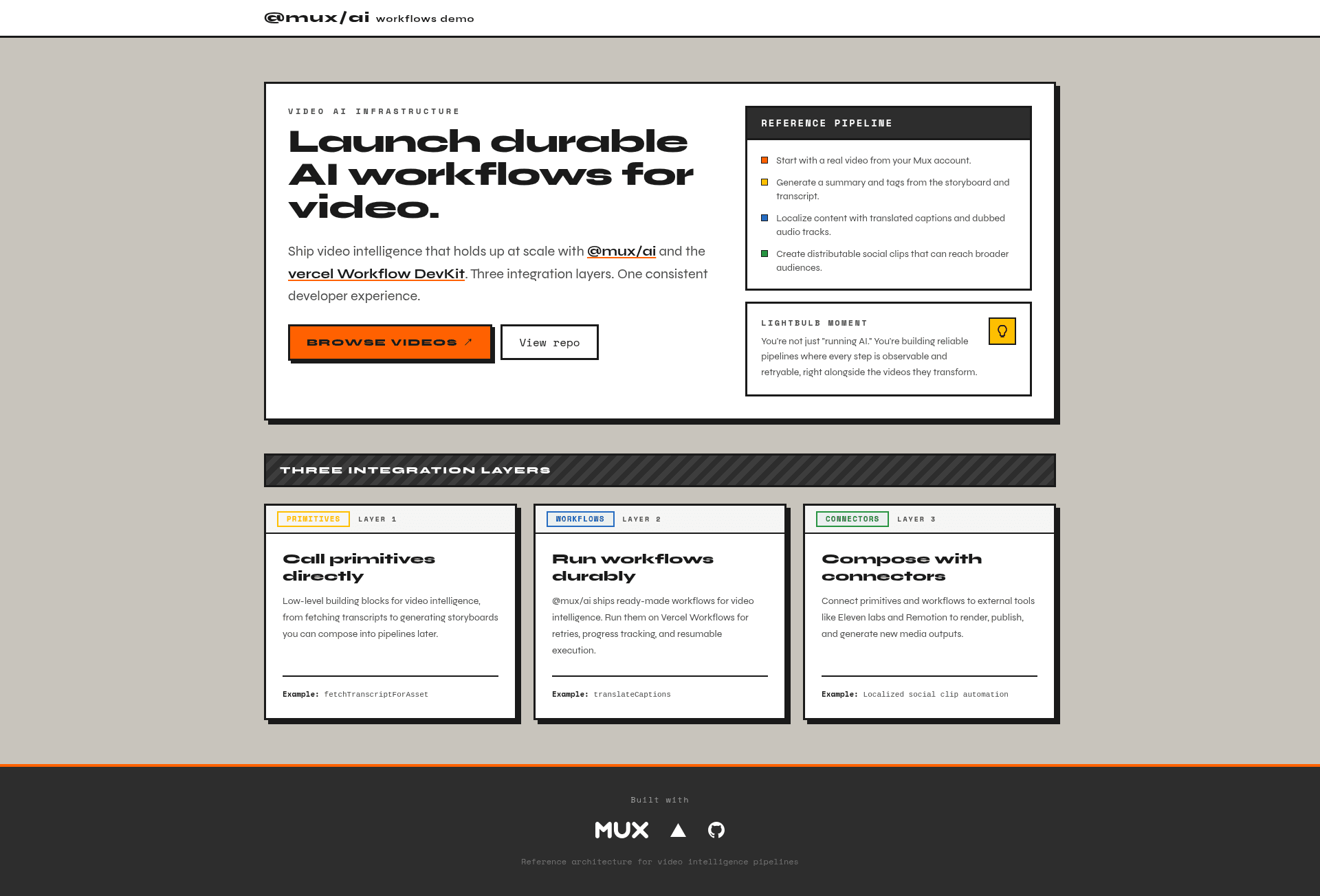
Open-source Next.js starter demonstrating durable video AI pipelines with @mux/ai and Vercel Workflows.
About this template
The @mux/ai + Vercel Workflows Starter is an open-source Next.js boilerplate that builds durable video AI pipelines by combining Mux media APIs with Vercel Workflows.
What is @mux/ai + Vercel Workflows Starter?
This Next.js starter template from Mux demonstrates how to build durable video AI pipelines using @mux/ai and the Vercel Workflow DevKit. It takes Mux assets, transcripts, and captions as inputs, and produces translated captions, dubbed audio, summaries and tags, semantic search over video content, and rendered social clips via Remotion. The app runs on Next.js and deploys to Vercel with one click, using PostgreSQL with pgvector for storing catalog metadata and generating embeddings, and OpenAI for embeddings generation.
Key Features
- Resumable durable workflows — Start captions, dubbing, or summary workflows; refresh the page and the workflow continues running asynchronously, with status rehydrated from browser localStorage.
- Three integration layers — Primitives for direct function calls, workflows that run durably via Vercel Workflows, and connectors that compose with external tools like Remotion for multi-step pipelines.
- IP-based rate limiting — Per-endpoint limits are enforced, e.g., translate-audio 3 requests per 24h, translate-captions 10 per 24h, render 6 per 24h, summary 10 per 24h, and search 50 per 1h; automatically bypassed in development mode.
- Remotion video rendering — Compose social clips with Remotion; use npm run remotion:studio for live preview, npm run remotion:render:local for local rendering, and npm run remotion:deploy for AWS Lambda production rendering with automated deployments on merge to main.
- pgvector semantic search — Store your Mux catalog in PostgreSQL, generate OpenAI embeddings, and search within video transcripts; schema is managed by Drizzle with db:migrate, db:generate, and db:studio scripts.
- Mux asset import — Run npm run import-mux-assets to fetch all ready Mux assets with playback IDs, upsert rows into videos, and write embedding rows into video_chunks; an optional --language flag sets which existing captions track to embed.
- Co-located feature folders — The media detail page at /media/[slug] is organized into localization, player, social-clips, summarize-and-tag, transcript, and workflows-panel modules, each with its own actions, constants, and UI.
Who is it for?
- Next.js developers building video AI features who want a reference implementation tying Mux, OpenAI, and Postgres together.
- Teams at video platforms needing durable, resumable pipelines for dubbing, translation, and summarization without losing job state on page navigation.
- AI engineers experimenting with Vercel Workflows who want working examples of primitives, workflows, and connectors around video media.
- Indie hackers deploying to Vercel who want a one-click deploy to a full-stack video AI app with rate limiting and semantic search included.
What can you do with @mux/ai + Vercel Workflows Starter?
- Translate video captions — Run the translate-captions workflow to translate subtitle tracks on a Mux asset; the UI shows progress with StatusBadge and StepProgress components.
- Dub audio — Use the translate-audio workflow to generate dubbed audio for a video, subject to a 3-requests-per-24h rate limit per IP.
- Summarize and tag videos — Start the summary workflow to get a summary and tags for a media item and persist them to the database.
- Search video transcripts semantically — Use the transcript module to run semantic search within a video's content, powered by pgvector embeddings.
How does @mux/ai + Vercel Workflows Starter work?
The app is organized around a media detail page that exposes feature co-located folders. You start a workflow from the UI; it runs durably in Vercel Workflows, and if you refresh or navigate away the state is restored from localStorage. To set up locally, run npm install and npm run dev, and inspect workflow runs with npx workflow web. Database setup requires running npm run db:migrate and then npm run import-mux-assets to load your Mux catalog and generate embeddings.
FAQ
Is @mux/ai + Vercel Workflows Starter free?
This is an open-source starter template on GitHub under the muxinc organization. You will need your own credentials for Mux, OpenAI, a PostgreSQL database with pgvector, and S3-compatible storage to run the full pipeline.
What environment variables are required?
At minimum you need MUX_TOKEN_ID, MUX_TOKEN_SECRET, OPENAI_API_KEY, and DATABASE_URL. The Vercel deploy flow also requests S3_ENDPOINT, S3_REGION, S3_BUCKET, S3_ACCESS_KEY_ID, and S3_SECRET_ACCESS_KEY for Remotion rendering storage.
Does it support resumable workflows?
Yes. The starter demonstrates durable workflows: start a captions, dubbing, or summary workflow, refresh or navigate away, and it will still run asynchronously with status rehydrated from browser localStorage.
What is Remotion used for?
Remotion is used for composing video clips. You can use remotion:studio for live preview, remotion:render:local for local rendering, and remotion:deploy to deploy the Remotion site to AWS Lambda for production rendering. Deployments are automated when changes to the remotion/ folder are merged into main.
Does the import script translate captions?
No. The import-mux-assets script only embeds subtitles from an existing captions track on the Mux asset. To translate captions, use the translate-captions workflow with a language that matches the source track.