Template details
myChat
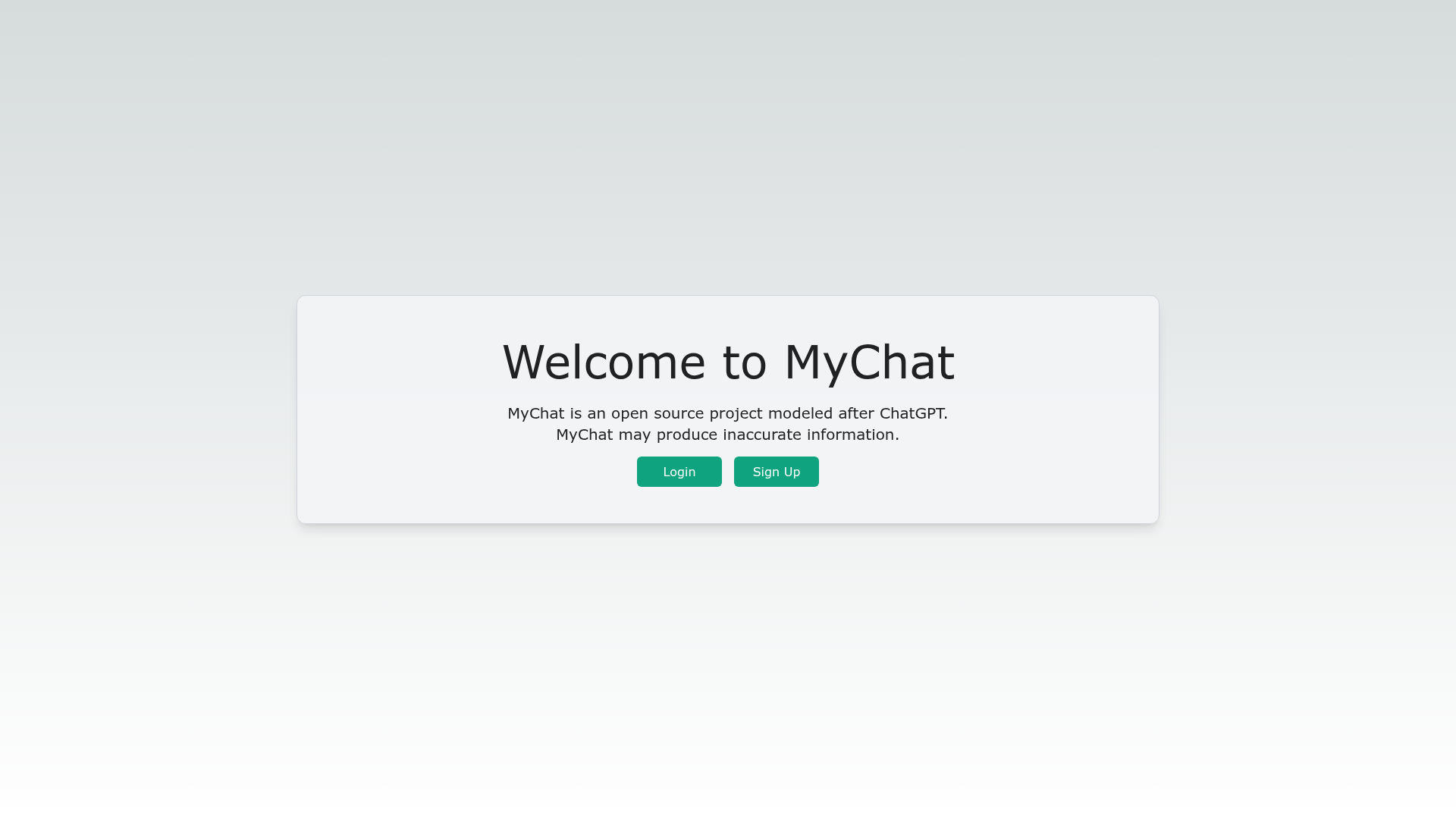
Open-source ChatGPT clone template built with Next.js, Tailwind CSS, and OpenAI API for building custom GPT chat interfaces.
About this template
myChat is an open-source Next.js template for building ChatGPT-style web interfaces that talk to OpenAI's GPT models.
What is myChat?
myChat is an open-source template for creating a ChatGPT-like web application. It takes an OpenAI API key as the core input and produces a functional chat interface where users can converse with GPT models. The template runs on Next.js (React) and is designed for deployment on Vercel, with MongoDB for user and session data, Redis for rate limiting, and NextAuth.js for authentication. The project is not affiliated with OpenAI and is published under the MIT License.
Key Features
- ChatGPT-like UI — A React-based interface that mirrors the look and feel of ChatGPT, styled entirely with Tailwind CSS utility classes.
- OpenAI API integration — Uses Axios for HTTP requests to OpenAI's GPT models, requiring users to supply their own API key.
- NextAuth.js authentication — Built-in authentication for Next.js apps, storing user information in MongoDB via Mongoose.
- MongoDB session storage — User profiles and session data persist in a MongoDB database, with connection strings configured in
.env.local. - Redis rate limiting — API routes are rate-limited using an in-memory Redis store, preventing abuse of the OpenAI API.
- Encrypted user API keys — Each user's OpenAI API key is encrypted with AES-128 using a 32-digit hexadecimal encryption key before storage.
- Vercel deployment — One-command deployment through the Vercel CLI, with environment variables supplied during the deployment prompt.
- MIT License — Free to use, modify, and distribute; the source is open and contributions are welcome via pull requests.
Who is it for?
- React developers who want a starter codebase for a GPT-powered chat product without building the UI from scratch.
- Indie hackers and startups looking to launch a self-hosted ChatGPT alternative with their own branding and API key management.
- Teams that need secure API key handling — the built-in AES-128 encryption means end users' OpenAI keys are not stored in plain text.
What can you do with myChat?
- Launch a custom chat assistant: Set up the repository, plug in your OpenAI API key, and deploy a functional chat UI on Vercel in minutes.
- Add authentication to an LLM app: The NextAuth.js integration gives you sign-in and session handling with MongoDB persistence out of the box.
- Experiment with GPT models: Use the template as a sandbox to test OpenAI's model responses through a familiar chat interface while controlling rate limits via Redis.
How does myChat work?
- Clone the repository and run
npm installto install dependencies. - Create a
.env.localfile with values forNEXTAUTH_URL,MONGODB_URI,NEXTAUTH_SECRET,ENCRYPTION_KEY, andREDIS_URL. - Start the development server with
npm run dev; the app connects to your OpenAI account and lets users log in and chat.
Pricing
myChat itself is free and open-source under the MIT License. Running the application requires your own OpenAI API key, a MongoDB database (a free tier is available from MongoDB Atlas), and a Redis instance (a free tier is available from RedisLabs), so usage costs depend on those external services.
FAQ
Is myChat free?
Yes. The template is open-source and licensed under the MIT License, so you can use, modify, and distribute it without paying a license fee. You do need to pay for OpenAI API usage and any hosting or database services you choose.
What are the prerequisites?
You need Node.js version 14 or newer, an OpenAI API key, a MongoDB database (local, Docker, or Atlas), and a Redis instance (local, Docker, or RedisLabs). The README provides setup instructions for each.
How do I deploy myChat to Vercel?
Install the Vercel CLI, log in, and run vercel --prod from the project root. During deployment, you'll be prompted to enter the same environment variables you used locally: NEXTAUTH_URL, MONGODB_URI, NEXTAUTH_SECRET, ENCRYPTION_KEY, and REDIS_URL.
Does myChat work without OpenAI?
No. The template's chat functionality depends on the OpenAI API to generate responses. You must supply an OpenAI API key, and the project is not affiliated with OpenAI.
How are users' API keys protected?
Individual user API keys are encrypted using AES-128 before being stored, using a 32-digit hexadecimal ENCRYPTION_KEY that you set in the environment variables. This prevents keys from being stored as plain text in the database.