Template details
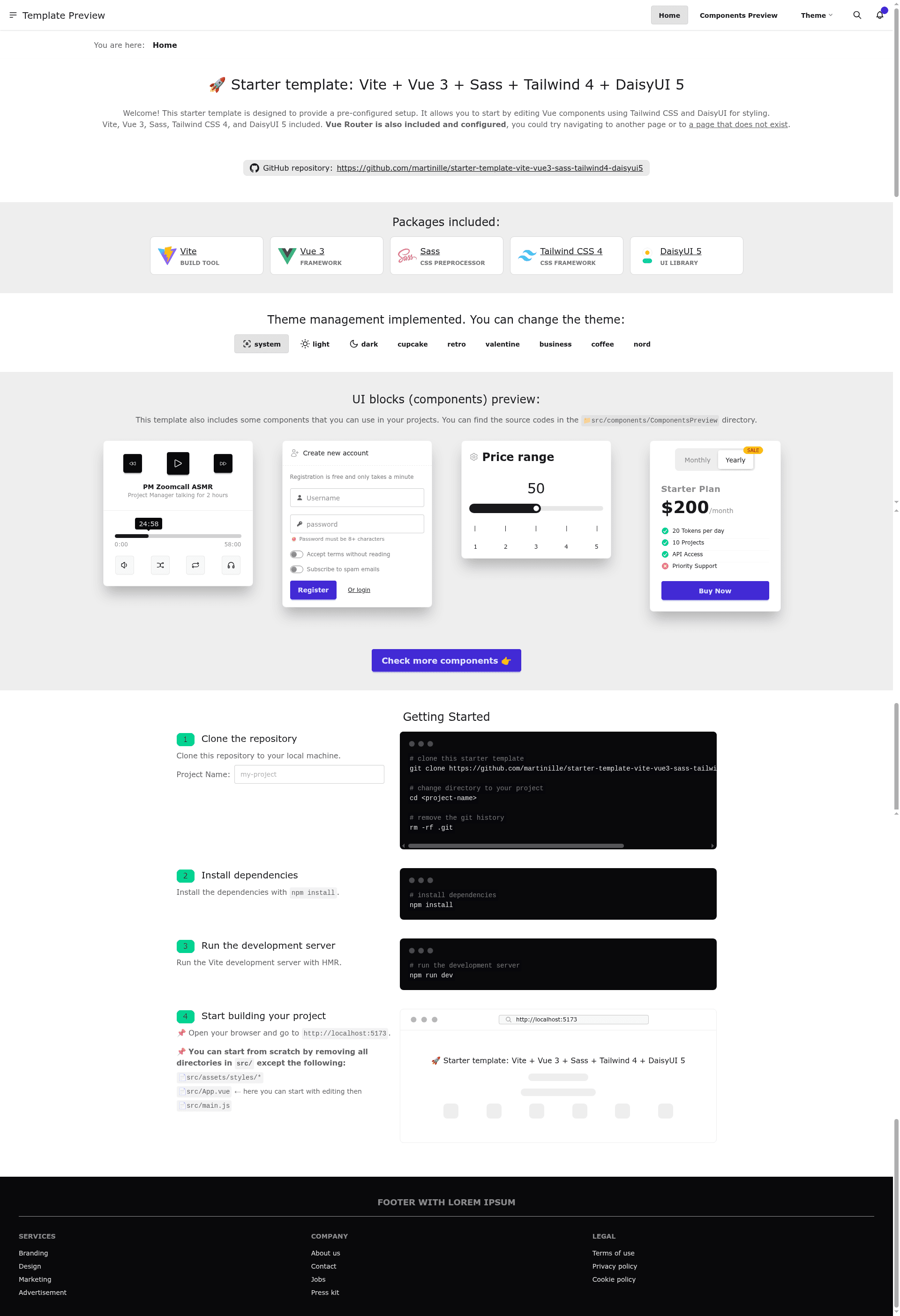
Vite + Vue 3 + Sass + Tailwind 4 + DaisyUI 5 Starter
Start your Vue3 project with pre-configured Sass, TailwindCSS 4 and DaisyUI 5 implementation.
About this template
The Vite Vue 3 Sass Tailwind 4 DaisyUI 5 starter template is a GitHub repository template that scaffolds a Vue 3 single-page application pre-configured with Vue Router 4, Sass, Tailwind CSS 4, and DaisyUI 5, so you can run npm run dev and start building immediately.
What is the Vite Vue 3 Tailwind 4 DaisyUI 5 template?
This boilerplate, created by GitHub user martinille, extends the official Vite + Vue 3 template (vite.new/vue) with a complete styling pipeline. It takes a repository template as input — via GitHub's "Use this template" button or a git clone — and produces a working Vite project with npm scripts for development and production builds. The output includes a component-based src directory, Vue Router setup, Sass preprocessed styles, Tailwind CSS 4 with DaisyUI 5 components, and a GitHub Actions workflow that publishes the site to GitHub Pages.
Key features that come pre-configured
- Vite — The build tool serves the app on a dev server with hot module replacement and generates an optimized production build.
- Vue 3 — The frontend is built with the Vue 3 Composition API (standard for Vue 3 projects).
- Vue Router 4 — Routing is set up in the
src/routerdirectory, giving you a structure for multi-page SPAs. - Sass — The
src/assets/stylesfolder includes Sass vendor styles for advanced CSS preprocessing. - Tailwind CSS 4 — Utility-first styling is wired in through
src/assets/styles/vendor/tailwind.css(the folder holds Tailwind and DaisyUI imports). - DaisyUI 5 — Pre-built Tailwind components and UI blocks are pre-configured in the components folder, plus support for light/dark theme configuration.
- PostCSS — The build pipeline uses PostCSS plugins to transform CSS.
- GitHub Pages workflow — A ready-made GitHub Action deploys the built site; enable it by setting Build and deployment source to "GitHub Actions" in the repository Pages settings.
Who should use this template?
- Vue developers starting a new project — You get a working Vue 3 app with routing and a full styling setup, so you can skip configuration and write components.
- Frontend teams standardizing on Tailwind and DaisyUI — Use the template as a consistent baseline for multiple projects, with the same theme configuration and UI block patterns.
- Developers deploying to GitHub Pages — The included workflow makes it a two-step process to publish a static Vue app on Pages.
- Learners exploring the Vite + Vue ecosystem — The folder structure clearly separates router, views, components, and styles, making it easier to see how the pieces fit together.
What can you do with this template?
- Quickly prototype an interface — Combine DaisyUI components and Tailwind utilities in Vue single-file components, then run
npm run devto see changes with hot reload. - Ship a themed site — Toggle between light and dark themes using the built-in DaisyUI theme configuration without writing custom CSS.
- Publish a blog or docs site — Set up Vue Router views and deploy the static output to GitHub Pages via the included action.
- Learn a modern frontend stack — Inspect how Sass, PostCSS, Tailwind 4, and DaisyUI 5 are wired together in the
src/assets/styles/vendorfolder.
How does this template work?
The template offers two initialization paths. The recommended path is forking: click "Create a repository from this template" on the GitHub page to create a new repo pre-filled with the starter code. To clone instead, run git clone with the repository URL, then remove the .git directory (rm -rf .git) to detach it from the template's history. After either path, install dependencies with npm install. For development, run npm run dev to start Vite's server with HMR; for production, run npm run build to generate a deployable static bundle.
FAQ
How do I install the template?
Use GitHub's "Use this template" button to fork it into a new repository, or clone the repository and delete the .git folder. Then run npm install to install all dependencies.
Does the template support dark mode?
Yes. The template includes theme configuration for light and dark themes via DaisyUI 5. The DaisyUI setup exposes theme classes that you can toggle to switch between light and dark appearance.
How do I deploy the template to GitHub Pages?
Enable GitHub Pages in your repository Settings, set the Build and deployment source to "GitHub Actions", and the included workflow will build and deploy the site on every push. The demo is live at https://tpl-vue3-tailwind4-daisyui5.brown.sk/.
What is the folder structure?
The template uses a src directory with assets (images and styles), components, router, and views subfolders, plus App.vue and main.js. Static files go in public. Vendor styles for Tailwind and DaisyUI are kept in src/assets/styles/vendor.
Are there any known limitations?
The template does not yet include unit tests; the project's TODO lists adding tests and creating a minimal template without the extra features. For the current state, you'll need to add your own test runner.