Template details
Gatsby Paradigmshift
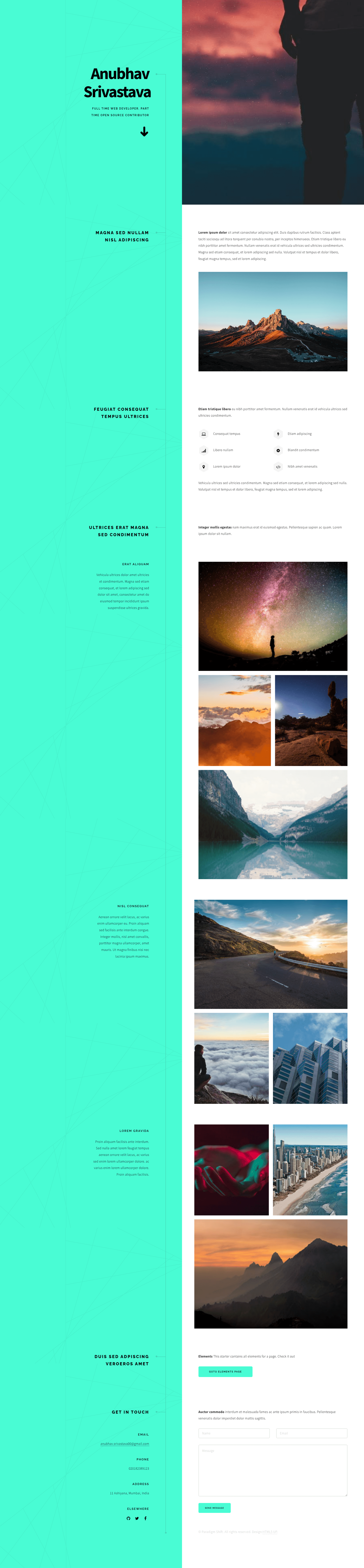
Gatsby.js V4 starter template based on the Paradigm Shift design by HTML5 UP.
About this template
Gatsby Starter Paradigmshift is a Gatsby.js V4 starter template that repackages the Paradigm Shift design by HTML5 UP into a React-based static site generator, letting you launch a single-page portfolio site from a GitHub repository in a few commands. It takes personal details from a config.js file and outputs a static site that you can deploy to GitHub Pages with an npm script.
What is Gatsby Starter Paradigmshift?
Gatsby Starter Paradigmshift is a Gatsby.js V4 starter template based on the Paradigm Shift design by HTML5 UP. It takes configuration from a config.js file — site title, heading, subheading, and social links — and produces a static, single-page portfolio site built with Gatsby and React. The starter is maintained by Anubhav Srivastava and includes a live preview at https://anubhavsrivastava.github.io/gatsby-starter-paradigmshift/.
Key Features
- Paradigm Shift design — Uses the modern, single-page layout from HTML5 UP's Paradigm Shift template as its visual foundation.
- Gatsby.js V4 — Built on Gatsby version 4, which provides static site generation, performance optimizations, and a React component model.
- Config-driven personalization — Edit
config.jsto change the site title, heading, subheading, and social links without touching component code. - GitHub Pages deployment script — A default npm script uses the
gh-pagesmodule, so runningnpm run deploypublishes the site to GitHub Pages directly. - Path prefix support — A configurable
pathPrefixinconfig.jslets you host the site under a subpath such ashttps://theanubhav.com/somePath/. - Font Awesome social icons — Social links are declared in
config.jswith Font Awesome icon names likefa-githubandfa-twitter. - MIT license — The starter is released under the MIT open source license, so it is free to use and modify.
Who is it for?
- Web developers and designers — Use the starter as a ready-made foundation for a portfolio site, then customize the contents and styling as needed.
- Freelancers and job seekers — Edit
config.jsto set your name, tagline, and social profile URLs to publish a professional single-page presence. - Gatsby learners — Study the project structure, which follows Gatsby's "Building with Components" documentation, to see how React components and configuration fit together.
What can you do with Gatsby Starter Paradigmshift?
- Launch a personal portfolio — Enter your heading and subheading in
config.js, choose your Font Awesome social icons, and you have a working portfolio page. - Deploy to GitHub Pages in one command — Run
npm run deployfrom the starter's root folder to publish the built site through thegh-pagespackage. - Remix it for client projects — Fork the repo, change the
pathPrefixwhen hosting on a subdomain or subpath, and reuse the Paradigm Shift design in a static React site.
How does it work?
Install the Gatsby CLI globally with npm install --global gatsby-cli, then run gatsby new <site-name> https://github.com/anubhavsrivastava/gatsby-starter-paradigmshift to scaffold a new project. After that, cd into the folder, run npm install, and start development with gatsby develop. Personalize the site by editing config.js, then build and deploy with npm run deploy.
Alternatives
The author publishes many similar Gatsby starters based on other HTML5 UP designs. Some notable ones are gatsby-starter-casual, gatsby-starter-grayscale, gatsby-starter-resume, and gatsby-starter-spectral, each offering a different visual style but the same config-driven workflow.
FAQ
Is this starter free to use?
Yes, the project is released under the MIT license, so you can use it for personal or commercial projects without restriction. The license file is included in the repository.
What do I need to install before using this starter?
You need the Gatsby CLI, installed globally with npm install --global gatsby-cli. The rest of the dependencies are managed through npm install inside the project folder.
How do I change my social media links?
Open config.js, locate the socialLinks array, and edit each entry's icon (a Font Awesome class name) and url field. Add or remove entries as needed.
Can I host this on a subpath of my domain?
Yes. Set the pathPrefix value in config.js to your subpath (for example https://theanubhav.com/somePath/), then build and deploy. If your site is at the root of a domain, remove the pathPrefix configuration.
What is the difference between this and the original HTML5 UP Paradigm Shift template?
The HTML5 UP version is a static HTML/CSS template. This starter wraps that design into a Gatsby.js V4 React project, enabling component-based structure, config.js personalization, and a one-command GitHub Pages deployment workflow.