Template details
Nagare
A personal portfolio website template built with Astro, featuring simplicity, beauty and clarity.
About this template
Nagare is a personal portfolio website template built on the Astro static-site generator, designed to showcase projects, experience, and contact information in a clean, responsive layout.
What is Nagare?
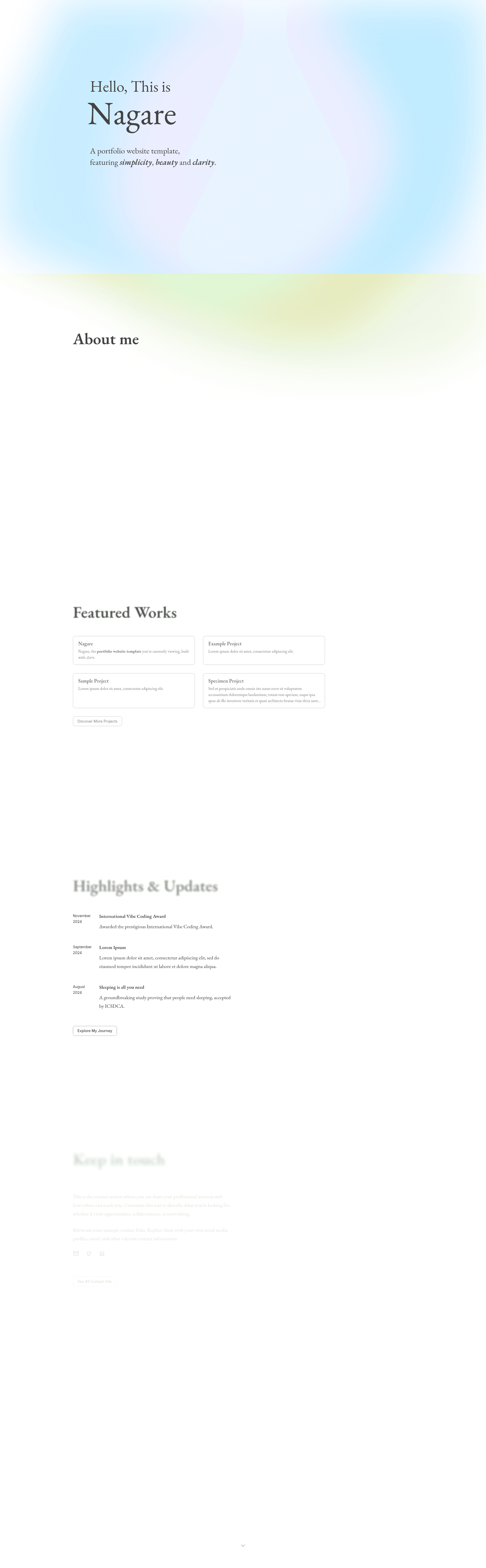
Nagare is a modern personal portfolio website template that uses Astro to compile your content into a static HTML site. You feed it project data, resume details, and contact information, and it outputs a site with four main pages: a project showcase, a timeline/resume page, a contact information page, and a separate resume page. The template is available on GitHub under the MIT license and is maintained by the repository owner angine04.
Key Features
- Responsive Design — The layout adapts to any screen width without requiring a separate mobile build, so your portfolio looks consistent on phones, tablets, and desktops.
- Project Showcase Page — A dedicated page for displaying your projects with images and descriptions, making it easy for visitors to see your best work at a glance.
- Timeline/Resume Page — A chronological format for listing work experience, education, and other milestones, ideal for a professional history.
- Contact Information Page — A dedicated area where visitors can find your email, social media links, or a contact form.
- Resume Page — A separate page for your resume that can be linked directly or printed.
- GSAP Animations — Integrates the GSAP animation library to add smooth scroll and hover animations without heavy JavaScript frameworks.
- Astro Icon Component — Uses the astro-icon package to render icons from popular icon sets consistently across the site.
- Static Site Output — Because Astro builds to plain HTML, the generated site loads fast and can be hosted on any static file server or CDN.
Who is it for?
- Freelance developers and designers who want a straightforward, attractive portfolio without building a site from scratch. They can clone the repo, run npm install, and edit the data files.
- Job seekers who need to present their work history and skills in a clean timeline format that recruiters can scan quickly.
- Students and recent graduates putting together a first portfolio for internships or entry-level positions, since the template provides ready-made layouts for projects and a resume.
- Static site enthusiasts who prefer a minimal, fast site and want to customize everything from components to styles using Astro's component model.
What can you do with Nagare?
- Developers: Clone the repository, run npm install or bun install, and start the dev server with npm run dev to preview the site at localhost:4321. Edit the data files under src/data to add your own projects, experience, and contact details.
- Designers: Restyle the entire look by modifying the style files in src/styles and the component markup in src/components. The template uses custom CSS and Astro components, so no separate CSS framework is required.
- Static site deployers: Run npm run build to generate a production-ready static site in the dist directory, then host it on GitHub Pages, Netlify, or any static hosting service.
How does Nagare work?
The workflow is clone, install, run, and customize. First, clone the GitHub repository to your machine and ensure you have Node.js version 18 or higher. Install dependencies with npm install (or bun install), then start the development server with npm run dev; the site runs at http://localhost:4321. When you are ready to publish, run npm run build to create static files and npm run preview to review the build locally.
Pricing
Nagare is free and open source. It is licensed under the MIT license, so you can use, modify, and redistribute it for personal or commercial projects without paying a fee.
FAQ
Is Nagare free?
Yes, Nagare is completely free to use. The project is released under the MIT license, which allows you to use it for personal or commercial purposes, modify the source code, and distribute your own version without restrictions.
What are the prerequisites for running Nagare?
You need Node.js version 18 or newer, along with a package manager such as npm or bun. After cloning the repository, run npm install to install dependencies and npm run dev to launch the development server.
How do I customize the portfolio content?
Portfolio content is managed through the src/data directory. Edit those data files to update project names, descriptions, timeline entries, and contact information. Pages and layouts live in src/pages and src/components, while global styles are in src/styles.
Does Nagare include a blog?
No, Nagare does not include a blog page. The template focuses on a project showcase, a timeline/resume page, a contact page, and a separate resume page, so it is suited for personal portfolios rather than content-heavy sites.
Is there a live demo for Nagare?
Yes, a live demo is available at nagare.angine.tech, where you can see the default portfolio layout before customizing it for your own use.