Template details
Neumorphism UI
Neumorphism inspired UI Kit: web components, sections and pages in neumorphic style built with Bootstrap CSS Framework.
About this template
Neumorphism UI is a free MIT-licensed Bootstrap UI kit by Themesberg for building soft, neumorphic web interfaces, with over 200 neumorphic components and ready-made page templates.
What is Neumorphism UI?
Neumorphism UI is a front-end UI kit that restyles the Bootstrap CSS framework with the neumorphic design trend, using soft outer shadows and subtle inner shadows to create a plastic, extruded look. It takes standard Bootstrap markup and adds a custom SCSS layer (scss/neumorphism/) so every component — buttons, cards, forms, modals, pills, toasts, tables — inherits a consistent soft-UI appearance. The output is static HTML, CSS, and JavaScript, making it a starter template you can edit directly or integrate into a larger project. The product is made by Themesberg (Crafty Dwarf LLC) and is documented on themesberg.com.
What makes Neumorphism UI stand out?
Neumorphism UI stands out because it delivers a complete neumorphic component library on top of Bootstrap, so you get both a recognizable visual style and a familiar development workflow. Its key strengths include:
- Over 200 neumorphic components — Buttons, cards, forms, modals, navs, pagination, progress bars, tables, toasts, tooltips, accordions, tabs, and widgets, all restyled with soft shadows and an optional inset-shadow add-on.
- Example page templates — Includes about, pricing, contact, sign-in, and sign-up pages under
src/html/pages/, plus anindex.htmllanding page, so you can wire up a multi-page site quickly. - Component demo pages — More than 20 HTML files in
src/html/components/(accordions, alerts, badges, carousels, forms, modals, etc.) serve as standalone references and starting points. - Built on Bootstrap — Uses Bootstrap's grid, utilities, and JavaScript plugins as the foundation, meaning existing Bootstrap knowledge transfers directly.
- Gulp and Sass workflow — Includes
gulpfile.js,package.json, and SCSS source files; runninggulpcompiles the theme, watches for changes, and serves it via BrowserSync. - Dual build outputs —
gulp build:devcreates an unminifiedhtml&cssfolder without Sass/Gulp/Node requirements, whilegulp build:distproduces a minifieddistfolder. - Full documentation — Online docs at themesberg.com/docs/neumorphism-ui cover quick start, every component, plugins, and the build workflow.
- MIT license — Released under MIT, so it can be used in personal and commercial projects without a paid license.
Who is Neumorphism UI for?
Neumorphism UI is for front-end developers and designers who want a neumorphic aesthetic without hand-coding soft shadows. Use it if you are building a Bootstrap site or dashboard and want a cohesive soft-UI look, if you need example pages to prototype a product quickly, or if you prefer a Sass/Gulp build to customize design tokens like shadows and backgrounds.
What can you do with Neumorphism UI?
- Startup websites: Assemble the index, pricing, about, and contact page templates into a multi-section marketing site.
- Admin panels and dashboards: Combine cards, tables, forms, and progress bars into a data-heavy interface with the neumorphic style.
- UI design prototypes: Use the 20-plus component demo pages to experiment with neumorphic styling and copy snippets into a design system.
- Portfolio or personal sites: Adapt the about and sign-in/sign-up pages for a personal brand or client project.
How does Neumorphism UI work?
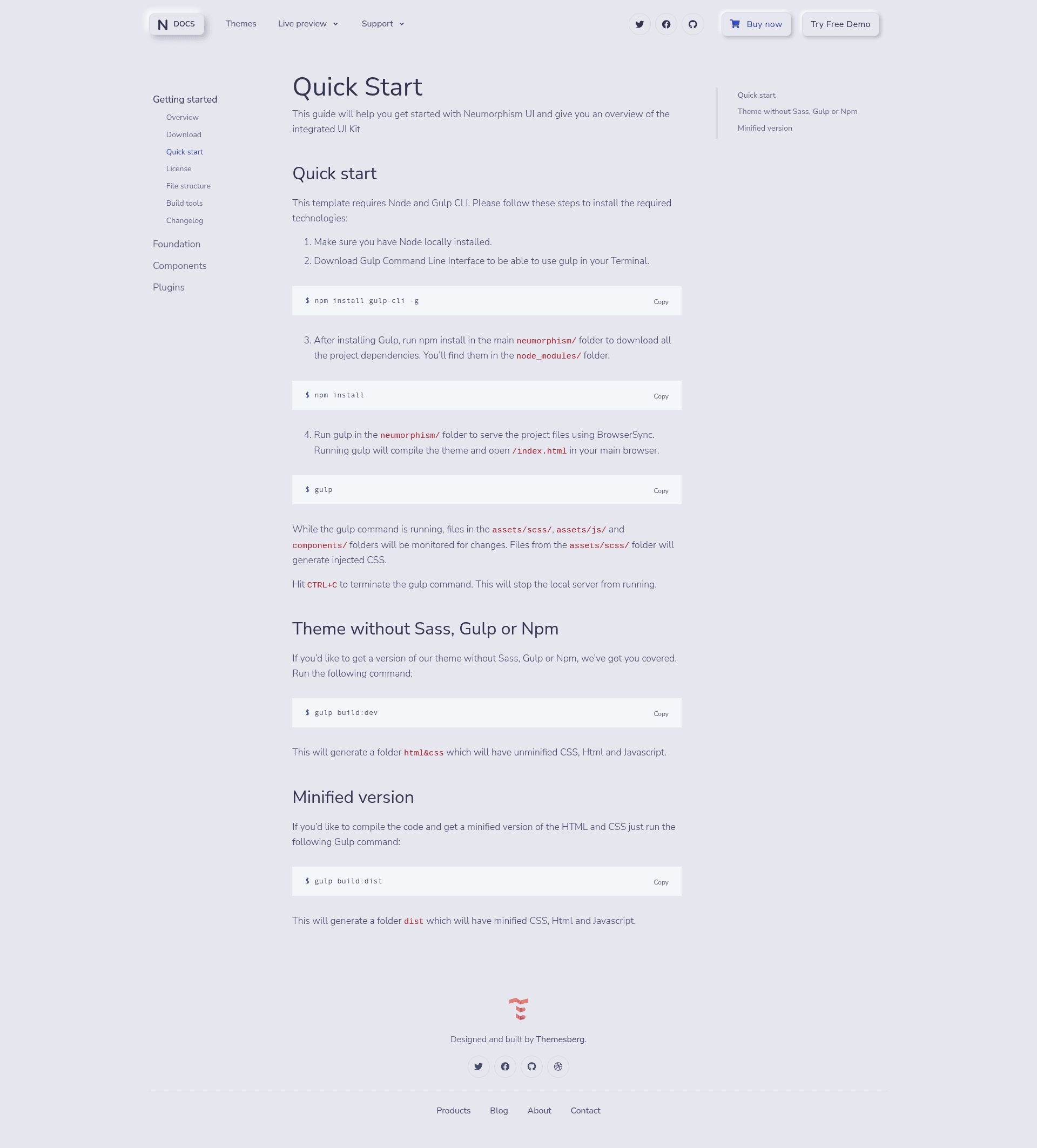
Neumorphism UI uses a Gulp-based build process. After downloading, you install Node and Gulp CLI, run npm install to fetch dependencies, then run gulp to compile the SCSS and serve the project through BrowserSync; file changes in assets/scss/, assets/js/, and components/ are watched and injected live.
- Download the project zip from Themesberg and extract it.
- Install Gulp CLI globally with
npm install gulp-cli -g. - Run
npm installin the mainneumorphism/folder to install dependencies intonode_modules/. - Run
gulpto compile the theme and openindex.htmlin your browser. - Use
gulp build:devfor an unminifiedhtml&cssversion orgulp build:distfor a minifieddistversion.
Pricing
Neumorphism UI is free. The repository is licensed under the MIT License, so you can use it for commercial projects without paying a licensing fee.
FAQ
Is Neumorphism UI free?
Yes, the GitHub version of Neumorphism UI is released under the MIT License, meaning it is free to use for personal and commercial projects. The license does not require an attribution fee, though the project is copyrighted by Themesberg (Crafty Dwarf LLC).
What CSS framework does Neumorphism UI use?
Neumorphism UI is built on the Bootstrap CSS framework. It includes Bootstrap-compatible grid, components, and JavaScript, with a custom SCSS layer in scss/neumorphism/ that applies the neumorphic shadow treatment.
How do I run Neumorphism UI locally?
Install Node.js and Gulp CLI (npm install gulp-cli -g), then run npm install and gulp in the project folder. The default gulp task compiles the SCSS, starts a BrowserSync server, and watches your source files for changes.
What example pages are included?
The project includes page templates for about, pricing, contact, sign-in, and sign-up, plus a main landing page index.html. There are also over 20 component showcase pages under src/html/components/.
What browsers does Neumorphism UI support?
The project officially aims to support the last two versions of Chrome, Firefox, Edge, Safari, and Opera, as stated in the README.