Template details
Next.js 16 Developer Portfolio Template
Modern and easy-to-use Next.js 16 portfolio template. Simple object-driven structure to make this template yours!
About this template
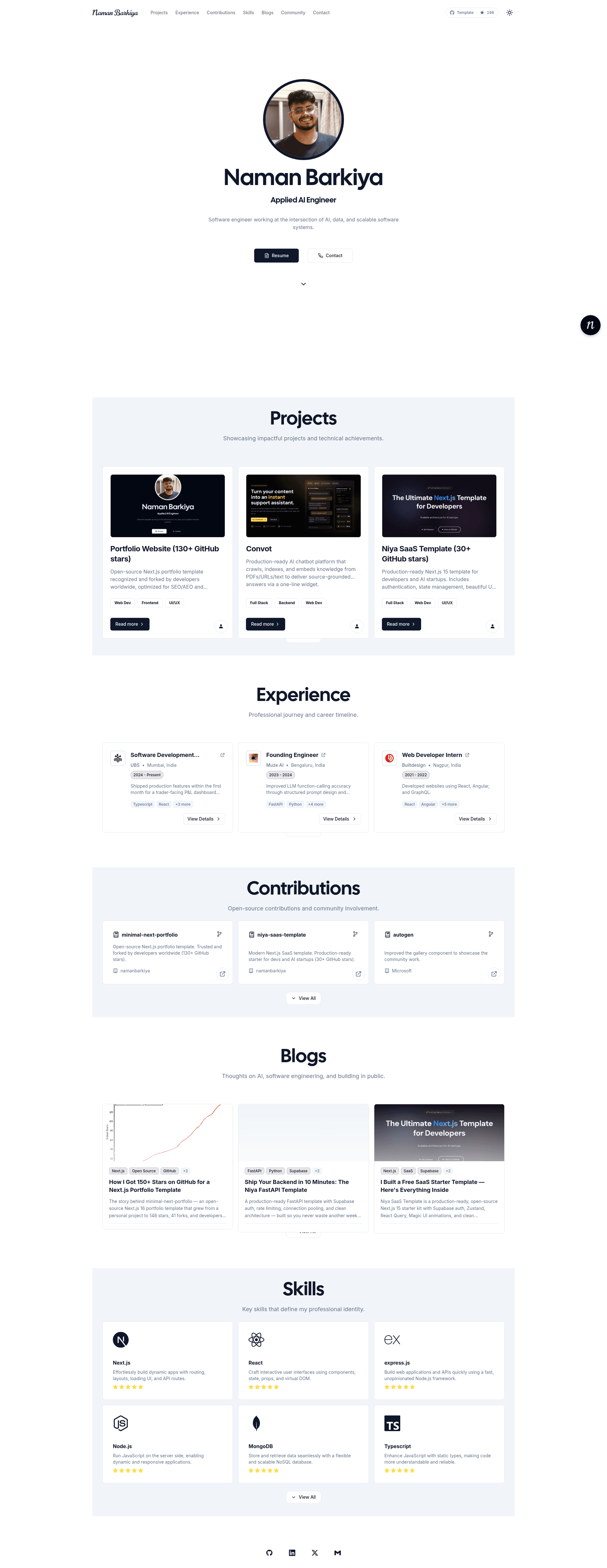
Next.js 16 Developer Portfolio Template (minimal-next-portfolio) is an open-source, MIT-licensed portfolio template built with Next.js 16, React 19, TypeScript, Tailwind CSS, and shadcn/ui that converts object-driven configuration files into a complete SEO-ready portfolio website. Created by Naman Barkiya and demonstrated live at https://nbarkiya.xyz/, it reports a 100% Lighthouse performance score and ranks #1 on AI search according to the project's documentation.
What is Next.js 16 Developer Portfolio Template?
Next.js 16 Developer Portfolio Template is a portfolio website starter for developers, designers, and other professionals who want a modern, responsive personal site without writing a frontend from scratch. It takes structured config files in the config directory (site.ts, skills.ts, projects.ts, experience.ts, contributions.ts) as input and outputs a full portfolio page with an experience timeline, project showcase, skill ratings, contributions list, and a validated contact form. It runs on Next.js with Turbopack and is designed for deployment on Vercel, the platform from the creators of Next.js.
Key Features
- Professional Experience Timeline: An animated, expandable timeline section that lets visitors explore each position and company in detail.
- Multiple Themes: Seven built-in themes — Dark, Light, Retro, Cyberpunk, Aurora, Synthwave, and Paper — switchable through tailwind.config.js.
- 100% Performance Score: The project reports a 100% Lighthouse score and emphasizes excellent Core Web Vitals, fast loading times, and image optimization.
- SEO-Ready: Includes structured data, meta tags, semantic HTML, and AEO/GEO optimizations that the author says rank the demo #1 on AI search.
- Object-Driven Customization: All content lives in typed config files — config/site.ts for personal info, config/skills.ts for skills, config/projects.ts for projects, config/experience.ts for experience, and config/contributions.ts for open-source contributions.
- Contact Form with Validation: A ready-to-use form built on server actions with validation, capable of connecting to backend services.
- Analytics Integration: Pre-configured for Google Analytics and Vercel Analytics.
- Modern Tech Stack: Next.js 16 with Turbopack, React 19, TypeScript, Tailwind CSS, shadcn/ui, Framer Motion, and Lucide icons.
Who is it for?
- Software developers: Publish a portfolio that displays GitHub projects, technical skills, and a career timeline with minimal configuration.
- UI/UX designers: Present design work using the Retro, Cyberpunk, Aurora, or Paper themes to match a personal aesthetic.
- Freelancers and consultants: Launch a professional site with a validated contact form and analytics to capture leads.
- Career-changers and students: Set up a polished online presence quickly and deploy it to Vercel for free.
Use cases
- Job seekers: Clone the repo, fill in configuration files, deploy to Vercel, and share a link with structured data that is SEO-optimized for recruiters.
- Open-source contributors: List contributions in config/contributions.ts to build credibility on a personal site.
- Performance-focused developers: Use the template to ship a site that reports perfect Lighthouse scores without tuning performance manually.
How does it work?
The setup is a standard Next.js workflow: clone the repository, copy .env.copy to .env and fill in required values, install dependencies with npm, yarn, or pnpm, then run npm run dev (or the equivalent) to view the site at localhost:3000. Customization happens by editing the documented config files rather than touching individual page components.
Pricing
This template is free and open source under the MIT License. There are no paid tiers or premium features described in the repository.
FAQ
Is the Next.js 16 Developer Portfolio Template free?
Yes, the template is open source and released under the MIT License, so you can use, modify, and deploy it for personal or commercial portfolios without paying a license fee.
What tech stack does this template use?
It uses Next.js 16 with Turbopack, React 19, TypeScript, Tailwind CSS, shadcn/ui, Framer Motion for animations, and Lucide icons. Form handling is done with server actions, and analytics can be wired to Google Analytics and Vercel Analytics.
How do I customize the portfolio content?
Edit the configuration files in the config directory: site.ts for personal info and social links, skills.ts for skills, projects.ts for projects, experience.ts for work history, and contributions.ts for open-source contributions. Color palettes and themes are adjusted in tailwind.config.js.
Where is the live demo?
The live demo is hosted at https://nbarkiya.xyz/. The repository also links to deployment instructions for hosting your own copy on Vercel.
Does the template include a contact form?
Yes, it includes a functional contact form with validation built on server actions. The page does not specify a particular backend, but notes it can connect to various backend services.