Template details
NextJS Ecommerce PoC
e-commerce PoC built with NextJS, TypeScript, ChakraUI, Zustand and Contentful API for content delivery.
About this template
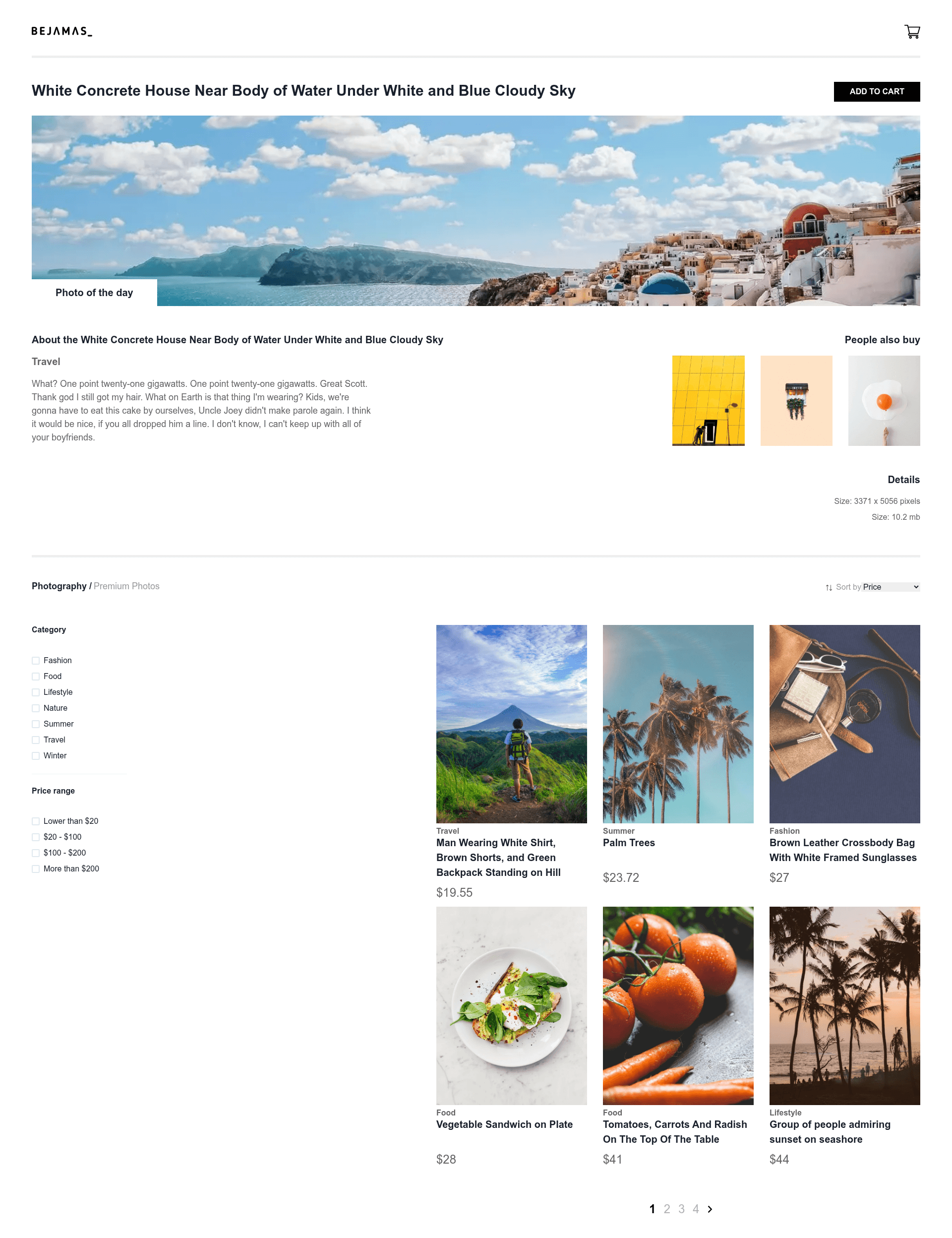
NextJS Ecommerce PoC is an open-source e-commerce proof-of-concept built with Next.js, TypeScript, ChakraUI, Zustand, and the Contentful API for content delivery. It demonstrates a complete storefront front-end: a product grid of digital artwork, add-to-cart interactions, a header cart badge with dropdown, dynamic pagination, sorting, and filtering—all driven by a headless CMS.
What is NextJS Ecommerce PoC?
NextJS Ecommerce PoC is a front-end e-commerce proof of concept that takes product entries from a Contentful CMS collection and renders them as an interactive storefront. It runs on Next.js and TypeScript, uses ChakraUI for UI components, Zustand for client-side state management, and react-paginate for pagination. The repository includes a live demo deployed to Vercel at https://nextjs-ecommerce-poc.vercel.app/.
Key Features
- Product grid — displays six digital artwork products per page with hover-revealed "add to cart" bars; some items show a "bestseller" flag.
- Featured product — one product flagged as "featured" appears above the grid.
- Cart dropdown — "Add to cart" updates a badge counter on the header basket icon and opens a dropdown showing cart contents; a "Clear" button empties the cart and hides the dropdown.
- Dynamic pagination — the grid paginates at six items per page, the page count is generated from product data, prev/next arrows hide on boundary pages, and pagination disappears entirely when only one page exists.
- Sorting — products sort alphabetically or by price, in ascending or descending order; default is price ascending.
- Filtering — category filters support multiple selections, while a separate price-range filter allows one range at a time.
- Headless CMS content — Contentful entries include name, category, price, currency, image, bestseller, featured, and details (dimensions, size, description); images are sourced from Pexels.
Who is it for?
- Developers prototyping e-commerce front-ends — use it to see how pagination, sorting, filtering, and cart state are implemented with Zustand hooks in a Next.js project.
- Designers building storefront proof-of-concepts — the ChakraUI product grid, cart dropdown, and badge interaction provide a ready-made UI foundation.
- Teams planning headless CMS integrations — the Contentful entry schema and API usage illustrate how a CMS can drive storefront content without a custom backend.
Use cases
- Online art gallery demo — showcase digital artwork with featured and bestseller flags, price sorting, and category filters.
- E-commerce cart flow prototype — demonstrate adding items, showing a live badge counter, opening a dropdown cart, and clearing the cart.
- Learning reference for Next.js and Zustand — study how global state is managed for cart contents and UI behavior in a TypeScript e-commerce context.
How does it run?
Run the project locally with npm i followed by npm start, as stated in the repository's instructions. The application expects a Contentful API configuration to fetch product entries; without it, you'll need to supply your own Contentful space and access token.
FAQ
How do I run this project locally?
Install dependencies with npm i and start the development server with npm start, as stated in the repository instructions.
What CMS does this template use?
Contentful, via its API. Product entries are stored in a Contentful collection and delivered to the storefront using the Contentful API.
How is pagination handled?
The product grid shows six items per page using react-paginate. The page count is generated dynamically from the product data, and the pagination list is hidden when there is only one results page.
What fields are in a product entry?
Each Contentful entry contains name, category, price, currency, image (with src and alt), bestseller, featured, and details (dimensions, size, description). This schema is shown in the repository README.