Template details
NextJS - MDX - shadcn-ui - Tailwind - Blog
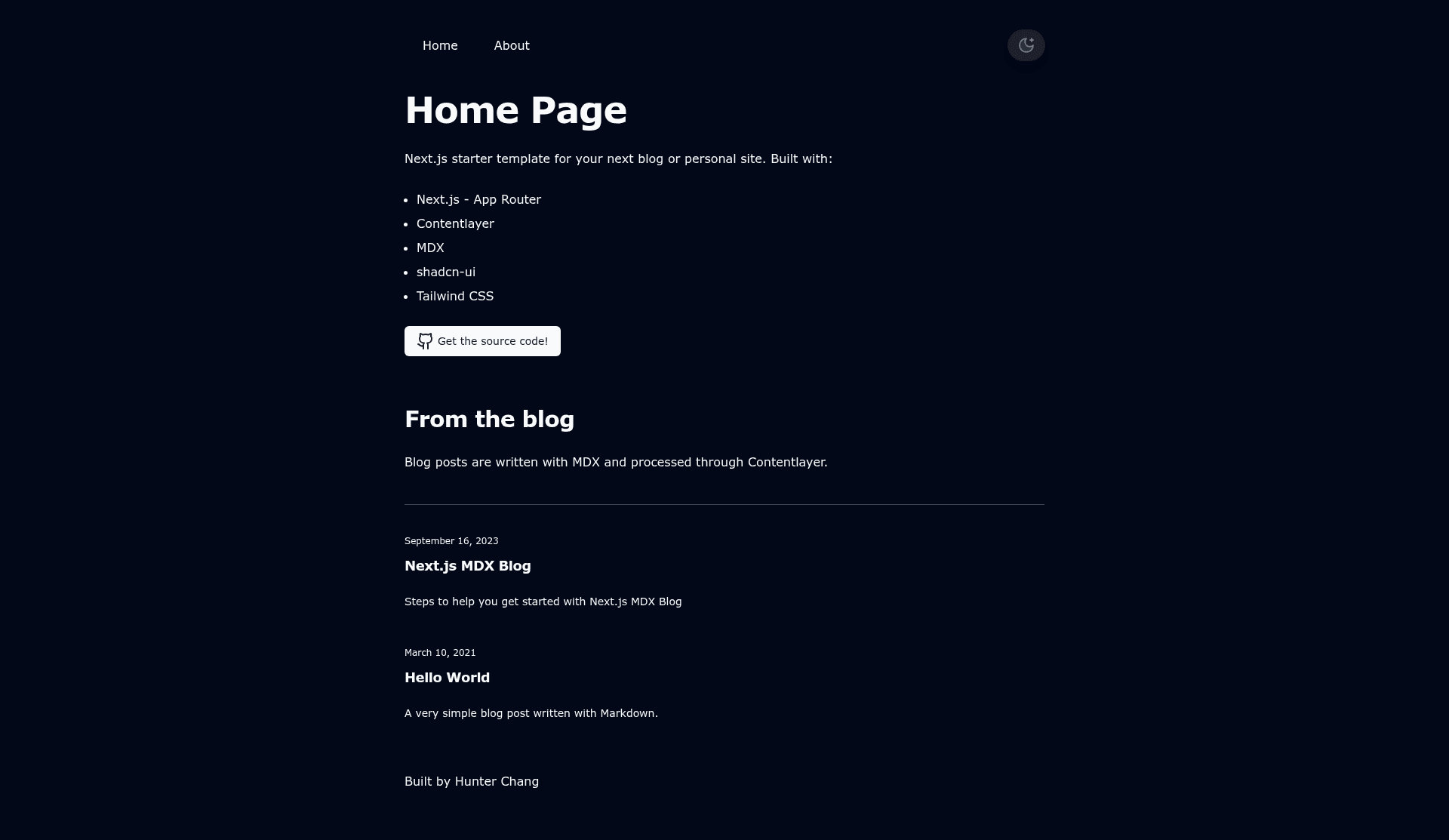
UPDATED to Next.js App Router! Starter template built with Contentlayer, MDX, shadcn-ui, and Tailwind CSS.
About this template
NextJS - MDX - shadcn-ui - Tailwind - Blog is an open-source Next.js starter template for building a blog or personal website, using MDX files as the content source and the App Router as the page framework.
What is NextJS - MDX - shadcn-ui - Tailwind - Blog?
NextJS - MDX - shadcn-ui - Tailwind - Blog is a starter template created by GitHub user ChangoMan and updated on 2023-08-22 to use the Next.js App Router. It takes MDX files placed in the posts directory as input and produces a deployable Next.js blog site as output. The template uses Contentlayer for content processing, shadcn-ui for UI components, and Tailwind CSS for styling, and is heavily inspired by Lee Robinson's personal site (leerob.io). A live demo is hosted at https://nextjs-typescript-mdx-blog.vercel.app/.
Key Features
- Next.js App Router — The template is updated to use the App Router, the modern file-based routing system in Next.js.
- Contentlayer integration — Contentlayer processes Markdown and MDX content, making it available to the application for rendering.
- MDX authoring — Blog posts are written in MDX, allowing JSX components to be embedded in Markdown.
- shadcn-ui components — UI components are sourced from shadcn-ui, a set of React components styled with Tailwind CSS.
- Tailwind CSS — Styling is built with Tailwind CSS's utility-first approach.
- TypeScript — The repository is written in TypeScript, as listed in its GitHub topics.
- Live demo — A working deployment is available at the Vercel URL for previewing the default template design.
Who is it for?
- Developers starting a blog — They can clone the repository, run
npm installandnpm run dev, and immediately begin adding posts in MDX. - Personal site owners — The template provides a foundation for a personal site with a blog section, styled with Tailwind CSS.
- Developers who want a modern Next.js stack — Those who want to work with the App Router, Contentlayer, MDX, and shadcn-ui without configuring the toolchain themselves.
What can you do with it?
- Writers and bloggers: Write posts as MDX files in the
postsdirectory and have them rendered on the site without touching routing code. - Developers: Customize the site's components using shadcn-ui and Tailwind classes to match a personal brand.
- Portfolio owners: Build a personal site that mixes static pages with a blog, using the same content pipeline.
How does it work?
The workflow starts by cloning the repository: git clone https://github.com/ChangoMan/nextjs-mdx-blog.git. After npm install, run npm run dev to serve the site at http://localhost:3000/. To add content, drop an MDX file into the root-level posts directory. Before deploying, update WEBSITE_HOST_URL in /src/lib/constants.ts and review the routes in sitemap.ts.
FAQ
How do I add a new blog post?
Create a new MDX file in the posts directory at the root of the repository. Contentlayer will pick it up, and it will be rendered automatically.
What does this template use for styling?
Styling is done with Tailwind CSS, and UI components come from shadcn-ui. Both are configured to work with the Next.js App Router.
Do I need to configure a separate content CMS?
No. Contentlayer processes MDX files directly from the repository, so content lives in files rather than an external CMS.
Is this template free to use?
The repository is public and can be cloned, so the starter is free to use and modify. There is no paid tier or license restriction mentioned.