Template details
Next.js SaaS Starter
A free Next.js boilerplate for subscription SaaS apps with auth, Stripe billing, Postgres, and a dashboard.
About this template
Next.js SaaS Starter is a free boilerplate for building subscription-based SaaS products, running on the Next.js App Router and pairing Postgres, Stripe billing, and shadcn/ui with a pre-built dashboard.
What is Next.js SaaS Starter?
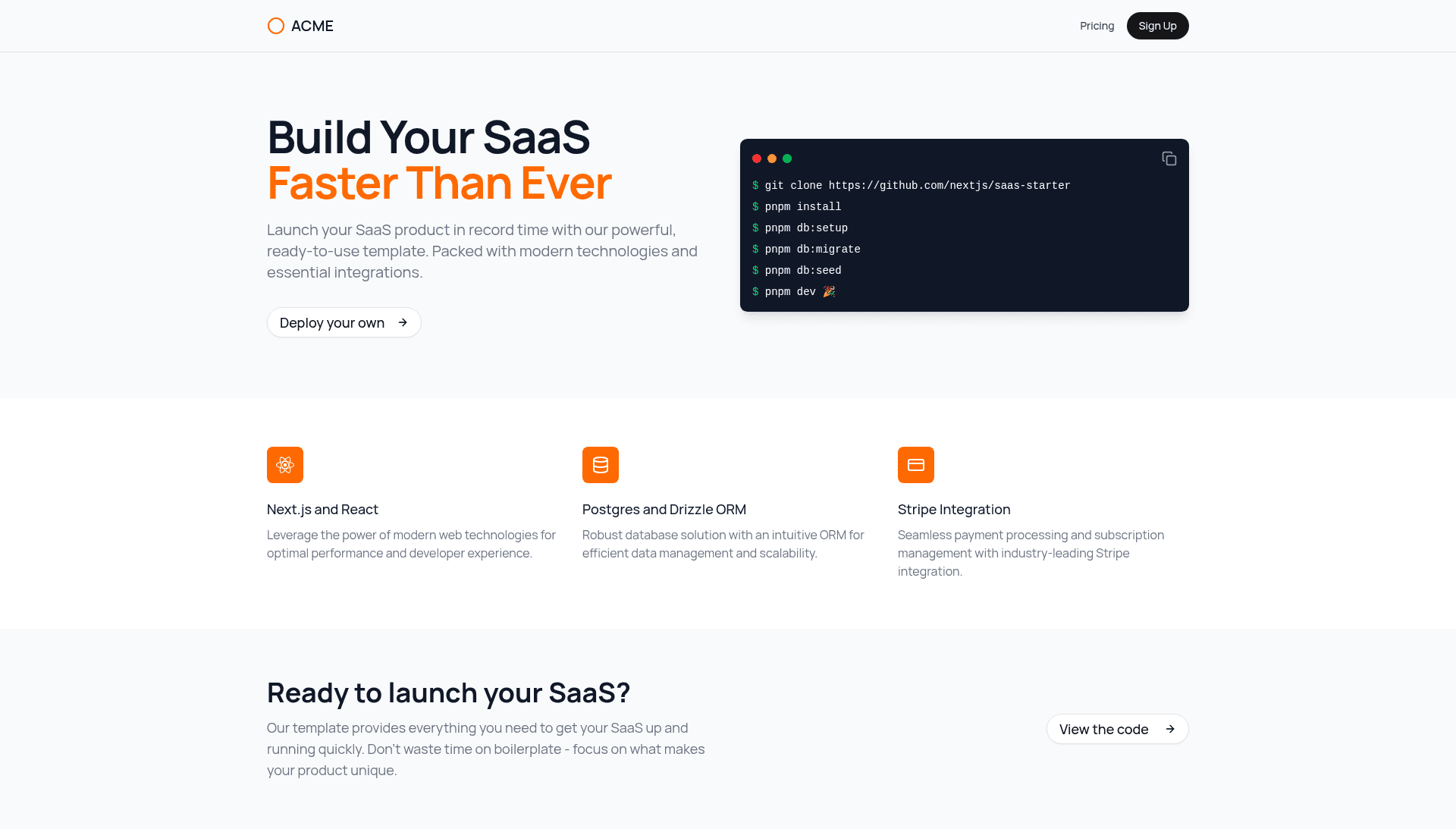
This starter template from the Next.js GitHub organization (nextjs/saas-starter) gives developers a production-ready foundation for a subscription SaaS. It accepts a fresh Next.js project and turns it into a functional app with email/password authentication, Stripe Checkout subscriptions, team management, and an admin dashboard. It runs on Next.js with a Postgres database accessed through Drizzle ORM, and its UI is built with shadcn/ui components. A live demo is available at https://next-saas-start.vercel.app/ and the repository has over 16,000 stars.
Key Features
This starter combines production plumbing (auth, billing, database) with a clean dashboard UI, so you can skip boilerplate and focus on your product's unique logic.
- Pre-built marketing and pricing pages — A landing page with an animated Terminal element and a
/pricingroute that connects directly to Stripe Checkout, so users can subscribe without custom payment code. - Complete authentication flow — Email/password sign-up and login with JSON Web Tokens stored in cookies, plus global middleware that protects logged-in routes from unauthenticated access.
- Dashboard with CRUD and RBAC — Dashboard pages support create, read, update, and delete operations on users and teams, with basic role-based access control separating Owner and Member permissions.
- Stripe Customer Portal integration — Subscribers can manage their plans and billing without leaving the app; the portal is handled through Stripe's managed flow.
- Activity logging system — Every user event can be recorded through a logging system, giving apps an audit trail out of the box.
- Seeded test data — A
pnpm db:seedcommand creates a default user (test@test.com) and team so you can log in immediately during development. - Local middleware for validation — Middleware can be applied locally to protect Server Actions or validate Zod schemas, in addition to the global route protection.
Who should use Next.js SaaS Starter?
Solo developers and small teams planning to launch a subscription product benefit the most, because the template removes boilerplate like auth, billing, and database setup. Developers learning how Stripe Checkout, webhooks, and customer portals fit into Next.js get a complete working reference they can trace line by line. Teams that need a minimal internal starting point, rather than a feature-heavy paid template, can fork it and extend the dashboard, routes, and schemas.
What can you do with it?
You can use this template to immediately prototype and ship a subscription product, test Stripe's full payment lifecycle, and learn how a production Next.js app wires auth and billing together.
- Indie hackers: Launch a paid SaaS MVP quickly — clone the repo, run the setup script, and deploy to Vercel with Stripe connected.
- Developers learning Stripe: Test the entire subscription lifecycle with the provided test card (4242 4242 4242 4242) and by forwarding Stripe webhooks to localhost:3000/api/stripe/webhook.
- Product teams: Use the seeded team and RBAC structure to prototype multi-user features like team billing or member permissions before building custom logic.
How does Next.js SaaS Starter work?
The template uses a setup script to generate your .env file. After running pnpm db:setup, you run pnpm db:migrate and pnpm db:seed, which creates a default user with the password admin123. A pnpm dev command starts the Next.js development server on localhost:3000. For payment events, you run the Stripe CLI with stripe listen --forward-to localhost:3000/api/stripe/webhook to catch subscription changes locally.
Pricing
The template itself is free; the repository is publicly available on GitHub. The community alternatives listed on the page — such as makerkit.dev, shipfa.st, and turbostarter.dev — are paid versions that build on this concept with more features.
Alternatives
The page explicitly links to five paid SaaS starters: achromatic.dev, shipfa.st, makerkit.dev, zerotoshipped.com, and turbostarter.dev. These are more full-featured than this intentionally minimal template and may include things like team billing, admin panels, or additional integrations out of the box.
FAQ
How do I test Stripe payments with this template?
Use the test credit card number 4242 4242 4242 4242 with any future expiration date and any 3-digit CVC. The template's pricing page redirects to Stripe Checkout, and you can verify webhook handling locally by running stripe listen --forward-to localhost:3000/api/stripe/webhook.
What login credentials are seeded?
The seed script creates a user with email test@test.com and password admin123. You can also sign up new users through the /sign-up route.
How do I deploy Next.js SaaS Starter to production?
Push the code to GitHub, connect the repository to Vercel, and deploy. Then create a production Stripe webhook in the Stripe Dashboard pointing to your production API route, and set environment variables including BASE_URL, STRIPE_SECRET_KEY, STRIPE_WEBHOOK_SECRET, POSTGRES_URL, and AUTH_SECRET (the last one can be generated with openssl rand -base64 32).
Is there a database included?
The template uses Postgres as its database and Drizzle as the ORM. The setup instructions assume you have a Postgres connection string available for the POSTGRES_URL environment variable.
Why is this template considered minimal?
The README states it is "intentionally minimal and to be used as a learning resource." It covers core auth, payments, and CRUD, but does not include the extra features found in paid alternatives like makerkit.dev or shipfa.st.