Template details
Next.js Starter Template
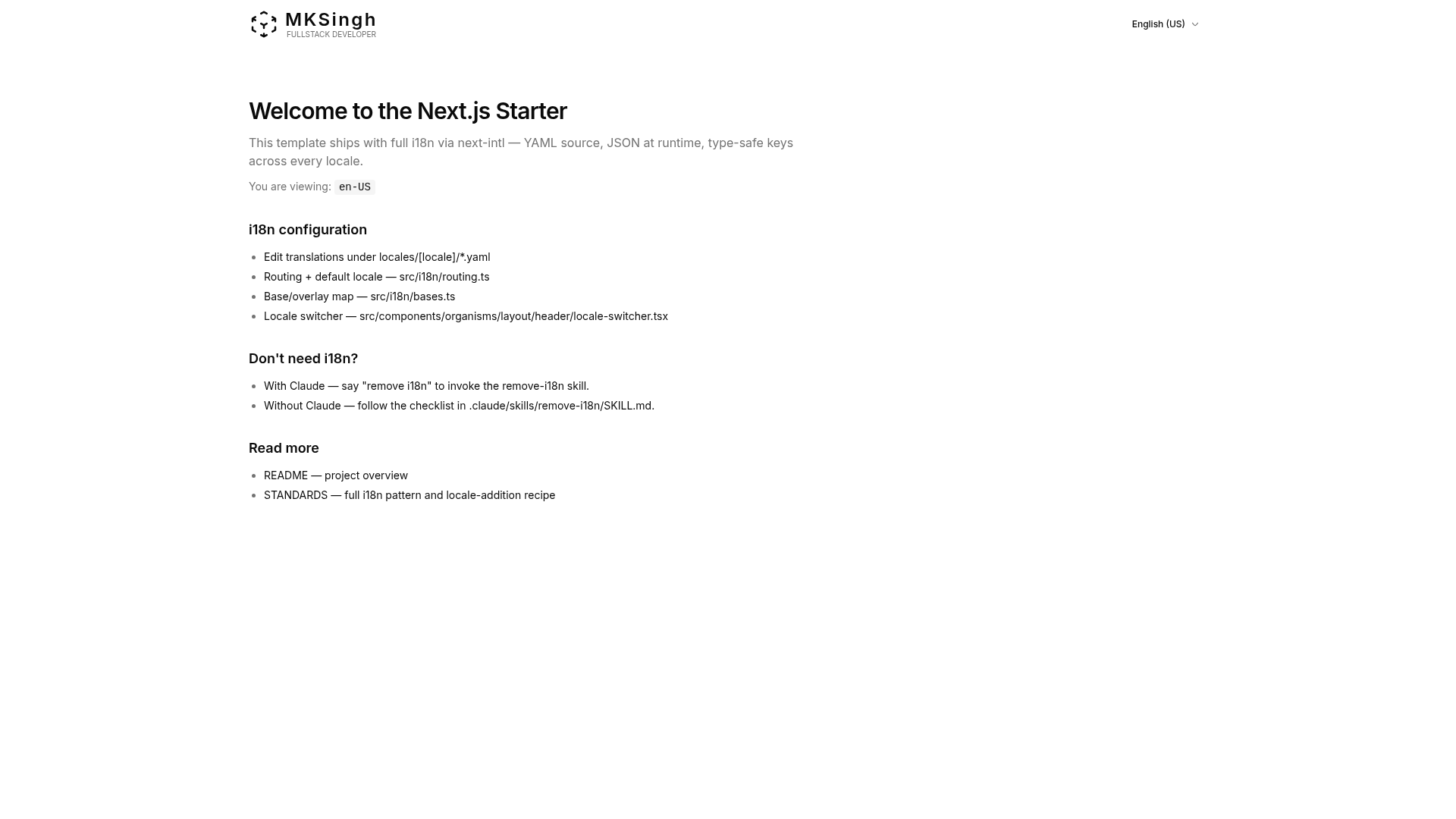
A Next.js 16 starter with App Router, TypeScript, Tailwind CSS v4, shadcn/ui components, and built-in i18n.
About this template
Next.js Starter Template is a GitHub boilerplate that gives you a production-ready Next.js 16 application with App Router, strict TypeScript, Tailwind CSS v4, shadcn/ui, and a full i18n pipeline.
What is Next.js Starter Template?
Next.js Starter Template is a starter template for building web applications on Next.js 16. It takes a fresh clone and produces a configured project that includes App Router with Server Components, TypeScript in strict mode, Tailwind CSS v4 with shadcn/ui components, an Atomic Design component structure, and a next-intl internationalization system based on YAML dictionaries and regional locale overlays. It runs on Node.js v24 or later and uses Bun as the recommended package manager, though pnpm, yarn, and npm are supported. The template is maintained by MKSinghDev and is released under the MIT License.
Key Features
- Next.js 16 with App Router — All pages live under a locale segment, using Server Components, and the root layout is in src/app/layout.tsx.
- Tailwind CSS v4 + shadcn/ui — Utility-first styling with Tailwind v4; shadcn/ui components are CLI-managed in src/components/ui.
- TypeScript strict mode — The tsconfig enforces strict checks, and translation keys are type-checked against the English reference shape for autocomplete.
- Atomic Design structure — Components are split into atom, molecule, organism, and ui layers with dependency rules (atoms have no internal deps, organisms compose atoms/molecules).
- Internationalization with next-intl — Locale dictionaries are YAML files under locales/, compiled to JSON and per-locale index.ts by scripts/gen-messages.ts; the runtime deep-merges a base dictionary with regional overlays.
- Biome for linting and formatting — Biome handles linting, formatting, and import sorting in a single fast tool configured via biome.json.
- Husky, lint-staged, and Commitlint — Pre-commit hooks run staged-file checks, and commit messages must follow conventional commit format.
- Testing stack — Vitest unit/component tests in tests/ mirror the src/ tree, a test-governance script fails if any authored component lacks a mirror test, and Playwright runs e2e tests in e2e/.
- Bun scripts — The package.json scripts use Bun (bun dev, bun start, bun run build) and include a test-all command that runs format, lint, type-check, governance, coverage, and build.
Who should use Next.js Starter Template?
- Next.js developers who want a pre-configured baseline with strict typing, linting, and commit standards, so they can start coding features instead of setting up tooling.
- Product teams shipping localized web apps — the i18n setup supports regional locales such as en-US, en-GB, es-ES, es-MX, and hi-IN, with base locales that are never URL-addressable.
- Teams using AI coding assistants — CLAUDE.md, AGENTS.md, STANDARDS.md, and a remove-i18n skill give Claude Code and other agents project-specific instructions.
- Open-source maintainers — the MIT license makes it safe to fork and adapt for public projects.
What can you do with Next.js Starter Template?
- Scaffold a new multi-page app quickly — clone the repository, run bun install and bun dev, and get a running Next.js app with i18n and linting on localhost:3000.
- Manage translations without touching JSON — edit YAML files under locales/, run bun gen:i18n to compile them to JSON, and the app consumes the compiled output.
- Enforce code quality automatically — run bun test-all to execute the full pipeline (format, lint, type-check, governance, coverage, build), or rely on Husky pre-commit hooks.
- Strip i18n from the project — ask Claude Code to run the remove-i18n skill, which removes i18n files and config or serves as a manual checklist.
How does Next.js Starter Template work?
Running bun dev first executes the i18n compiler, which transforms locales/**/*.yaml into sibling .json files plus index.ts, then starts the Next.js dev server alongside a chokidar watcher for live regeneration. The routing module src/i18n/routing.ts lists URL locales as regional variants (for example en-US, es-MX), and each variant maps to a base locale such as en or es via src/i18n/bases.ts. At request time, next-intl deep-merges the base dictionary with the regional overlay, so overlays only store keys that differ.
Pros and cons
- Single-tool linting — Biome replaces separate ESLint and Prettier setups, reducing config surface.
- Strong i18n defaults — YAML-authored dictionaries and typed keys make translations checked at compile time.
- Test governance — the test:governance script enforces that every component in src/components has a mirror test.
- Node v24 requirement — the template requires Node.js v24 or later, which may be newer than some environments provide.
- Bun-centric scripts — while other package managers work, the documented scripts use Bun, and the messages/ directory is gitignored and regenerated on every build or dev run.
Pricing
The template is free and open source under the MIT License; there are no paid tiers or licensing fees.
Alternatives
- create-next-app — the official CLI from Vercel that generates a minimal fresh Next.js project without pre-configured linting, i18n, or test governance.
- create-t3-app — a community boilerplate that scaffolds a Next.js app with TypeScript, tRPC, Prisma, and Tailwind, with a different focus on full-stack type safety.
FAQ
Is Next.js Starter Template free?
Yes. The project is released under the MIT License, so you can use, modify, and redistribute it freely, including in commercial projects, without paying fees.
What Node.js version is required?
The README lists Node.js v24 or later as a prerequisite. Bun is the recommended package manager, but pnpm, yarn, and npm are also acceptable for running the scripts.
How does the i18n system work?
Translation dictionaries are written in YAML files under locales/ and compiled to JSON by scripts/gen-messages.ts. The runtime uses next-intl to deep-merge a base dictionary with regional overlays, and all keys are type-checked against the English reference structure.
Can I remove the i18n setup?
Yes. The repository includes a remove-i18n skill at .claude/skills/remove-i18n/SKILL.md. You can ask Claude Code to run it, or follow the file as a manual checklist to strip i18n files and configuration.
What testing tools are included?
The template uses Vitest for unit and component tests, with tests stored in a tests/ directory mirroring the src/ structure. It also includes a governance script that ensures every authored component has a mirror test, coverage thresholds, and Playwright for end-to-end tests.