Template details
create-react-boilerplates
A CLI scaffolding tool that generates React 19 + TypeScript + Vite projects from interactive template selection.
About this template
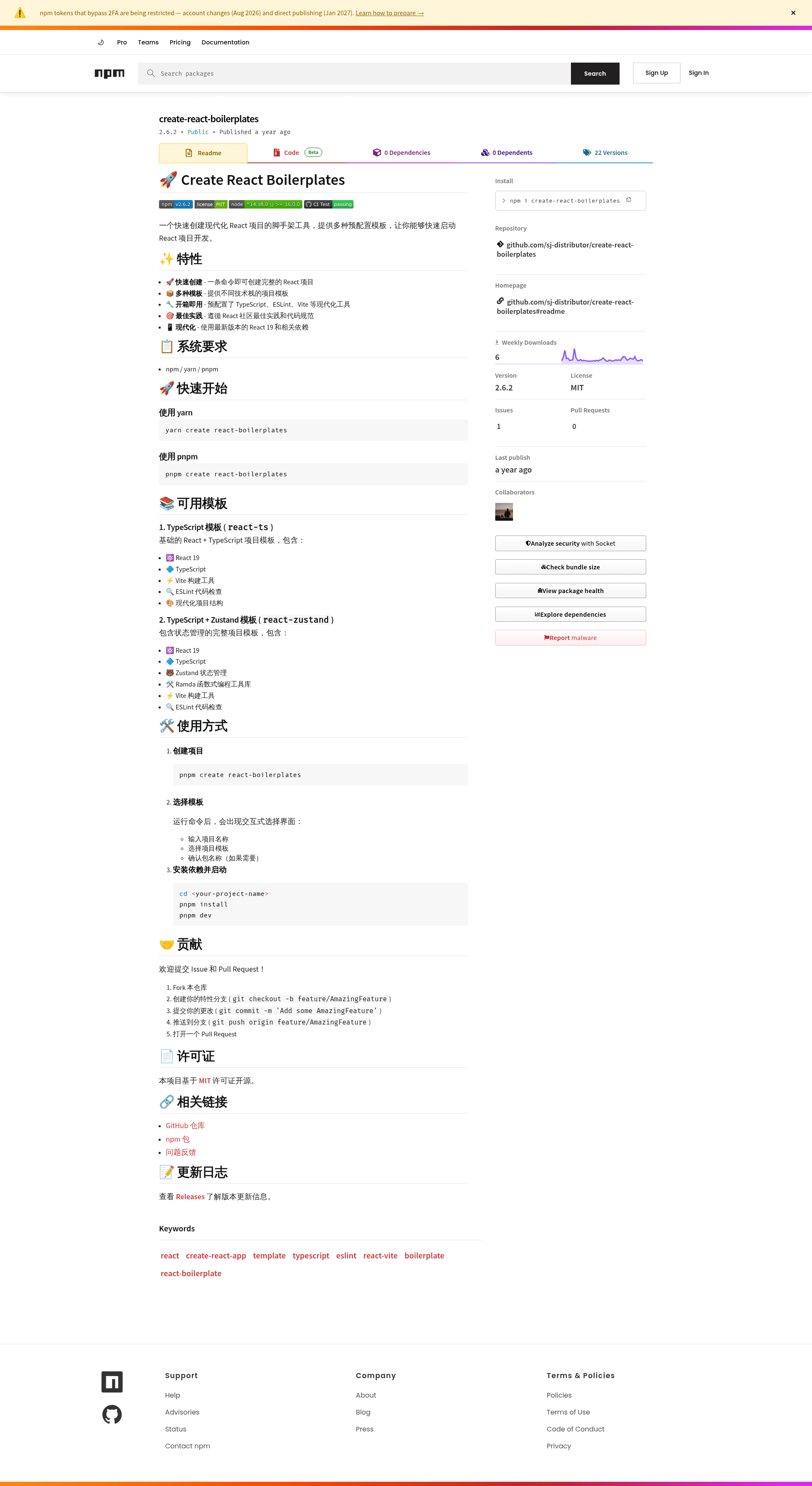
create-react-boilerplates is an open-source command-line scaffolding tool that generates ready-to-run React 19 projects through an interactive template picker, published on npm by sj-distributor.
What is create-react-boilerplates?
create-react-boilerplates is a CLI tool that takes a project name and a template choice as interactive inputs and outputs a complete React project directory preconfigured with TypeScript, ESLint, and the Vite build tool. The tool runs on any system with npm, yarn, or pnpm and is distributed via npm under a MIT license. It currently ships two templates: react-ts for a plain React + TypeScript setup and react-zustand which adds Zustand state management and the Ramda functional utility library.
Key Features
- One-command scaffolding — Run
pnpm create react-boilerplates(or the yarn/npm equivalent) to generate a full project without manual configuration. - Interactive CLI — The tool prompts you for a project name, lets you select between the two templates, and asks for package name confirmation when needed.
- React 19 by default — Both templates build on the latest React version, so new projects start from a current baseline.
- Two template variants —
react-tsincludes React 19, TypeScript, Vite, ESLint, and a modern project structure;react-zustandadds Zustand for state management and Ramda for functional programming utilities. - Out-of-the-box tooling — TypeScript for type safety, ESLint for code linting, and Vite for fast development builds are preconfigured in every generated project.
- Fast to start developing — After scaffolding, the documented workflow is
pnpm installfollowed bypnpm devto launch the development server. - Open-source contribution flow — Fork the repository on GitHub, create a feature branch, commit changes, push, and open a pull request; the project uses an MIT license.
Who is it for?
- React developers starting new projects — Use the CLI to get a working project skeleton with TypeScript, ESLint, and Vite already wired up instead of configuring each tool by hand.
- Teams building stateful applications — Pick the
react-zustandtemplate to receive a project with Zustand store setup and Ramda helpers ready to use. - Open-source contributors — Add new boilerplate templates to the repository by following the contribution guidelines and submitting a pull request for review.
Use cases
- Frontend developers: scaffold a React 19 + Vite + TypeScript project in one command and immediately run
pnpm dev. - Developers adopting state management: generate the
react-zustandtemplate to start with Zustand and Ramda preconfigured. - Maintainers and contributors: extend the tool by proposing new templates or improving the existing ones through GitHub pull requests.
How does it work?
- Run
pnpm create react-boilerplates(or use yarn/npm). - In the interactive prompt, enter a project name, choose a template (
react-tsorreact-zustand), and confirm the package name if requested. - The CLI writes a new project folder. Navigate into it, run
pnpm installto install dependencies, thenpnpm devto start the Vite development server.
FAQ
Is create-react-boilerplates free?
Yes. The project is released under the MIT License, so it is free to use, modify, and distribute for both personal and commercial projects.
What templates are included?
The current version includes two templates: react-ts, which bundles React 19, TypeScript, Vite, and ESLint; and react-zustand, which adds the Zustand state management library and the Ramda functional utility library to the same base stack.
What package managers are supported?
The tool works with npm, yarn, and pnpm. The quick-start examples show yarn create react-boilerplates and pnpm create react-boilerplates; npm's npm create command works the same way.
Which React version does it use?
Both templates are built on React 19, the latest major release at the time of writing, along with Vite as the build tool.
How can I contribute?
Fork the GitHub repository, create a feature branch, commit your changes, push the branch, and open a pull request. The project also tracks releases and a changelog in the GitHub Releases section.