Template details
Now-ui Dashboard Pro Laravel
Bootstrap 4 admin dashboard for Laravel with role, user, tag, category, and item management examples.
About this template
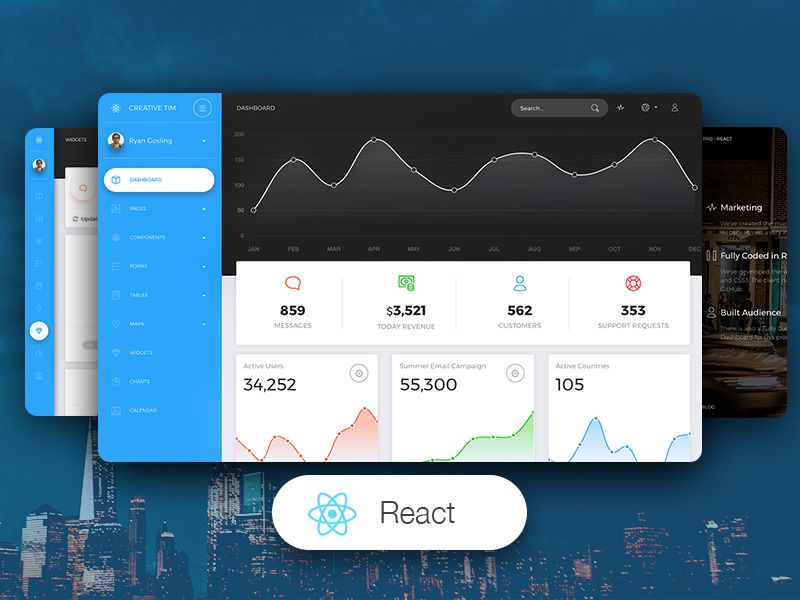
Now-ui Dashboard Pro Laravel is a premium Bootstrap 4 admin dashboard template from Creative Tim that packages the Now UI Dashboard design system into a Laravel application with ready-to-use role, user, tag, category, and item management examples. The template targets Laravel Framework 9.x and up (the repository metadata lists 11.x), uses the Now UI Dashboard v1.4.1 frontend, and ships with controllers, form requests, blade views, migrations, seeders, policies, and observers already wired into routes/web.php.
What is Now-ui Dashboard Pro Laravel?
Now-ui Dashboard Pro Laravel is a Laravel admin panel template built on Bootstrap 4 that turns a fresh Laravel installation into a functional dashboard with authentication and CRUD management examples. It takes a Laravel project with PHP and MySQL as input and produces a running admin interface with seeded roles and users, plus example pages for dashboard, profile, roles, users, tags, categories, and items. The template is produced by Creative Tim with backend integration by UPDIVISION and is based on the Now UI Dashboard Pro HTML theme.
Key Features
- Role management — Default Admin, Creator, and Member roles are seeded via RolesTableSeeder, with authorization policies in App\Policies\RolePolicy.php and no support for role deletion.
- User management — Add, edit, and delete users through UserController, with profile picture storage, role assignment, and validation rules in App\Http\Requests\UserRequest.
- Tag and category management — Both have dedicated CRUD pages; tags include a color field, and deletion is blocked when a tag or category is attached to items.
- Item management — The most advanced example: items have a picture, a category, multiple tags, a status (published/draft/archive), and a date; an ItemObserver deletes pictures from disk and detaches tags on deletion.
- Profile editing — Users can update their name, email, profile picture, and password via ProfileController, with current-password validation from App\Rules\CurrentPasswordCheckRule.
- Auth scaffold — Login, registration, password reset, and email verification controllers and blade views are included from Laravel's auth system.
- Frontend plugins — The dashboard ships with ChartJS, FullCalendar, DataTables, SweetAlert2, bootstrap-selectpicker, jquery-jvectormap, nouislider, and other jQuery plugins in public assets.
- Demo pages — Beyond the CRUD examples, the template includes pages for calendar, charts, maps (google and vector), tables, forms, pricing, timeline, typography, widgets, and more under resources/views/pages.
Who is it for?
Laravel developers who need a starting point for admin panels with authentication and role-based access control. Agencies building custom backends for clients can use the seeded roles and CRUD examples as templates for their own models. Product teams that want a polished Bootstrap 4 interface can extend the existing controllers, requests, and blade views instead of starting from scratch.
What can you do with it?
- Admin users: Log in with admin@nowui.com and manage roles, users, categories, tags, and items from the dedicated sidebar pages.
- Creator users: Log in with creator@nowui.com to create and edit categories, tags, and items while lacking access to role and user management.
- Member users: Log in with member@nowui.com to update their profile and view the list of items.
- Developers: Run
php artisan migrate --seedto populate the database with sample roles, users, categories, tags, and items, then modify the seeded data and policies.
How does installation work?
Installation follows a standard Laravel setup: unzip the archive, run composer install, copy .env.example to .env and configure the database, run php artisan key:generate, then php artisan migrate --seed to create tables and seed roles and users. A final php artisan storage:link creates the public storage symlink for uploaded pictures.
FAQ
What Laravel version is supported?
The README states Laravel Framework 9.x and up, while the repository metadata on GitHub lists Laravel Framework 11.x. The template uses standard Laravel auth scaffolding, so it is compatible with contemporary Laravel releases.
What default users are seeded?
Three users are seeded: admin@nowui.com, creator@nowui.com, and member@nowui.com, all with the password secret. They map to the Admin, Creator, and Member roles respectively.
Can I delete roles?
No. The role management section allows adding and editing roles, but deletion is intentionally not supported. Tags and categories can be deleted only when they are not attached to any items.
What file structure is included?
The template includes app/Http/Controllers, app/Http/Requests, app/Policies, app/Observers, database/migrations, database/seeds, and resources/views organized by feature. Routes are pre-defined in routes/web.php, and the public/now folder contains a copy of the frontend assets.