Template details
Page Transitions Travelapp
Travel App, Native-like Page Transitions
About this template
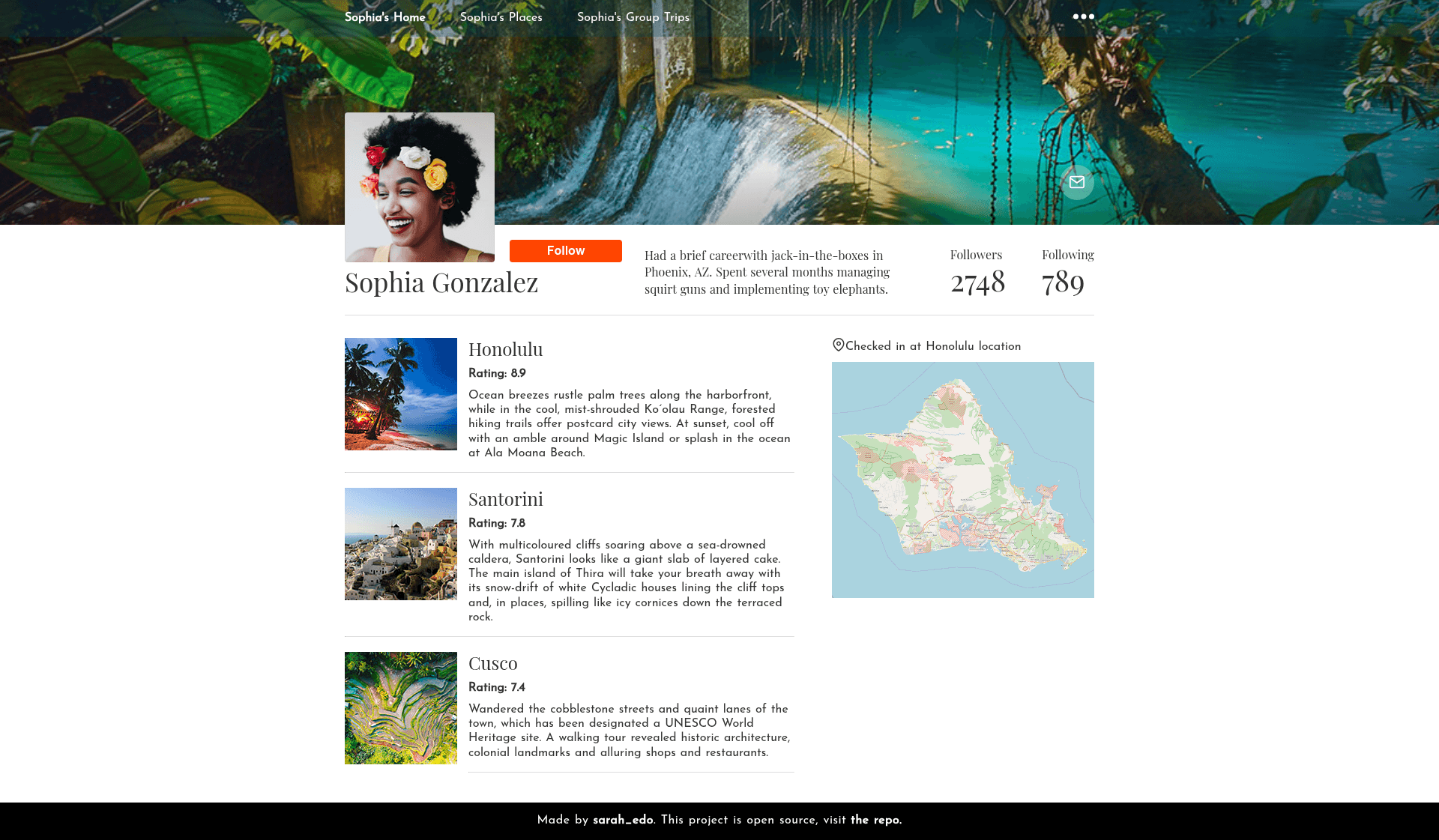
Page Transitions Travelapp is a Nuxt.js boilerplate that demonstrates native-like page transitions inside a travel app interface. It is a public GitHub repository with 1,717 stars, built to show how Vue.js applications can achieve smooth, app-like navigation in the browser.
What is Page Transitions Travelapp?
Page Transitions Travelapp is a frontend demo project built on Nuxt.js, the Vue.js framework for universal applications. As input it takes no data or API; it is purely a UI template presenting a multi-screen travel booking experience. As output it produces a complete Nuxt application that can be started in development, built for production, or generated as static HTML. The repository's core purpose is to showcase how page transitions can mimic the feel of a native mobile app on the web.
Key Features
- Native-like page transitions — Implements mobile-style transitions between pages using Vue/Nuxt transition hooks, the main selling point of the project.
- Travel app interface — Includes realistic travel booking screens, such as destination browsing and detail views, providing a concrete scenario for testing transitions.
- Nuxt.js foundation — Leverages Nuxt's file-based routing, server-side rendering, and static generation capabilities out of the box.
- SCSS styling — The visuals are authored in SCSS, giving developers variables, mixins, and nested syntax for maintainable styles.
- Hot reload development server — Running
yarn devstarts a live-reloading server at localhost:3000, so changes appear immediately. - Production build and static export —
yarn buildandyarn startrun the app on a Node server, whileyarn generatecreates a fully static site for any hosting provider.
Who is it for?
- Vue and Nuxt developers who want to learn how to implement native-like transitions can read the code and reuse the patterns in their own projects.
- Mobile-first web teams building travel or booking products can use this as a visual prototype to validate navigation interactions before writing production code.
- UI/UX designers evaluating transition styles can run the demo locally and compare how different page changes feel to users.
- Educators and workshop leaders can use the travel app as a concrete example when teaching animation concepts in the Vue ecosystem.
What can you do with Page Transitions Travelapp?
- Experiment with transitions: Modify the page transition components to change the animation type, duration, and easing, then observe the effect in the travel app.
- Bootstrap a new Nuxt project: Clone the repository and replace the travel content with your own screens, keeping the transition infrastructure intact.
- Test on real devices: Serve the static build with
yarn generateand deploy to hosting to evaluate the transition performance on mobile browsers. - Study Vue internals: Follow how Nuxt integrates page transitions with the router and component lifecycle to deepen your understanding of the framework.
How does Page Transitions Travelapp work?
The project follows Nuxt's standard workflow. First, install dependencies with yarn install. Then run yarn dev to start a development server with hot reload at localhost:3000. To deploy, yarn build compiles the app and yarn start serves it; alternatively, yarn generate pre-renders the whole site into static HTML, CSS, and JavaScript files.