Template details
Personal Portfolio Template
A responsive single-page portfolio template for software developers, built with HTML5, CSS3, Typed.js, and Materialize, hosted on GitHub Pages.
About this template
Personal Portfolio Template is an open-source, static single-page portfolio template for software developers, designed to be hosted on GitHub Pages and customized by editing plain HTML.
What is Personal Portfolio Template?
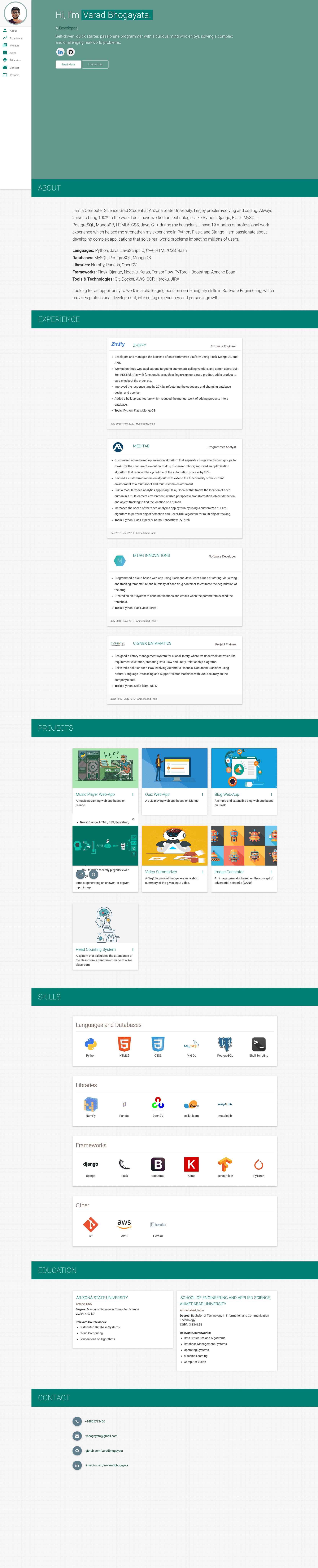
Personal Portfolio Template is a responsive, single-page website built with HTML5, CSS3, and JavaScript, with styling from the Materialize CSS framework and a typing effect from Typed.js. It takes your personal details, projects, and resume information entered directly in index.html and outputs a clean portfolio site with seven sections: About me, Experience, Projects, Skills, Education, Contact Info, and Resume. The template is maintained by Varad Bhogayata and deployed live at https://varadbhogayata.github.io.
Key Features
- Fully responsive — The layout uses Materialize CSS grid and components to adapt to mobile, tablet, and desktop widths.
- Typing animation — The hero heading rotates through keywords using the Typed.js JavaScript library.
- Seven ready-made sections — About me, Experience, Projects, Skills, Education, Contact Info, and Resume are included as editable markup in one HTML file.
- Easy to modify — All content lives in a single index.html, with images stored under assets/img/ for simple swaps.
- GitHub Pages ready — The README walks through pushing the code to a your-username.github.io repository for free hosting.
- Google Analytics hookup — A script tag with a placeholder analyticsId is included; replace it with your own tracking ID.
- MIT License — The project can be freely used, modified, and redistributed under the MIT license.
Who is it for?
- Software developers — Set up a personal branding page in under an hour by replacing the placeholder text and images.
- Computer science students — Showcase coursework, internships, and a resume link for job and graduate-school applications.
- Freelance developers — Display a project portfolio and contact links so potential clients can get in touch.
What can you do with it?
- Job seekers: Edit index.html to list your work experience, education, and projects, then deploy to GitHub Pages under your own username subdomain.
- Students: Add project screenshots in assets/img/ and link a PDF resume in the Resume section to create a one-page professional site.
- Open-source contributors: Fork the repository and use it as a starting point for a content-focused personal website.
How does it work?
- Clone the repository and modify the content of index.html for your details.
- Add or remove images from varadbhogayata.github.io/assets/img/ as needed.
- Create a GitHub repository named your-username.github.io, push the files to the master branch, and GitHub Pages serves the site automatically.
Pros and cons
- Pros: No build tools or dependencies; deploy free on GitHub Pages; simple single-file content editing.
- Cons: All content is in one HTML file, so large portfolios get unwieldy; customizing beyond the default design requires editing the CSS directly.
Pricing
Free — the template is published under the MIT License, so there are no fees or licensing costs.
FAQ
Is this portfolio template free?
Yes, the project is released under the MIT License, which allows free personal and commercial use, modification, and redistribution.
How do I deploy this template to GitHub Pages?
Create a GitHub repository named your-username.github.io, push this project's code to the master branch, and GitHub Pages will automatically serve the site at https://your-username.github.io.
What sections does the template include?
It includes About me, Experience, Projects, Skills, Education, Contact Info, and a Resume section, all editable in index.html.
Can I use my own Google Analytics?
Yes, replace the placeholder analyticsId in the included Google Analytics script tag with your own account ID to track site visitors.