Template details
Personal Portfolio Website
Gatsby-powered personal portfolio website with GitHub Pages deployment, based on Brittany Chiang's design.
About this template
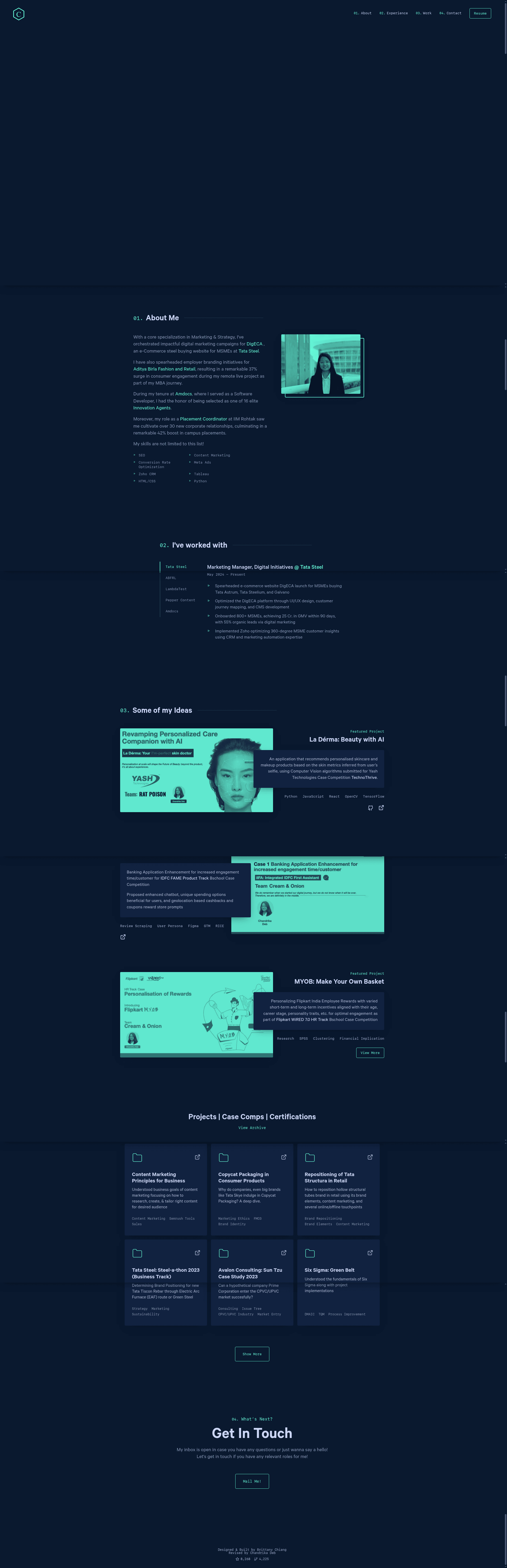
Personal Portfolio Website is a Gatsby-based personal portfolio template that generates a static site deployable to GitHub Pages, created by Chandrika Deb as the second version of chandrikadeb7.github.io.
What is Personal Portfolio Website?
Personal Portfolio Website is an open-source portfolio template built with the Gatsby static site generator and React, designed to be hosted on GitHub Pages. It takes your content and configuration as input and outputs a static personal portfolio site. The project is maintained by Chandrika Deb and is a fork of the design originally created by Brittany Chiang, with credit required.
Key Features
- Gatsby static site generator — Builds a static portfolio using Gatsby and React, with npm scripts for development and production builds.
- GitHub Pages deployment — Includes a deploy script (
npm run deploy) that pushes the production build to GitHub Pages automatically. - Color reference palette — Provides a defined color scheme with eight hex values: Navy
#0a192f, Light Navy#172a45, Lightest Navy#303C55, Slate#8892b0, Light Slate#a8b2d1, Lightest Slate#ccd6f6, White#e6f1ff, and Green#64ffda. - Node version requirements — Requires Node.js 18 or 20 and the Gatsby CLI, with an nvm config for installing the correct Node version.
- Forkable with attribution — The repository explicitly permits forking, provided users link back to brittanychiang.com for credit.
- Based on a professional design — The layout is inherited from Brittany Chiang's portfolio, a well-known developer portfolio design.
Who is it for?
Personal Portfolio Website is for developers, designers, and students who want a polished single-page portfolio without building one from scratch. It suits anyone comfortable with the command line who wants to deploy a portfolio to GitHub Pages for free. It also works as a learning tool for developers exploring the Gatsby framework and static site workflows.
What can you do with it?
- Job-seeking developers: Create a professional portfolio site to showcase projects, experience, and contact links, then deploy it to GitHub Pages at no cost.
- Gatsby learners: Study a real-world Gatsby project structure, including gatsby-cli usage, build commands, and production deployment scripts.
- Open-source contributors: Fork the repository, customize the color palette and content, and use the included nvm and npm scripts to streamline local development.
How does it work?
The template follows a standard Gatsby workflow: install the Gatsby CLI globally, install the correct Node version (18 or 20) via nvm, then run gatsby build to generate the static site or npm start to launch the development server on localhost. For production, run gatsby build followed by npm run deploy to publish the site to GitHub Pages.
FAQ
Is this portfolio template free?
Yes, the repository is open source and explicitly allows forking. The only requirement is giving proper credit by linking back to brittanychiang.com, the original design source.
What Node.js version do I need?
The setup instructions require Node.js 18 or 20 and recommend using NVM to install the correct version. The Gatsby CLI is installed globally with npm before building.
How do I deploy my portfolio to GitHub Pages?
After building the static site with gatsby build, run npm run deploy. This script generates the production build and pushes it to GitHub Pages hosting.
Can I customize the colors?
Yes, the README provides a color reference table with eight hex values, so you can update the theme colors of the portfolio to match your personal brand.