Template details
Phantom Jekyll Theme
A Jekyll version of the 'Phantom' theme by HTML5 UP.
About this template
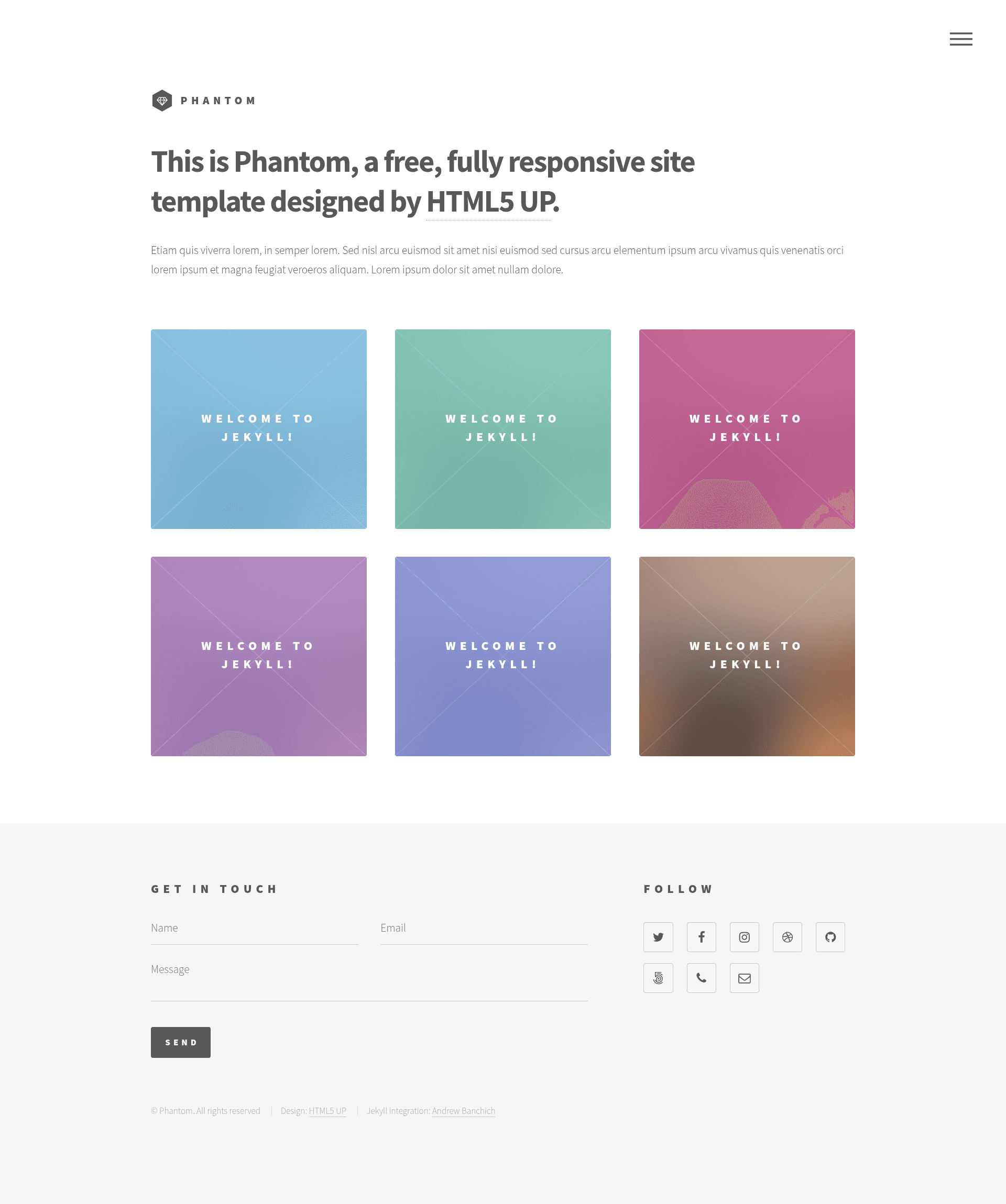
Phantom Jekyll Theme is an open-source Jekyll port of the 'Phantom' design by HTML5 UP that generates a grid-based image-tile portfolio website from Markdown content and a single _config.yml file.
The repository is marked WIP (work in progress), so two advertised features are still planned rather than implemented.
What is the Phantom Jekyll Theme?
The Phantom Jekyll Theme is a Jekyll-based reimplementation of the 'Phantom' template by HTML5 UP. It takes Markdown posts and YAML configuration as input and produces a static website built around a grid of large, colorful, semi-interactive image tiles. It is maintained by Andrew Banchich on GitLab, with a GitHub mirror repository.
Key Features
The Phantom Jekyll Theme runs on Jekyll and carries over the original Phantom design's Sass styling, jQuery interactions, and Font Awesome icons. Its concrete Jekyll integrations include:
- Formspree contact form integration — add your email address to
_config.ymland the contact form submits through Formspree.io without a custom backend. - Social profile links — enter usernames for supported social networks in
_config.yml; only the buttons you configure appear in the site footer. - Flexible site logo — set any image or a Font Awesome icon class in
_config.yml; an icon class overrides the default image logo. - Grid of image tiles — the homepage showcases posts as large, colorful tiles with semi-interactive hover states, based on the original HTML5 UP design.
- Generic page template — includes a ready-made generic page (besides the homepage) for content like about or contact.
- Jekyll-native workflows — uses standard Jekyll front matter, posts, and pages, so it works with GitHub Pages and GitLab Pages.
- Coming soon: featured images — front matter fields for featured images and thumbnails on the homepage posts grid are planned.
- Coming soon: featured image height control — a
_config.ymlsetting to either enforce a set image height or display the full image is planned.
Who is it for?
The Phantom Jekyll Theme is for Jekyll users who want a visual portfolio with a grid of image tiles. Specifically:
- Photographers and visual artists: showcase a portfolio of images as clickable tiles, each linking to a post or page.
- Freelancers and small-business owners: build a simple marketing site with a contact form and links to social profiles.
- Jekyll beginners: learn Jekyll by forking the repository, editing
_config.yml, and publishing the result on GitHub Pages or GitLab Pages.
What can you do with the Phantom Jekyll Theme?
- Display a portfolio grid: publish a series of posts, each with a title and tile, to create an image-heavy homepage.
- Collect messages via Formspree: set your email in
_config.ymland receive contact-form submissions without writing server code. - Link your social profiles: add usernames to
_config.ymlto automatically generate footer buttons for the networks you use. - Customize the logo: swap in your own image or a Font Awesome icon class to brand the site.
How does the Phantom Jekyll Theme work?
Setup follows the standard Jekyll workflow. Fork the repository, edit _config.yml with your site details, and write content as Markdown posts or pages. On GitHub, create a branch named gh-pages for publishing; on GitLab, the project is ready to publish from the default branch.
Pricing
The theme is open source and free to download from its GitLab repository or the GitHub mirror. The original HTML5 UP 'Phantom' design it is based on is also free for personal and commercial use under the CCA 3.0 license.
FAQ
Is the Phantom Jekyll Theme free?
Yes, this is an open-source Jekyll theme hosted on GitLab with a GitHub mirror, so you can download and use it without paying. The original HTML5 UP Phantom design is also free for personal and commercial use under the CCA 3.0 license.
How do I install the Phantom Jekyll Theme?
Fork the GitLab repository, or fork the GitHub mirror and create a branch named gh-pages. Then edit the _config.yml file to set your site title, social usernames, and other options, and add your posts as Markdown files.
What is the Formspree integration?
The theme includes a contact form that submits to Formspree.io. To activate it, add your email address to the _config.yml file. The form then forwards submissions to that email without requiring a custom backend.
What features are listed as coming soon?
The README lists two planned features: support for featured images and thumbnails in front matter for the homepage posts grid, and a _config.yml setting to control whether featured images use a fixed height or display the full image.
Where can I report a bug or request a feature?
Report issues on the GitLab repository (andrewbanchich/phantom-jekyll-theme). You can also email incoming+andrewbanchich/phantom-jekyll-theme@incoming.gitlab.com. The GitHub repository is a mirror, so issue tracking happens on GitLab.