Template details
Pillar
A minimal Jekyll Theme to host your resume (CV)
About this template
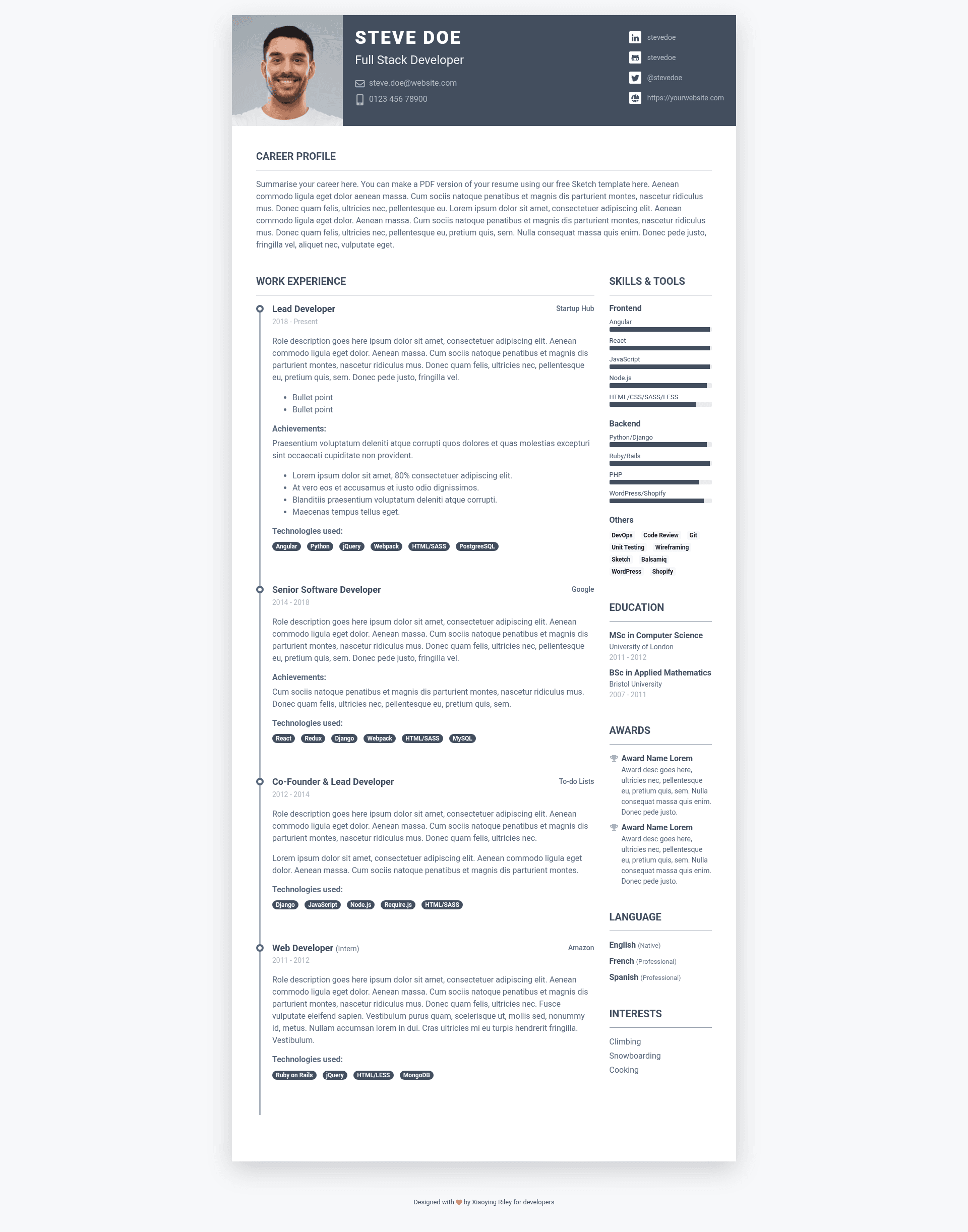
Pillar is a minimal Jekyll theme created by Xiaoying Riley at 3rd Wave Media for hosting a resume or CV as a static website. It is designed for job seekers and professionals who want a clean, fast-loading online presence without a database or complex CMS.
What is Pillar?
Pillar is a Jekyll theme that turns plain content files into a static resume website. It takes Markdown or HTML content and configuration data as input, and Jekyll generates a set of static HTML pages as output. The theme runs on Jekyll, the Ruby-based static site generator, so it can be deployed to GitHub Pages or any web server. The project is licensed under the MIT license, and its repository explicitly lists topics like online-cv, resume-template, and resume-website.
What makes Pillar stand out?
- Minimal design — The theme prioritizes content over decoration, giving resumes and CVs a clean, professional appearance.
- Skins support — The documentation includes a "Skins" section, which indicates the theme offers multiple visual color or style variants that you can apply.
- Jekyll platform — Built for Jekyll, the theme benefits from the generator's simple file-based structure, easy version control, and compatibility with GitHub Pages.
- Resume/CV focus — Unlike general-purpose themes, Pillar is tailored specifically for presenting professional experience, education, and skills.
- MIT license — The theme is free to use, modify, and redistribute, both personally and commercially.
- Simple installation — The repository includes installation instructions, making it straightforward to get a resume site running.
Who should use Pillar?
- Job seekers — Anyone who wants a personal resume website to share with recruiters or include on applications.
- Developers — Programmers comfortable with Jekyll who want a lightweight base to build a personal bio or portfolio page.
- Freelancers — Independent professionals who need a simple, no-frills page to present their services and background.
What can you do with Pillar?
- Create an online CV — Publish your resume as a fast-loading static site that works on any device.
- Host on GitHub Pages — Free hosting by pushing the Jekyll site to a GitHub repository.
- Customize the look — Apply a skin or modify the Jekyll templates to match your personal brand.
How does Pillar work?
Pillar follows the standard Jekyll workflow: you install Jekyll, obtain the theme files, edit configuration and content, and run the build command to output a static HTML site. The repository's Installation section covers these steps, and the Skins section explains how to switch between available visual variants.
FAQ
Is Pillar free?
Yes. Pillar is released under the MIT license, so you can use, modify, and distribute it without licensing fees.
What do I need to run Pillar?
You need a Jekyll environment, typically Ruby and Bundler, or you can use GitHub Pages which supports Jekyll themes directly.
Can I customize the theme?
Yes. Since it is a Jekyll theme, you can edit templates, styles, and configuration files, and optionally use the included skins to change the design.