Template details
MacOS Terminal Portfolio
Interactive macOS-inspired portfolio with AI-powered chat, dynamic backgrounds, and SEO optimization
About this template
MacOS Terminal Portfolio - Astro Theme
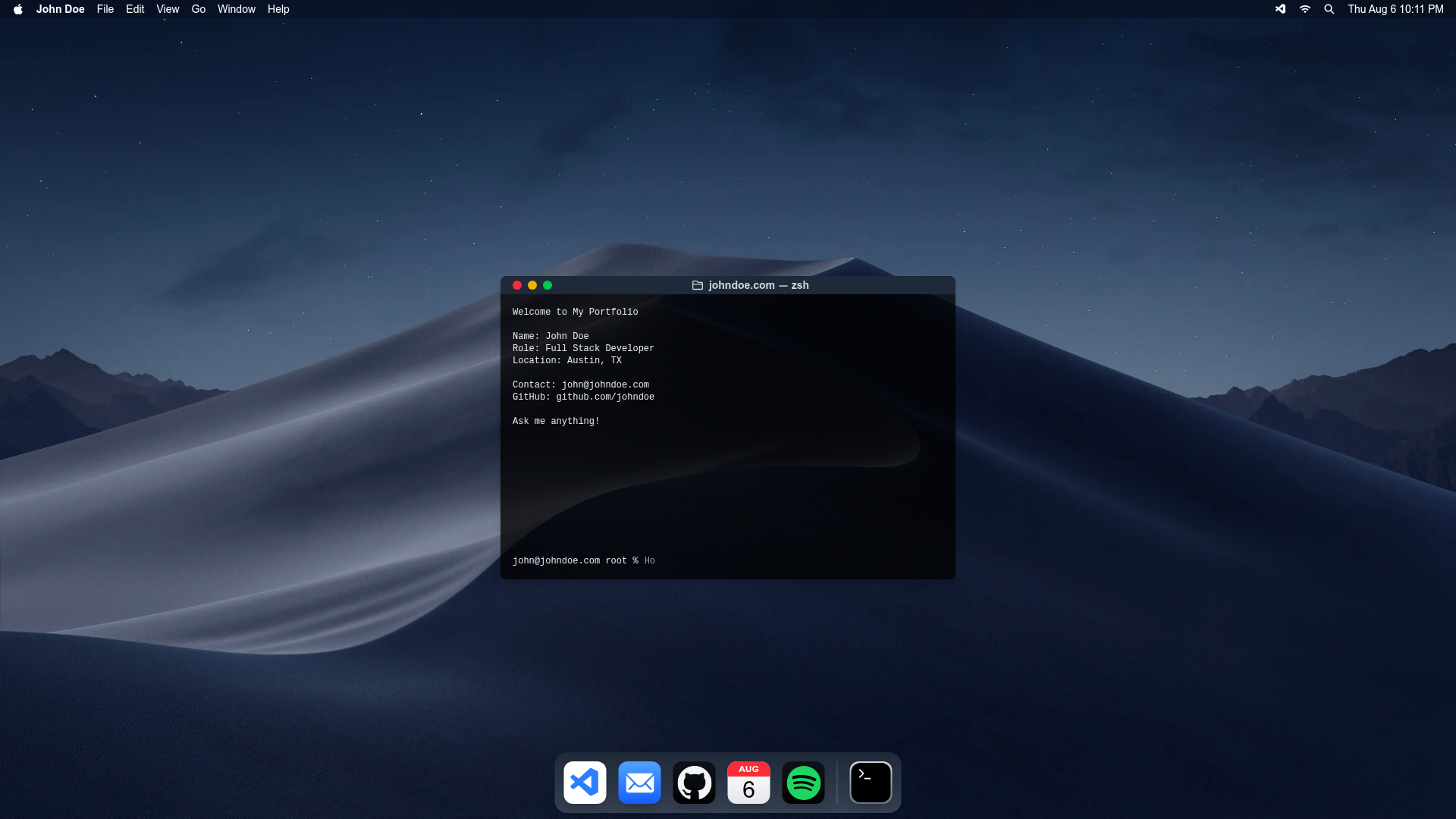
MacOS Terminal Portfolio is an Astro portfolio theme that recreates a macOS desktop interface with an AI-powered terminal chat, dynamic wallpapers, and a responsive dock.
What is MacOS Terminal Portfolio?
MacOS Terminal Portfolio is an open-source Astro theme for building a portfolio website styled as a macOS desktop. It takes your personal details, OpenAI API key, and background images as input, and produces a static site with a rotating wallpaper, a macOS-style dock, and a terminal chat widget that talks to OpenAI. The theme is authored by Johnny Culbreth in Austin, TX and is built with Astro, React, TypeScript, and Tailwind CSS.
Key Features
- OpenAI-powered terminal chat — Visitors type prompts into a terminal and receive AI-generated answers; the system prompt, welcome message, and placeholder text are configurable in src/components/global/MacTerminal.tsx.
- Dynamic rotating wallpapers — The desktop background cycles through images in src/assets/images/ automatically.
- Responsive macOS-style dock — Separate DesktopDock.tsx and MobileDock.tsx components serve desktop and mobile users with different shortcut layouts.
- Built-in SEO optimization — Uses @astrolib/seo with configurable meta tags in src/pages/index.astro and src/components/global/BaseHead.astro.
- Automated sitemap generation — @astrojs/sitemap creates the sitemap automatically; settings are in astro.config.mjs.
- Customizable system prompts — Both the OpenAI system prompt and the terminal's UI copy are editable in one component.
- Tailwind CSS styling — Utility classes keep the macOS look responsive and consistent.
- Vercel deployment ready — The repo includes @astrojs/vercel and astro.config.mjs is preconfigured for Vercel; other platforms require editing that config.
Who is it for?
- Front-end developers who want a portfolio that shows off a novel, interactive interface instead of a traditional blog-style layout.
- AI enthusiasts who want visitors to ask their portfolio questions through a terminal chat driven by their own OpenAI key.
- Astro users looking for a ready-made theme that already wires React islands, TypeScript, and Tailwind together.
What can you do with it?
- Make your portfolio memorable: replace the default background images and dock icons to reflect your brand while keeping the terminal and desktop window metaphor.
- Let visitors chat with your résumé: with your OpenAI key in place, guests can ask the terminal about your skills, projects, or background and get conversational replies.
- Ship to production quickly: clone the repo, run npm install, drop in a .env file with OPENAI_API_KEY, and deploy to Vercel with no extra build steps.
How does it work?
Setup follows a standard Astro flow: git clone the repository, run npm install, copy .env.example to .env, add your OPENAI_API_KEY, then run npm run dev. The only prerequisites are Node.js v18 or higher and, if you want the chat to respond, a valid OpenAI API key.
FAQ
Does it require an OpenAI API key?
Yes, for the terminal chat to return AI responses you must set OPENAI_API_KEY in a .env file. Without the key the wallpaper, dock, and page content still work, but the chat will not reply.
Can I change the dock icons?
Yes. Dock shortcuts are defined in src/components/global/DesktopDock.tsx (desktop) and MobileDock.tsx (mobile), so you can add, remove, or reorder shortcuts by editing those components.
Is this theme free to use?
Yes. It is licensed under the MIT License, so you can use and modify it for personal or commercial portfolios without cost.
How do I update the SEO metadata?
Edit the meta tags in src/pages/index.astro for the homepage and src/components/global/BaseHead.astro for global head tags. The sitemap is generated automatically by @astrojs/sitemap.
Can I deploy somewhere other than Vercel?
Yes. The theme includes @astrojs/vercel, but you can switch to another Astro adapter by editing astro.config.mjs. The rest of the codebase is platform-agnostic.