Template details
Plainwhite Jekyll
A configurable portfolio-style Jekyll theme for writers.
About this template
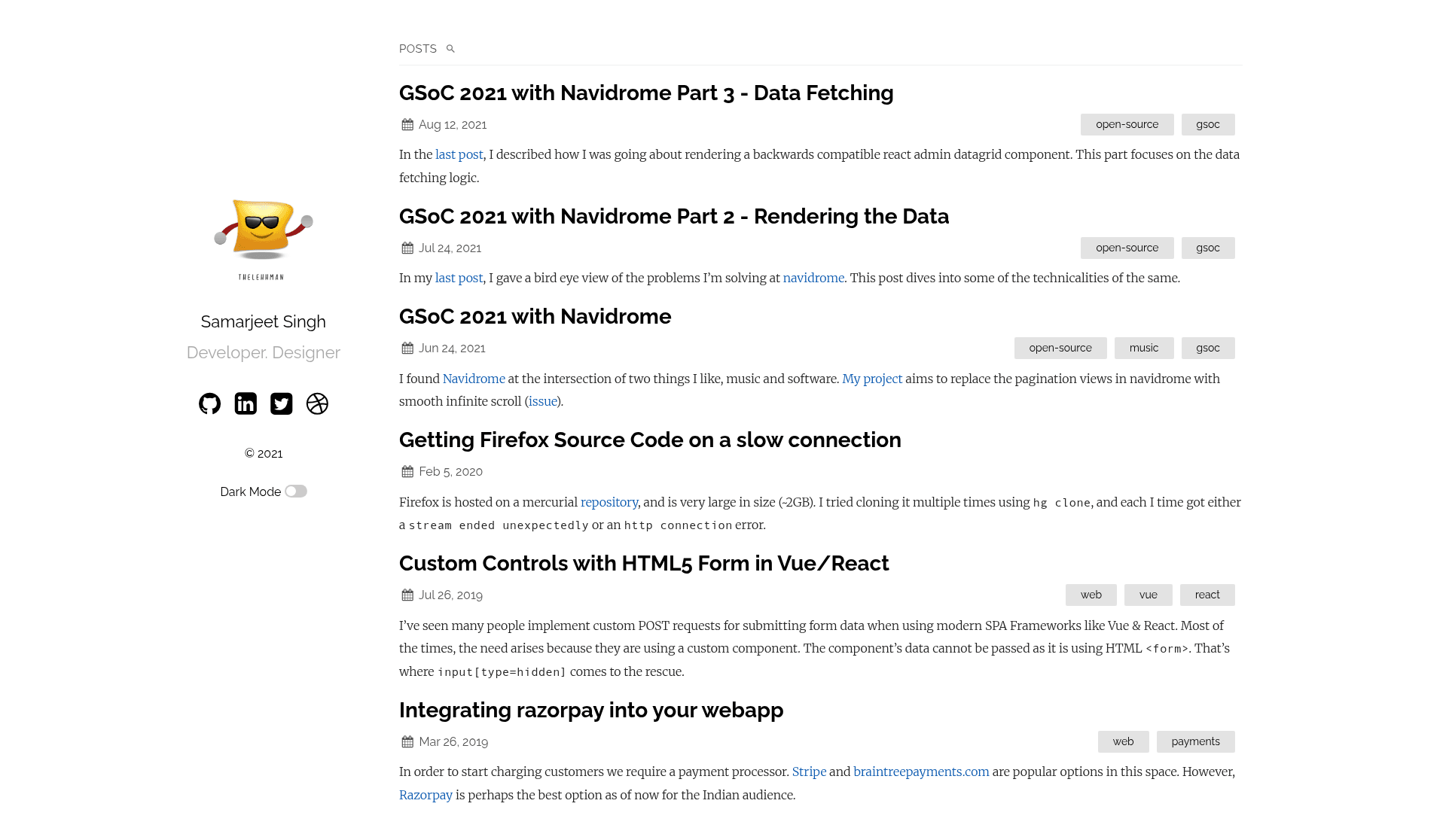
Plainwhite is a minimalist portfolio-style Jekyll theme for writers, distributed as a Ruby gem and GitHub-hosted remote_theme, that turns a standard Jekyll site into a personal blog and portfolio with a single line of configuration.
What is Plainwhite?
Plainwhite is an open-source Jekyll theme designed for writers and developers who want a clean, single-column portfolio and blog. It takes the standard Jekyll inputs — Markdown posts, pages, and a _config.yml file — and outputs a static HTML site with a sidebar portrait, tagline, and post list. The theme is maintained by Samar Sault (GitHub user samarsault), released under the MIT License, and has 471 stars on GitHub. It can be installed either as a gem (gem "plainwhite") or as a remote_theme on GitHub Pages (remote_theme: samarsault/plainwhite-jekyll).
Key Features
- Dark mode — Enable with a
dark_modeflag; the site checks the OS color scheme and saves the user's preference in a cookie. - Search bar — Turn on with a
searchflag; search is powered by Simple-Jekyll-Search and generates asearch.jsonfile in the site root with post metadata and content. - Disqus comments — Add comments to posts by setting
disqus_shortnamein theplainwhiteconfig block. - Google Analytics — Enable by providing an
analytics_id; no extra plugin needed. - Custom navigation — Define a list of title/url pairs to show a navigation menu.
- Portfolio image — Replace the placeholder profile image by adding
assets/portfolio.pngor overridingportfolio_image; support for a separate dark-mode image viaportfolio_image_dark. - Mobile condensed layout — Choose which layouts (home, post, page) show a condensed sidebar on narrow screens using the
condensed_mobileoption. - Configurable extras — Sitemap toggle, post excerpts (
show_excerpts), multiline taglines, custombaseurl, andhtml_langattribute are all set from_config.yml.
Who is it for?
- Writers — Publish a personal blog with a clean reading layout, optional Disqus comments, and a prominent profile image.
- Developers — Use Plainwhite as a portfolio site to showcase projects, with GitHub and LinkedIn social links configured in
social_links. - Freelancers — Set up a fast, static portfolio and resume without a CMS or build pipeline beyond Jekyll.
- GitHub Pages users — Deploy via
remote_themewith no local build required, ideal for personal project pages.
What can you do with Plainwhite?
- Personal blogging: Enable excerpts, search, and Disqus comments to create a full-featured blog from Markdown files.
- Portfolio showcase: Replace the placeholder image and tagline to display your name and profession, with links to social profiles.
- Dark-mode-friendly design: Provide two portfolio images so the sidebar looks good in both light and dark themes.
- Multilingual sites: Set
html_langto any valid language code to control the HTML lang attribute.
Alternatives
- Texture — Another minimalist Jekyll theme by the same author, also available on GitHub.
FAQ
Is Plainwhite free?
Yes. Plainwhite is open source under the MIT License, so it is free to use, modify, and distribute. You can also donate to the author via PayPal if you find it useful.
How do I install Plainwhite on GitHub Pages?
Add remote_theme: samarsault/plainwhite-jekyll to your _config.yml. No gem installation is needed for GitHub Pages.
Does Plainwhite support dark mode?
Yes, set plainwhite.dark_mode: true. The theme then adapts to the OS preferred color scheme and stores the choice in a cookie. You can provide a separate dark-mode portfolio image via portfolio_image_dark.
How do I enable search on my Plainwhite site?
Set plainwhite.search: true. The theme uses the Simple-Jekyll-Search plugin to generate a search.json file that the JavaScript searches for posts based on user input.
What layouts does Plainwhite include?
Plainwhite includes three layouts: Home, Page, and Post. You can control which layouts use the condensed mobile sidebar via the condensed_mobile setting.