Template details
Plumbus Landing Page
An Astro-powered landing page with cosmic animations, JSON content management, and MDX blog support.
About this template
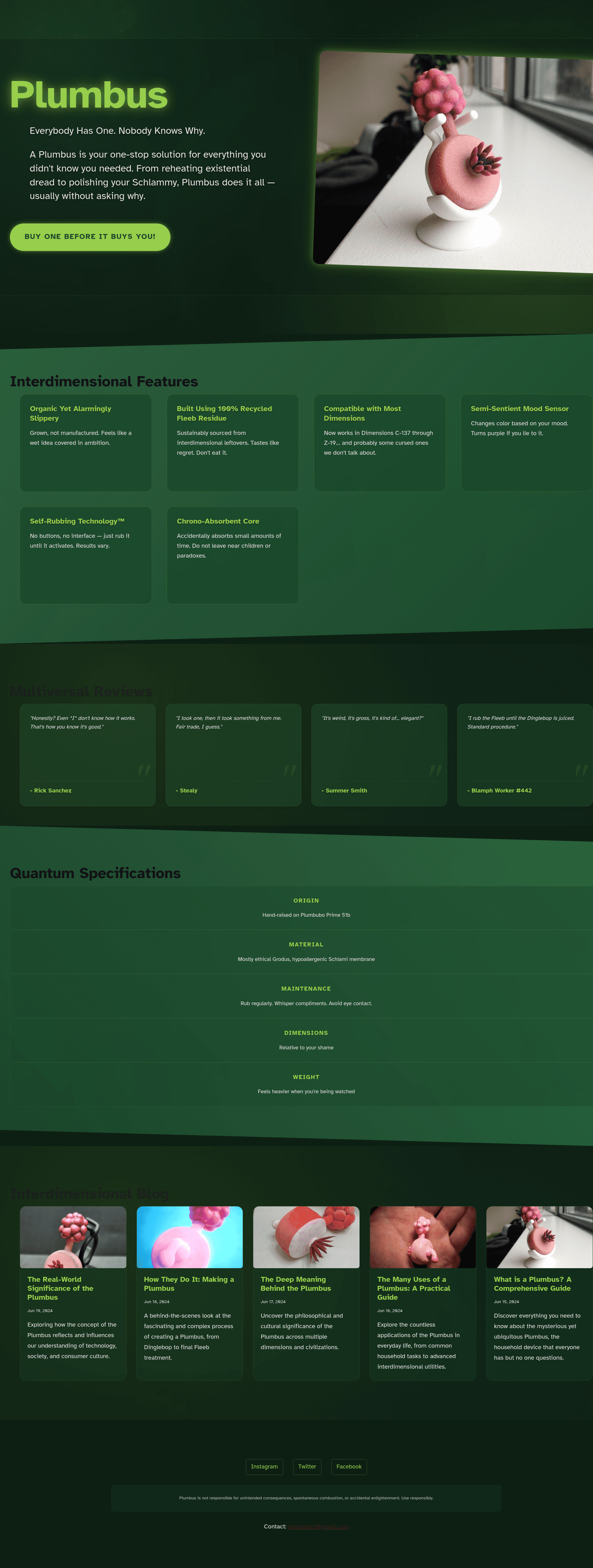
Plumbus Landing Page is a fictional product landing page template built with Astro, designed for content-driven sites, and distributed as a GitHub repository by temaprint. It combines a cosmic animation theme with a JSON-based content management system and an MDX blog. The template produces a fully static site with a landing page, shop page, about page, and blog section.
What is Plumbus Landing Page?
Plumbus Landing Page is an Astro-powered landing page template for a fictional product called the Plumbus. It takes content from a JSON file and Markdown/MDX files and outputs a static HTML site. The template runs on Astro and includes pages for the home landing, a shop (/shop/plumbus.astro), an about page, and a blog with dynamic slug routing. The repository is maintained by the GitHub user temaprint.
Key Features
- Astro framework — Built entirely on Astro, the web framework for content-driven websites, enabling fast static output.
- JSON content management — All site content, including product details, features, testimonials, SEO metadata, social links, and contact info, is stored in
src/content/data/main.jsonfor easy editing. - MDX blog support — Blog posts are stored as
.mdor.mdxfiles insrc/content/blog/, with support for custom frontmatter, hero images, syntax highlighting, and embedded components. - Cosmic animations and portal effects — Custom CSS animations, transitions, and interactive UI elements give the page an interdimensional theme.
- Responsive design — Fully responsive across all screen sizes, with modern CSS custom properties and lazy-loaded responsive images.
- SEO, RSS, and sitemap — The template includes SEO optimization, RSS feed support, and sitemap generation out of the box.
- Deployment-ready scripts — Includes
npm run buildto generate a production build andnpm run previewto preview it locally.
Who is Plumbus Landing Page for?
- Independent product developers who want a quirky, polished landing page with a built-in shop and blog can use this template to present their next product.
- Astro developers looking for a starting point with JSON-driven content and MDX blog support can adapt the structure for their own static sites.
- Fans of science-fiction humor can use the Plumbus theme as a playful portfolio or side-project page that stands out.
What can you do with Plumbus Landing Page?
- Launch a themed landing page: Customize
src/content/data/main.jsonwith your product name, description, and testimonials to create a unique launch page. - Publish an MDX blog: Add Markdown or MDX files to
src/content/blog/to create posts with rich formatting, code blocks, and embedded components. - Bring up a shop page: The included
/shop/plumbus.astroroute can be repurposed to showcase a product with its own details and specs. - Generate RSS and sitemap: The built-in RSS feed and sitemap generation help with content syndication and SEO.
How does Plumbus Landing Page work?
- Clone the repository from GitHub (
https://github.com/temaprint/plumbus.git). - Install dependencies with
npm install. - Start development with
npm run devand openhttp://localhost:4321. - Edit content in
src/content/data/main.jsonor add blog posts insrc/content/blog/. - Build a production version with
npm run buildand preview it withnpm run preview.
FAQ
How do I change the content on the landing page?
Edit the JSON file at src/content/data/main.json. It holds product details, feature lists, testimonials, SEO metadata, social links, legal disclaimers, and contact information. Save the file and the dev server will update the page automatically.
Does the template support blog posts?
Yes. Blog posts are stored as Markdown or MDX files in src/content/blog/. Each post can have custom frontmatter, hero images, rich text, code syntax highlighting, and embedded MDX components.
Is Plumbus Landing Page free to use?
Yes. The repository is published under the MIT License, so you can use and modify it freely across any dimension.
What pages are included?
The template includes an index page (index.astro), about page (about.astro), a shop page (shop/plumbus.astro), and a dynamic blog page (blog/[...slug].astro). All these are built with Astro and styled with global styles in src/styles/global.css.
How do I deploy the site?
Run npm run build to generate a production build of the site, then host the resulting files on any static hosting service. You can use npm run preview locally to verify the build before deploying.