Template details
ProductLog Theme
A NextJS changelog theme for products with Notion support, analytics, and SEO-friendly design.
About this template
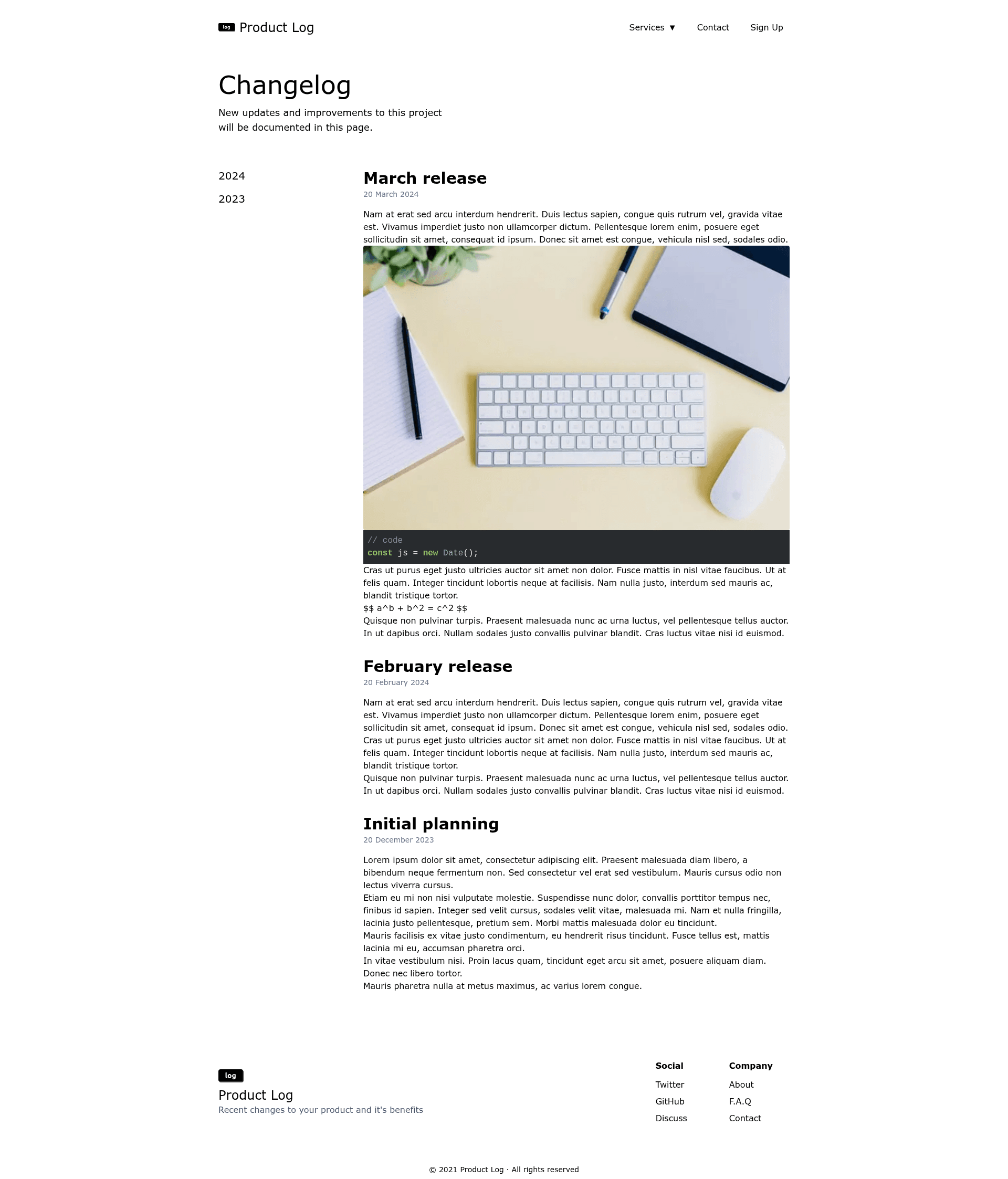
ProductLog Theme is a free, open-source Next.js template for publishing a product's changelog as a static, SEO-friendly website, with Notion as an optional content source and built-in analytics integrations.
What is ProductLog Theme?
ProductLog Theme is a Next.js-based changelog theme that turns changelog entries written as files—or pulled from a Notion page—into a mobile-friendly, performance-optimized website. It outputs static pages you can deploy on Vercel, Netlify, or any static host. The theme was created by Varun A (apvarun) and is released under the MIT license.
Key Features
- Excellent Lighthouse score — The theme is engineered for performance, aiming for top scores in Lighthouse audits.
- Mobile-friendly view — Layouts are responsive and designed to work on phones and tablets.
- SEO friendly — Includes meta tags and structured content to help search engines index your changelog.
- Notion as a content source — You can manage changelog entries in Notion and render them in the theme; a sample Notion page is linked in the README.
- Built-in analytics — Supports Google Analytics, Plausible, and Simple Analytics out of the box, so you can track visitors without adding extra code.
- Next image optimization — Uses Next.js's built-in image component to serve optimized, compressed images.
- Styling customization with Tailwind v3 — The theme is built with Tailwind CSS v3, allowing quick edits to colors, fonts, and layout.
- Syntax highlighting — Code blocks in changelog entries are highlighted for readability.
- KaTeX support — Write mathematical formulas in changelog posts using KaTeX rendering.
Who is it for?
ProductLog Theme is designed for product teams, SaaS founders, and indie hackers who need a clean public page for release notes and update announcements. Developers with basic knowledge of Next.js and JSON configuration can get a changelog site running in minutes. Marketing and support teams can use it to communicate feature updates to customers without building a custom CMS.
What can you do with ProductLog Theme?
- SaaS founders: Publish release notes for your software product and keep users informed about new features and fixes.
- Product managers: Maintain a searchable changelog that doubles as internal documentation for what shipped in each version.
- Indie hackers: Set up a free, branded changelog page on Vercel or Netlify in under an hour, with analytics included.
How does it work?
Start by cloning the project with npx degit apvarun/productlog-nextjs-theme. Then customize config.json with your site information, add changelog entries as files (or configure Notion as the source), and deploy to Vercel, Netlify, or any static host. The wiki contains more details about configuration.
Pricing
ProductLog Theme is free and open-source under the MIT license. There are no paid tiers or feature gates; you can use it for commercial and personal projects. The author accepts voluntary support through Buy Me a Coffee and GitHub sponsorship.
FAQ
Is ProductLog Theme free?
Yes, ProductLog Theme is free to use and modify under the MIT license. There are no hidden costs or premium features; you can self-host it on any static hosting service.
Does ProductLog support Notion as a content source?
Yes, the theme supports Notion as an alternative to file-based changelog entries. A sample Notion page is linked in the README, and configuration details are available in the project wiki.
How do I deploy ProductLog Theme?
You can deploy the project to Vercel, Netlify, or any static site host. The README includes a one-click deploy button for Vercel and manual deployment via the npm start or npm run dev commands.
Which analytics services are built in?
ProductLog includes built-in support for Google Analytics, Plausible, and Simple Analytics. You activate them by adding your tracking IDs to the site configuration.
Can I customize the look and feel?
Yes, the theme uses Tailwind CSS v3, so you can adjust colors, typography, and layout by editing the Tailwind config. Site-wide content settings live in config.json.